10 Help and tips
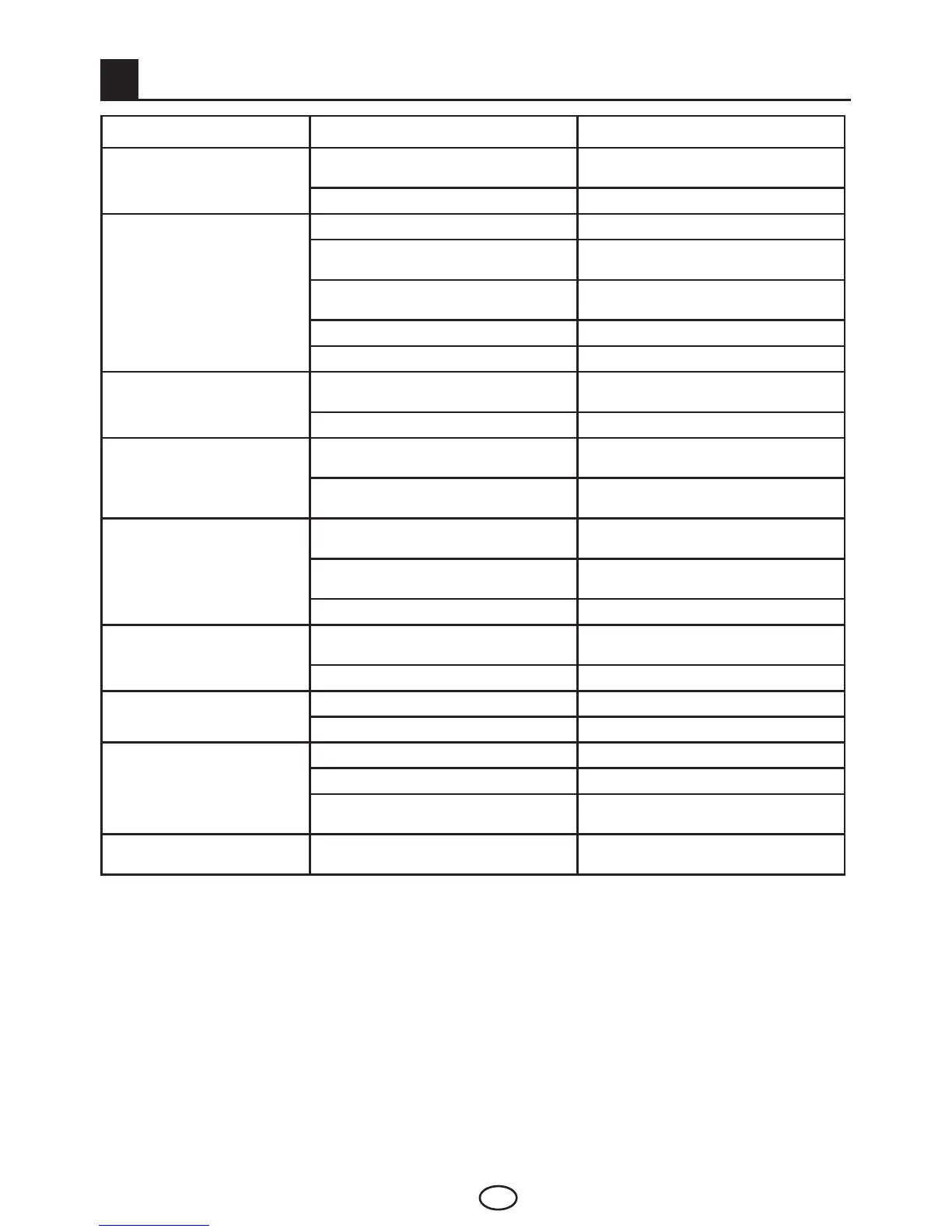
Failure Possible cause Solution
The television does not function
Isthepowercordconnectedtothe
mains supply?
Check the power cord.
IsthemainpowerOn/Offbuttonon? CheckiftheOn/Offbuttonison.
Poor picture quality
Istheantennacableattached? Check the antenna cable.
Ifyouareusingasatelliteantenna,isit
well adjusted?
Have the antenna adjusted.
Antenna may be affected by two
connected external devices.
Try disconnecting one of the devices.
Itmayneedfinetuning. Perform fine tuning.
Picture settings are not correct. Adjust Brightness, Contrast and Color.
Shadow and reflection in the
picture.
Channel setting
Perform automatic, manual channel
setting or fine tuning.
Antenna Check antenna cable and system
Nopicture
Isthereanydamageontheantenna
cable?
Check the antenna cable.
Are you sure you pressed the correct
button on your remote control?
Press the PR+ or PR- button to turn on
the TV.
Nocolor.
Color intensity level is at the lowest
setting.
Lighten the color.
Broadcastsystemsetting(ifsetting
choiceisavailable)
Select the broadcast system.
Problem in channel broadcasting. Test with another channel.
Noordefectiveteletext
Televisionchannel(noteletext)or
antenna system.
Test another channel for fine tuning and
shadowy pictures
Very weak signal Check the antenna system.
Nosound
Temporary sound mute may be on Try pressing the mute button
Isthesoundturneddown? Turn on the volume with Vol + button.
Remote control does not work
Are the batteries correctly placed? Place the batteries correctly.
Are batteries exhausted? Replace the batteries with new ones.
Isthereanyobstaclebetweenthe
remote control and television?
Ifyes,removeit.
Picture is not readable after
turning on the TV
Child lock is active. Disable the child lock.
Ifyourtelevisiondoesnotworkproperlyeventhoughyoutriedtheabovementionedsolutions,tryturning
itonandoffagain.Ifyoucannotstartyourtelevisioneventhoughyouhaveappliedallnotedmethods,
refertothedealerorauthorisedservicefromwhereyoupurchasedtheproduct.Neverattempttorepaira
faulty device yourself.



 To Next Page