External equipment connection
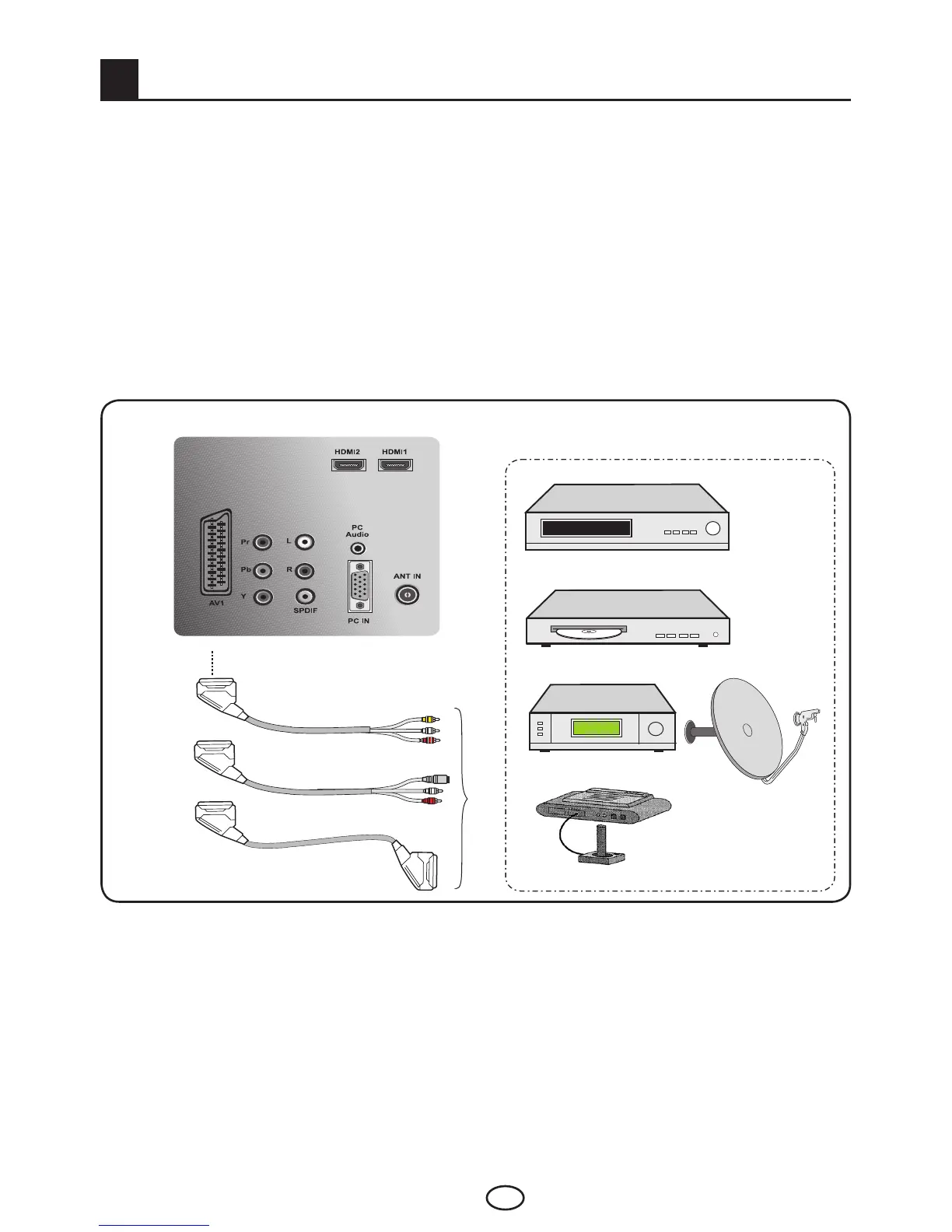
Your TV is equipped with 8 inputs including antenna input, which allows for the external device
connection.Theseinputsare:
1-Antenna input
2-SCART input
3-AV input
4-S-Video input
5-PC input
6-HDMI1input
7-HDMI2input
8-YPbPr Component input
You can connect your external device supporting the suitable inputs to your TV via these inputs. By
pressing the AV button on your remote control, select the external source input to which you connected
your device.
9.1-Connecting an external equipment via Scart connection
Rear view of the TV
or
or
VCR
DVD
SATALLITERECEIVER
GAMECONSOLE
SCART : To watch the picture of the broadcast device connected to Scart, select AV1 from the Source
menu and press OKbutton.(YoucanwatchviathisScartiftheconnecteddevicehasRGBorCVBS
output.PictureinformationisrecognizedautomaticallyandspecifiesasRGBorCVBS.)
9



 To Next Page