VRP-M VAV
Adaptive VAV controller
www.belimo.eu Product information S4-VRP-M VAV • en • v2.0 • 11.2006 • Subject to changes 13 / 28
VRP-M Tool – Operating data settings
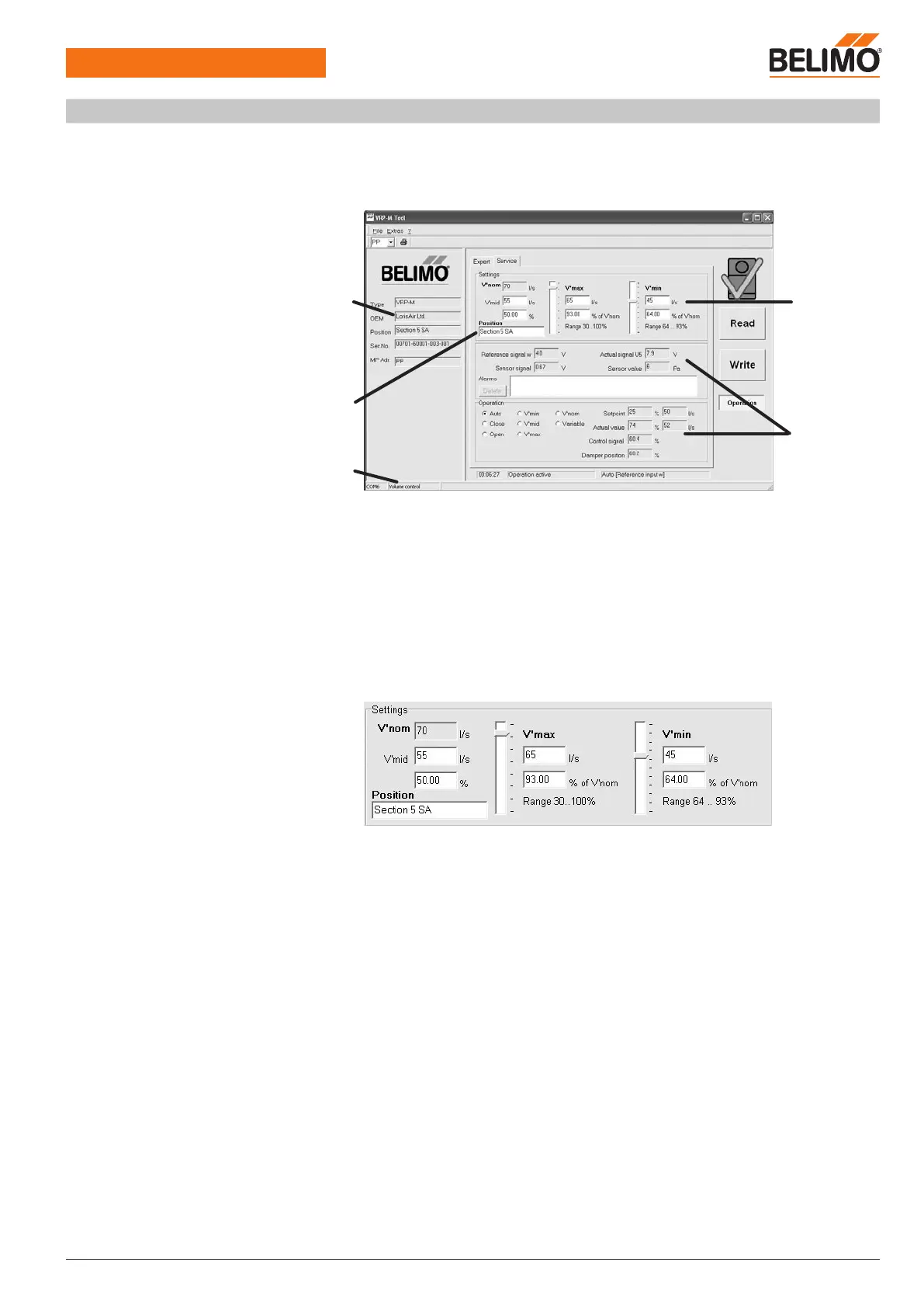
Adjustments on the system with VRP-M-Tool
The VRP-M-Tool can be used to adjust the operating data (
min
,
mid
,
max
settings) and the
reference signals (mode setting – voltage range) directly on the system if necessary. The VRP-
M-Tool adapter must be connected to the diagnostics socket on the VRP-M or to the MP connec-
tion routed to the terminals for this purpose (see Note on page 15).
VRP-M-Tool
Service tab
1 Identification
2 Operating volumetric flow settings
3 System designation entry
4 Volumetric flow
5 Operational test:
Reference signal
Differential pressure [pascal]
Setpoint / actual value [m3/h, l/s]
Selected operating mode:
– AUTO / CLOSED / OPEN
–
min
/
mid
/
max
/
nom
– Variable setpoint (
min
...
max
)
Operating volumetric flow settings
These parameters are used to set the VAV unit to the air volumes required for each application.
The settings are based on the air volumes calculated by the planning engineer and can either be
preset by the VAV unit manufacturer or adjusted on the system using the VRP-M-Tool.
max
Range 30...100% of
nom
Upper volumetric flow limit
min
Range 0 ...100% of
nom
Control range x * ...100% of
nom
Lower volumetric flow limit
Shut-off operation (CLOSED) according tomin setting
If a shut-off function is required in VAV operation, it can be achieved by setting
min
0%.
mid
Range 0 ...100% of
min
...
max
An intermediate position
mid
is available for constant air volume (CAV) applications to facilitate
finer steps.
*
min
settings lower than the control range
min
values that are lower than the start value indicated in this range can be set, for example, if the
VAV unit has a shut-off function
System designation entry
Input field (16 characters) for specific system designations, e.g. MCR address, system name,
item number in diagram, etc.
1
3
2
5
4


 To Next Page