7
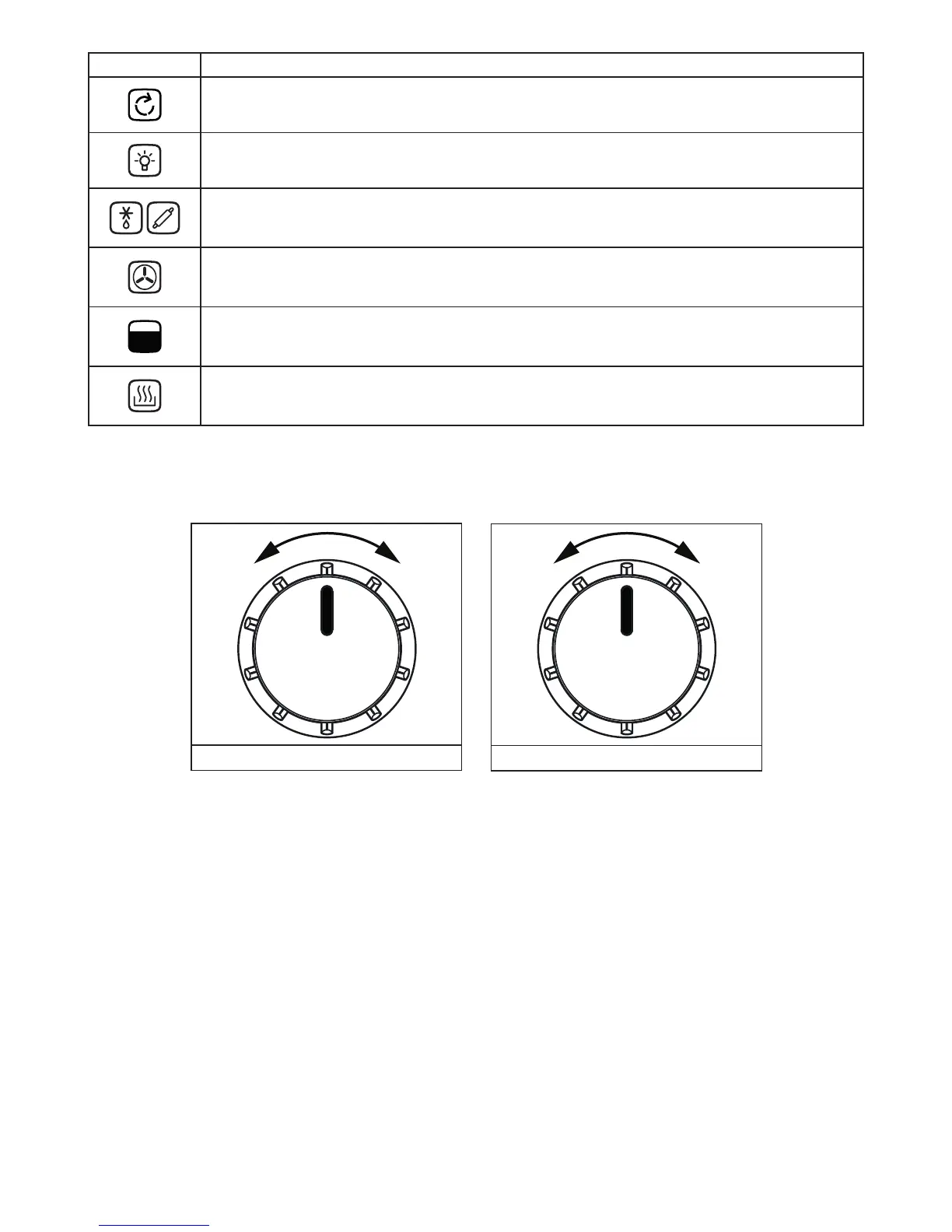
Symbol Main Oven Function Descriptions
Oven Function Selector Switch:- Use to select the desired oven function.
Oven Lamp:- Can be operated on its own for cleaning or maintenance without any heating elements coming
on.The Oven lamp will also come on when any oven function is selected.
Defrost and Dough Proving:- Can be used to gently defrost frozen foods, This setting can also be used to help
dough to rise faster than at room temperature.
Fanned Oven:- The even temperature in the oven makes this function suitable for batch baking, or batch cook-
ing foods on one or more levels at the same time.
Oven Temperature Control:- Use to select the oven temperature.
Slow Cook:- Provides a gentle heat suitable for slow cooking or keeping food warm. Select the conventional
cooking function and set the temperature to 100
o
C.
Oven
Selector control
Temperature control
Cooling Fan
When cooking is nished, paused, or if the central oven temperature is over 75
o
C, the cooling fan will
continue working for around 15 minutes. When the central oven temperature drops below 75
o
C, the
cooling fan will stop.
To use your appliance
To select a Cooking Function and Cooking Temperature
1. Begin by turning K1 to the desired cooking function. The functions are shown on the appliance facia.
2. Rotate K2 to select the desired cooking temperature. This can be adjusted during use.



 To Next Page