8
Select The Temperature
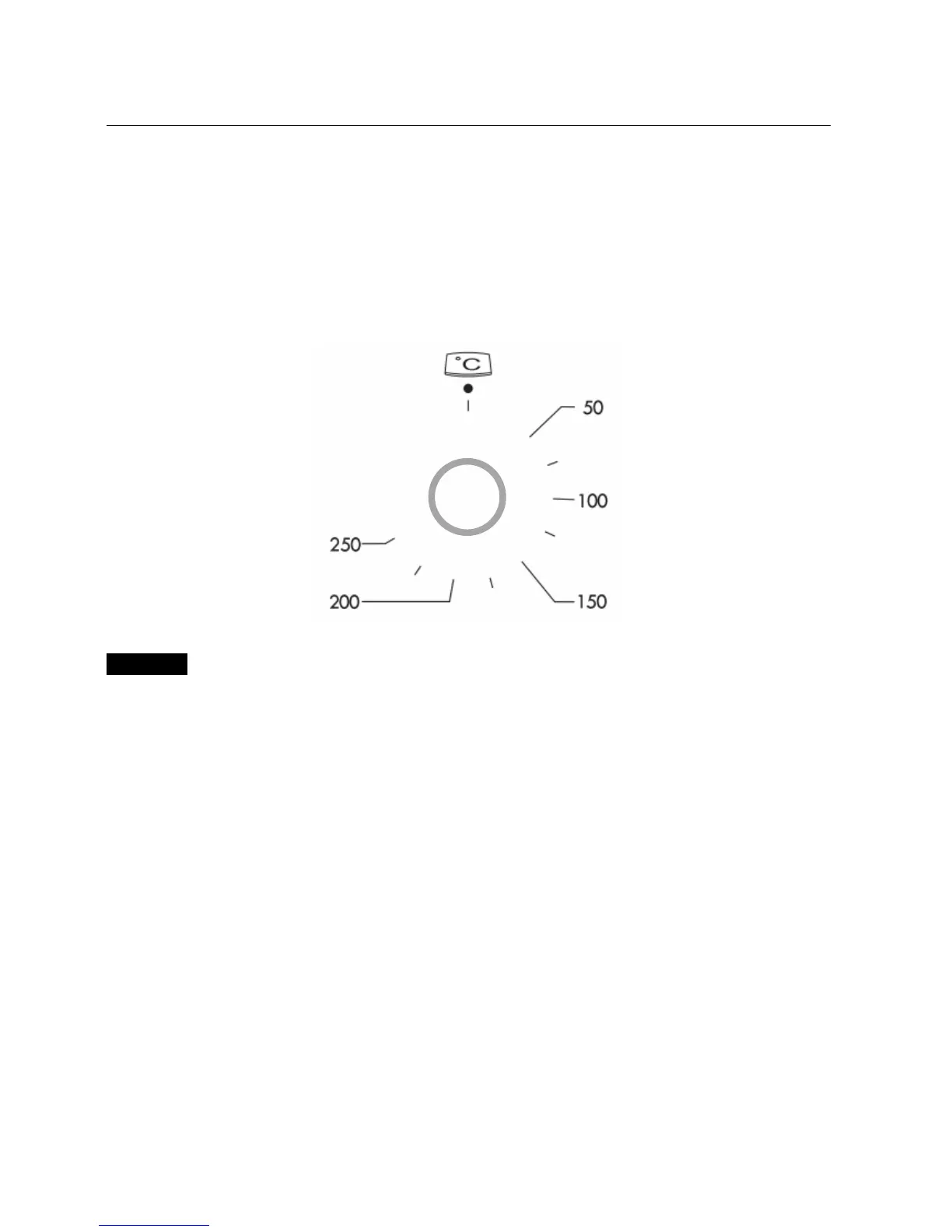
To set the temperature, turn the temperature selector in a clockwise direction to the desired setting. An
indicator light above the temperature selector will come on.
A thermostat controls the temperature in your appliance. When the temperature is reached, the heating
source switches itself off and the indicator light goes out. When the oven temperature falls below the desired
setting, the heating source switches on and the indicator light comes on again.
Once the food is cooked, turn the temperature selector back in an anti-clockwise direction. Do not force it
right round in a clockwise direction as this will result in damage to the thermostat.
Important
The desired cooking function must be selected before the oven will operate.
Time Features
Your oven is equipped with a 3 button timer that has the following features:
O’clock time – you can set current O’clock time
Timer – you can set a countdown time that will beep when the set time has elapsed.
Cooking duration – you can set cooking duration. A timer will count down the preset cooking time, beep
when the time has elapsed and turn the appliance off.
Cooking end time – instead of setting a cooking duration you can set a cooking finish O’clock time. When
the finish time has been reached the timer will beep and turn the appliance off.
Delayed start cooking time – you can combine the cooking duration and end cooking time to switch oven on
and off at a specific time during the day.


 To Next Page