7. INSTRUCTIONS FOR USE
A. USING THE CONTROL PANEL AND DISPLAY SCREEN
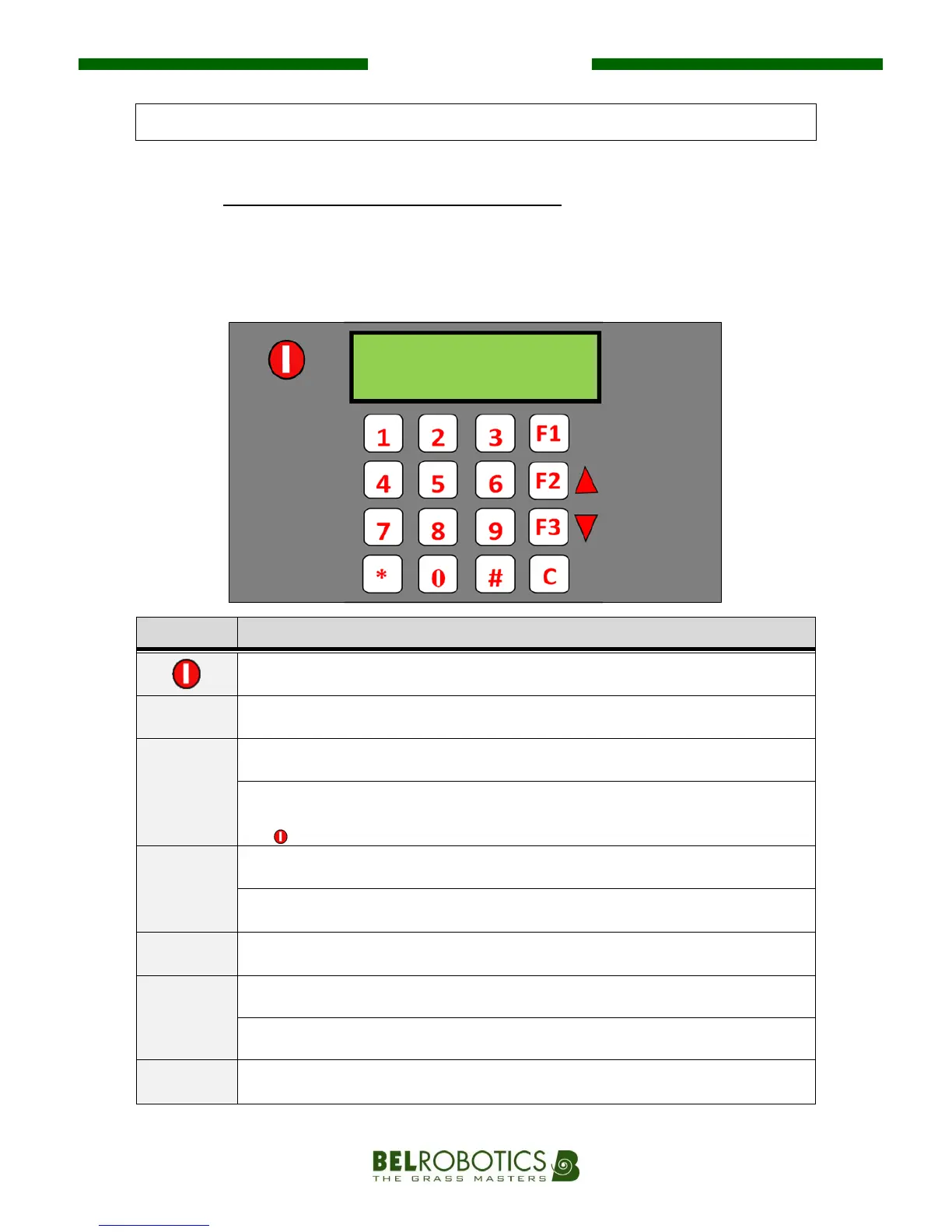
The control panel has a total of 17 keys: 10 "Numbers” keys and 7 "Action" keys.
When it starts up, the display shows the time and date on the system, as well as the battery
voltage.
Switch on and start the robot.
Bring the robot back to the charging station. When the battery is charged, the
robot will automatically continue its mowing programme.
Navigate through the menu and sub-menus.
Bring the robot back to the charging station. The robot will remain at the
station even after the battery has been charged. The user will need to press
the
key for the robot to continue its mowing programme.
Navigate through the menu and sub-menus.
Show the “magnetic distance” of the robot from the boundary wire (instead of
the time). This function is for after-sales services.
- Access menu and sub-menus.
- (De)select an option.
Go back in menu and sub-menus.
Delete the robot’s alarm messages which are displayed on the screen.
- Enter a pin number or access code to change settings.
- (De)select rest days.
Menu Sa 04/05
27,2 09 :34


 To Next Page