Select
the first
data
storage
bin
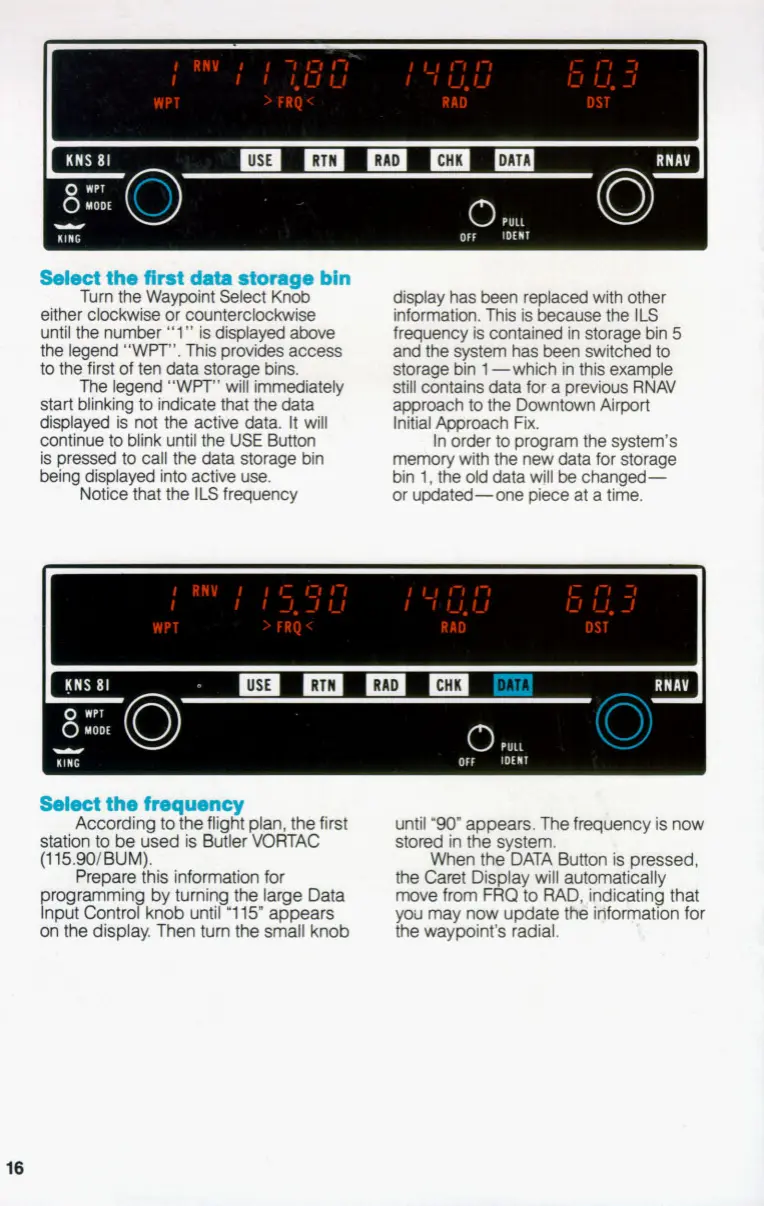
Turn the Waypoint Select Knob
either clockwise
or
counterclockwise
until the number
"1"
is
displayed above
the legend "WPT". This provides access
to
the first of ten data storage
bins.
The legend "WPT" will immediately
start blinking
to
indicate that the data
displayed is not the active data.
It
will
continue
to
blink until the
USE
Button
is pressed
to
call the data storage bin
being displayed into active use.
Notice that the
ILS
frequency
display has been replaced with other
information. This is because the
ILS
frequency is contained in storage bin
5
and the system has been switched
to
storage bin
1
-which in this example
still contains data for a previous RNAV
approach
to
the Downtown Airport
Initial Approach Fix.
In order
to
program the system's
memory with the new data for storage
bin
1,
the old data will be changed-
or updated-one piece at a time.
PULL
inrmr
Select
the
frequency
According
to
the flight plan, the first
station
to
be
used is Butler VORTAC
(115.90/BUM).
Prepare this information for
rogrammin by turning
the
large Data
kput
Controfknob until
'1
15"
appears
on the display. Then tum the small knob
until
"90"
appears. The frequency is now
stored in the system.
When
the
DATA Button
is
pressed,
the Caret Dis lay will automatically
move from
F
0
to
RAD, ,indicating that
you
may now update
tM
idformation for
the waypoint's radial.
8
16


 To Next Page