b
I
Nav
ating
to
waypoint
1
vectors to the southwest of Kansas City
and then a clearance
to
proceed under
our own navigation direct
to
the first
NAV waypoint.
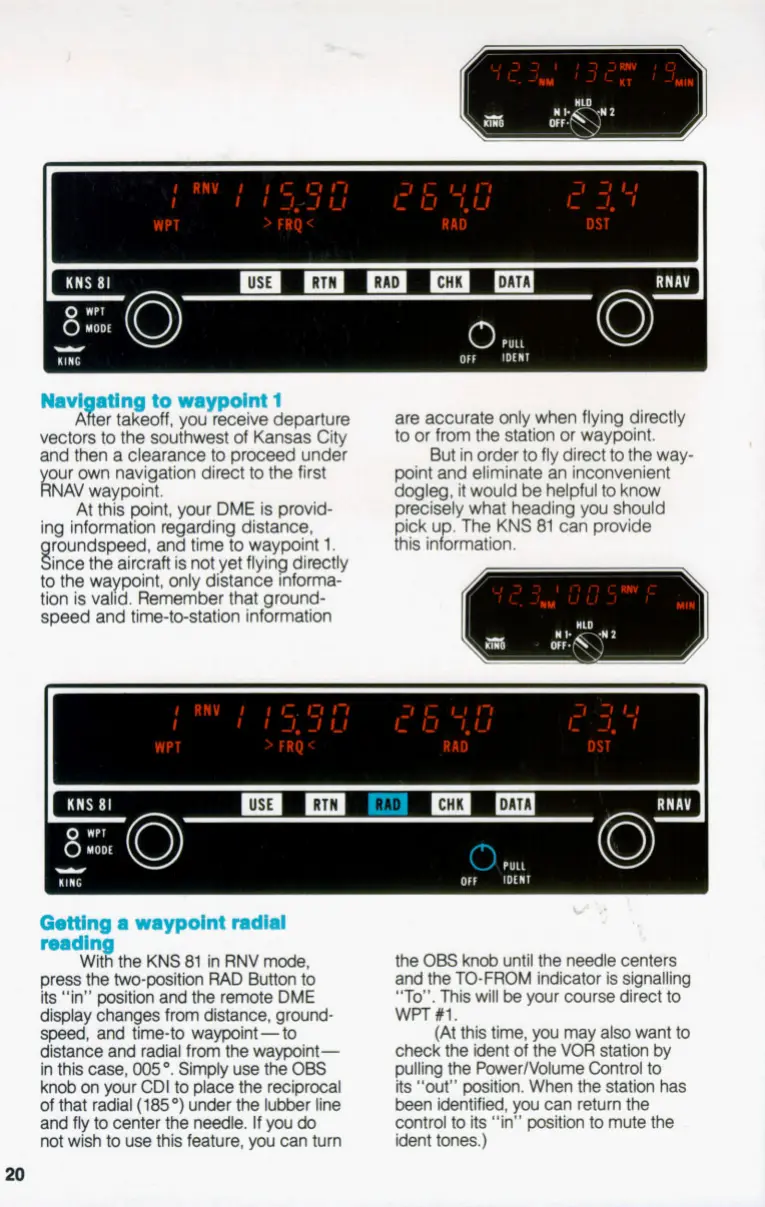
At this point, your
DME
is provid-
ing information regarding distance,
aroundsDeed. and time to wavmint
1.
A
?!
er takeoff, you receive departure
R
are accurate onlywhen flying directly
to or from the staton or waypoint.
point
and
eliminate an inconvenient
dogleg,
it
would
be
helpful to know
precisely what heading you should
pick u
.
The KNS
81
can provide
this ingrmation.
But in order to fly direct
to
the way-
n
Since
the
airckft is notyet flyiib directiy
to the waypoint, only distance nforma-
tion is valid. Remember that grwnd-
speed and time-ttxtation information
Getting
a waypoint radial
mdln
Wnf!
the KNS
81
in RNV mode,
press the two-position
RAD
Button
to
its
“in”
position
and the remote DME
display changes
from
distance, ground-
speed,
and timeto waypoint
-
to
distance and radial from the waypoint-
in this
case,
005”.
Simply use the
OBS
knob on your CDI to place the reciprocal
of
that radial
(185
”)
under the lubber line
and fly to center the needle.
If
you
do
not wish
to
use this feature,
you
can turn
20
\>
.
the
OBS
knob
until the needle centers
and the TO-FROM indicator is signalling
“To”.
This will
be
your course direct to
WFT
#l.
(At this time, you may also want to
check the ident of the
VOR
station by
pulling the PowerlVolume Control
to
its
“out” position. When the station has
been identified,
you
can return the
control to its “in” position to mute the
ident tones.)


 To Next Page