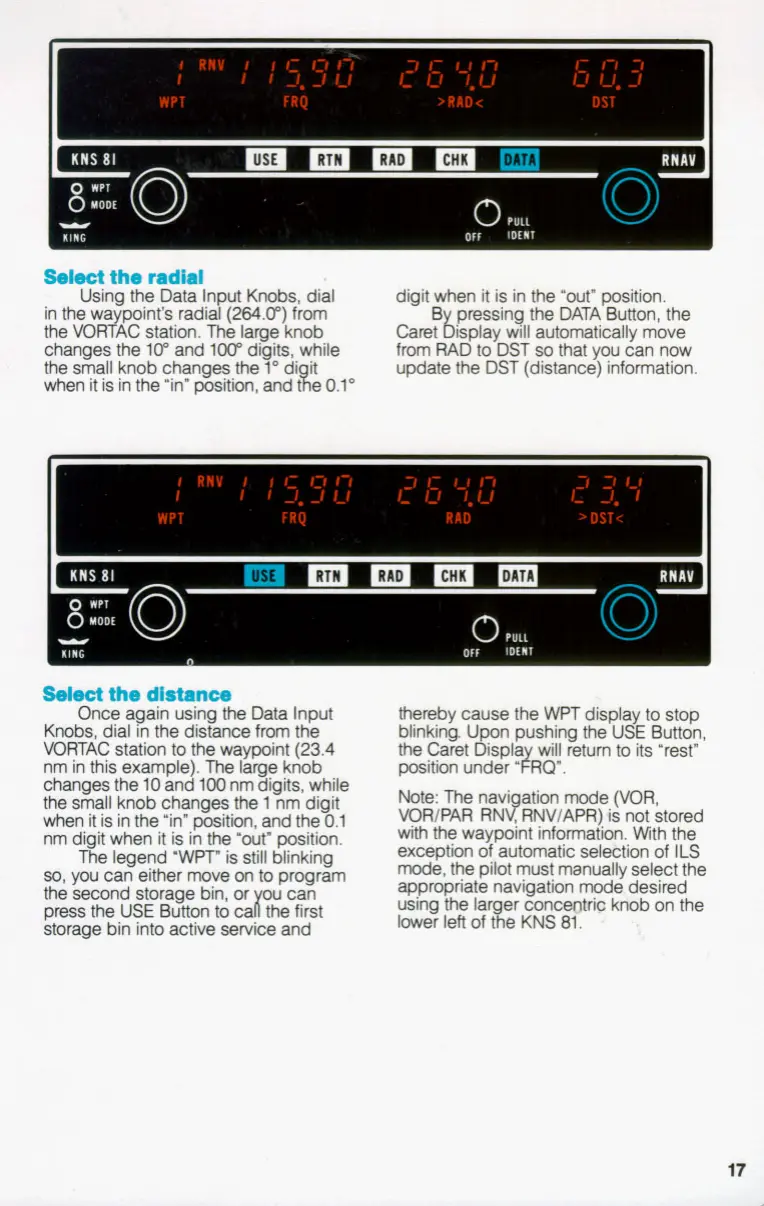
Select
the radial
Using the Data In
ut
Knobs, dial
in the waypoint's radiap(264.0") from
the VORTAC station. The large knob
changes the
lo"
and
loo"
digits, while
the
small knob changes the
1"
di it
when it is in the "in" position, and Re
0.1"
digit when it is in the "out" position.
B pressing the DATA Button, the
from RAD
to
DST
so
that you can now
update the DST (distance) information.
Caret
i5
isplay will automatically move
Select
the distance
Once again using
the
Data Input
Knobs, dial in the distance from the
VORTAC station
to
the waypoint (23.4
nm in this example).
The
large knob
changes the
10
and
100
nm digits, while
the
small
knob changes
the
1
nm digit
when it is in the "in" position, and the
0.1
nm digit when it is in the 'Out" position.
The legend
'WPT"
is still blinking
so,
you can either move
on
to
program
the
second storage bin, or
w
can
press the
USE
Button
to
cai the first
storage bin into active service and
thereby cause the
WPT
display
to
stop
blinking. U on pushing the USE Button,
the
Caret
&spla will retum
to
its "rest"
position under
'~RGY.
Note: The navi ation mode (VOR,
VOR/PAR RN$RNV/APR)
is
not stored
with the waypoint information. With the
exception of, automatic sel&tion of
ILS
mode, the pilot must manually select the
appropriate navigation mode, desired
using the lar er conc-b knob on the
lower left of
#e
KNS
81.
-
17
1


 To Next Page