Controls,
Functions, and Displays
r-
d
.
~merical displays
on
the
KNS
81
are 7-segment gaseous dis-
charge lights. Operating modes and
status information are annunciated by
individually lighted abbreviations and
legends.
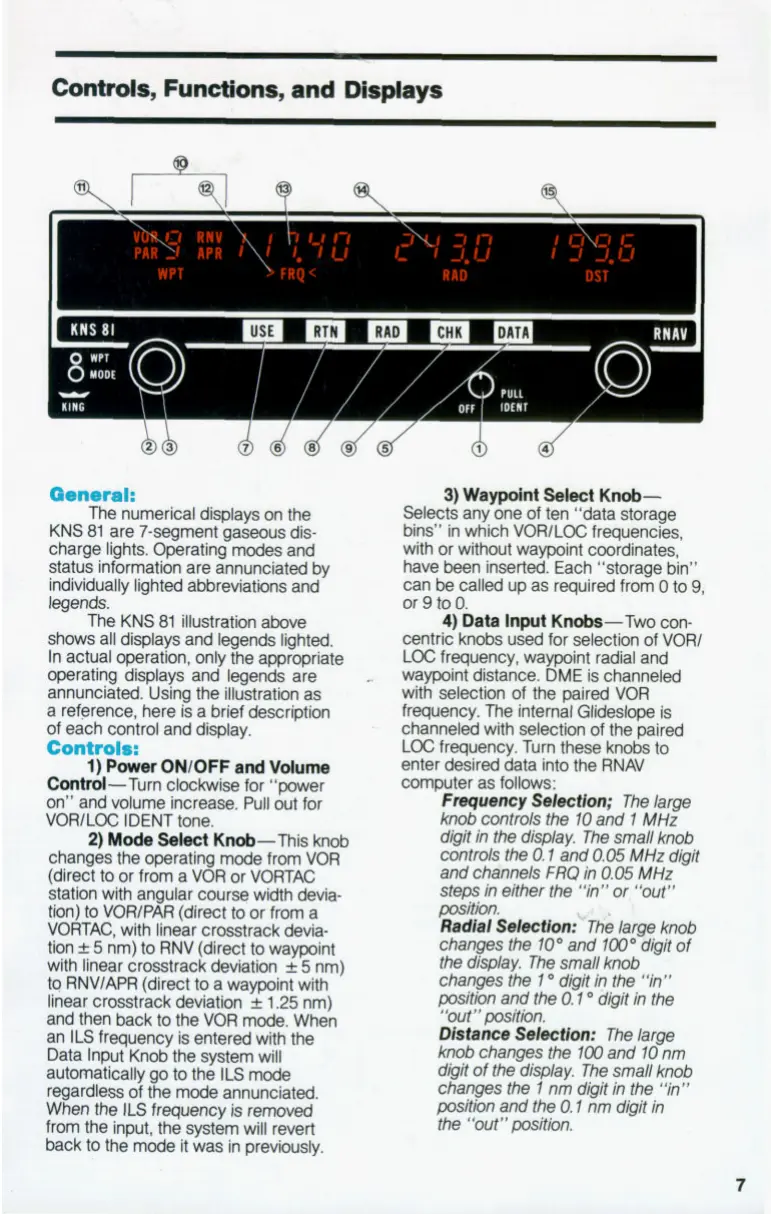
The KNS
81
illustration above
shows all displays and legends lighted.
In actual operation, only the appropriate
operating displays and legends are
annunciated. Using the illustration as
a reference, here is a brief description
of each control and display.
11
r-
ONlOFF
and
Volume
Control-Turn clockwise for “Dower
B:
on” and volume increase.
PUII
out for
VORlLOC IDENT tone.
2)
Mode
Select
Knob-This knob
changes the operating
mode
from VOR
(direct to or from a VOR or VORTAC
station with angular course width devia-
ti) to
VORlPAR
(direct
to
or from a
VORTAC, with linear crosstrack devia-
tion
f
5
nm) to RNV (direct to waypoint
with linear crosstrack deviation
f
5
nm)
to RNVlAPR (direct to a waypoint with
linear crosstrack deviation
f
1.25
nm)
and then back to the VOR
mode.
When
an
ILS
frequency is entered with the
Data Input Knob the system
will
automatically go to the
11s
mode
regardless of the
mode
annunciated.
When the ILS frequency is removed
from the input, the system will revert
back to the
mode
it was in previously.
3)
Waypoint
select
Knob-
Selects any one of ten “data storage
bins” in which VORlLOC frequencies,
with or without waypoint coordinates,
have been inserted. Each “storage bin”
can
be
called up as required from
0
to
9,
or
9
to
0.
4)
Data
Input
Knobs-Two con-
centric
knobs
used for selection of VORl
LOC frequency, waypoint radial and
waypoint distance. DME is channeled
with selection of the paired VOR
frequency. The intemal
Glideslope
is
channeled with selection of the paired
LOC frequency. Turn these knobs
to
enter desired data into the RNAV
computer as follows:
I
Fmquency
SektiOn;
The large
knob
controls the
10
and
1
MHz
digit
in
the
display. The small knob
controls the
0.1
and
0.05
MHz
digit
and chinnels
FRQ
in
0.05
MHz
steps
in
either the
“in”
or, “out”
posith.
Radial
Sdectfon:bThe large knob
changes the
10”
and
100”
&&it
of
the display. The small
knob
changes the
1
O
digit
in
the “in”
position
and the
0.1
O
digit
in
the
”0Ut”posith.
Distance
Sdectlon:
The large
knob
changes the
100
and
10
nm
d@it
of
the display. The small knob
changes the
1
nm digit
in
the
“in”
position and the
0.1
nm digit in
the “out” position.
7


 To Next Page