LR-10000 Low-Rise Scissor Lift 30 P/N 5900075 — Rev. B — August 2021
Lift Controls
The controls on the Lift are:
• Raise button. Moves the Platforms up. Located near the top of the Power Unit. Shown in the
Power Unit drawing in Preparing the Power Unit.
• Lowering Handle. Moves the Platforms down. Located near the middle of the Power Unit.
Shown in the Power Unit Drawing in Preparing the Power Unit.
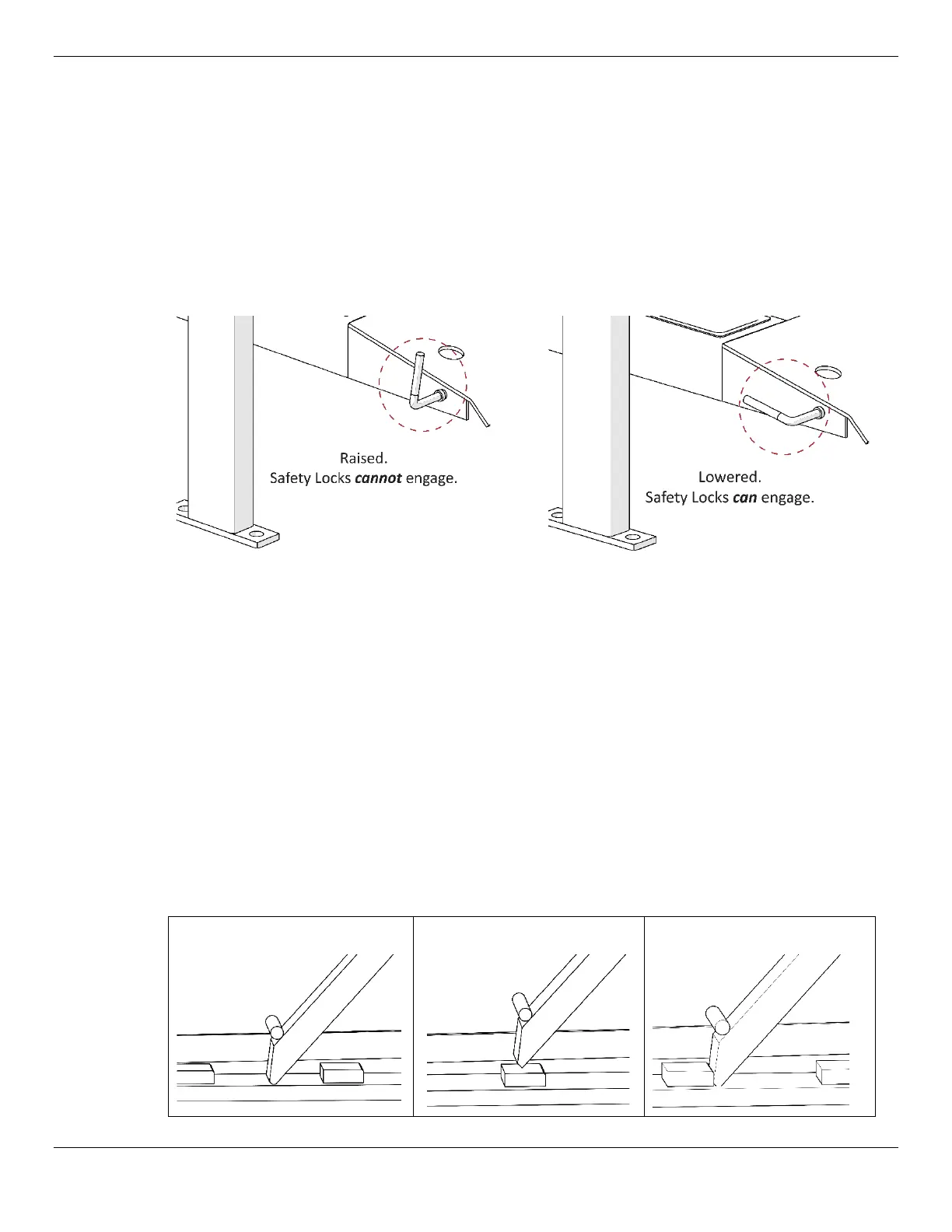
• Safety Lock Release Handle. When lowered, allows the Safety Locks to engage. When
raised, prevents the Safety Locks from engaging. Lowered and raised positions shown in the
following diagram.
Not necessarily to scale. Not all components shown. Side view.
About Safety Locks
Your Lift comes with three Safety Lock positions; they serve two important functions:
• Safety. Safety Locks hold the Platforms in place. Once the Platforms are engaged on Safety
Locks, the weight of the Vehicle holds the Platforms in place. If the power goes out, the Safety
Locks continue to hold the Platforms, and anything on them, in place.
⚠ WARNING
Always leave your Lift engaged on a Safety Lock or fully lowered
.
Although rare, it is possible for Hydraulic Fluid in the Hydraulic Cylinders to leak,
causing the Platforms to slowly come down.
• Adjustable height. Having multiple Safety Lock positions means you can raise the Vehicle to
just the right height for the work you are performing.
The following diagram is a side view of various Safety Lock conditions.
Not
engaged
on Safety Lock:
Passing over Safety Lock:
Engaged on Safety Lock:



 To Next Page