Page15
setting ID_OUTPUT_FORMAT=0x05” section.
6.5 Continuous Ranging Mode
TF-Luna will keep tracking the distance 500 times per second, but as the customized output
frequency is lower, the output may take the average. For instance, if the output frequency is 100Hz as
default, then the output values are the average (arithmetic mean) of 5 previous range data. Therefore,
lower output frequency gives less time of the averaging process as well as less fluctuation of the output.
The highest output frequency that TF-Luna supports is 250Hz (output_frequency ≤ 250Hz), and it must
be 500/n Hz (where n is an integer that is in the range [2, 500]). Thus, all supported values of output
frequency are: 250Hz, 166Hz, 125Hz, 100Hz, …, 2Hz, 1Hz. User can change the output frequency using
“Output frequency ID_SAMPLE_FREQ=0x03”.
6.6 Trigger Mode
TF-Luna enters trigger mode if the output frequency is set to 0 with “Output frequency
ID_SAMPLE_FREQ=0x03”. In this mode, TF-Luna stops measuring and outputting unless it is triggered
by “Trigger mode ID_SAMPLE_TRIG=0x04” — in other words, TF-Luna measures and output once as
soon as it receives the hexadecimal byte string 5A 04 04 00.
6.7 On/off Mode
On/off mode is designed from those users who only need to detect the existence of an object.
TF-Luna can start this mode using “Enable/disable on-off mode ID_ON_OFF_MODE=0x3B” and then
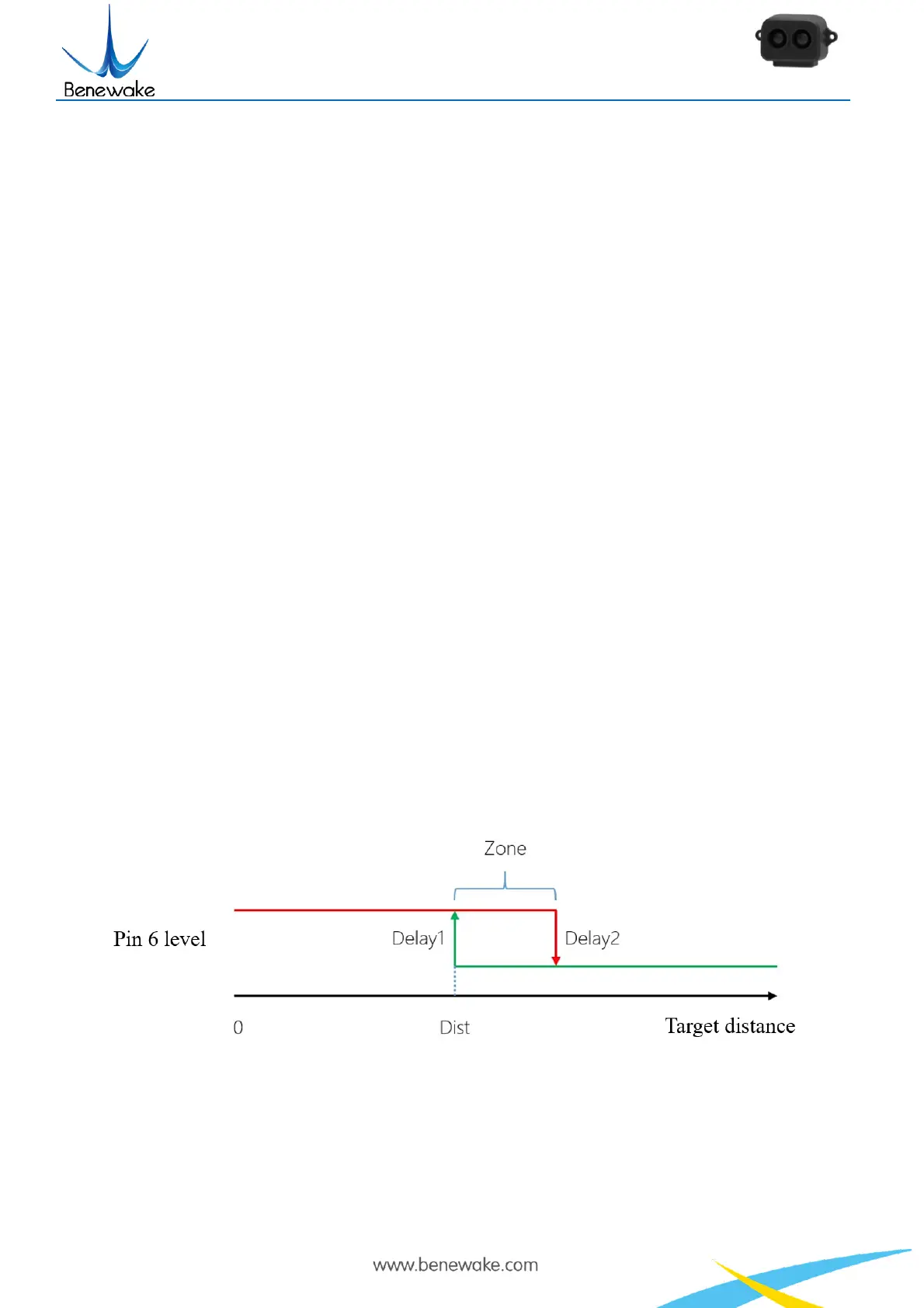
shows result through pin 6. Figure 6 below shows how the mode works when a high level is set to
represent an object is detected.
Figure 6 On/off mode that high level means closer
Zone value: If an object is detected closer than Dist, then Pin 6 outputs high-level, but only if an
object is detected farther than Dist + Zone, then Pin 6 outputs low-level. When zone is set to 0, pin 6
may output up and down cause by fluctuation of the measuring when the real distance happens to be


 To Next Page