9
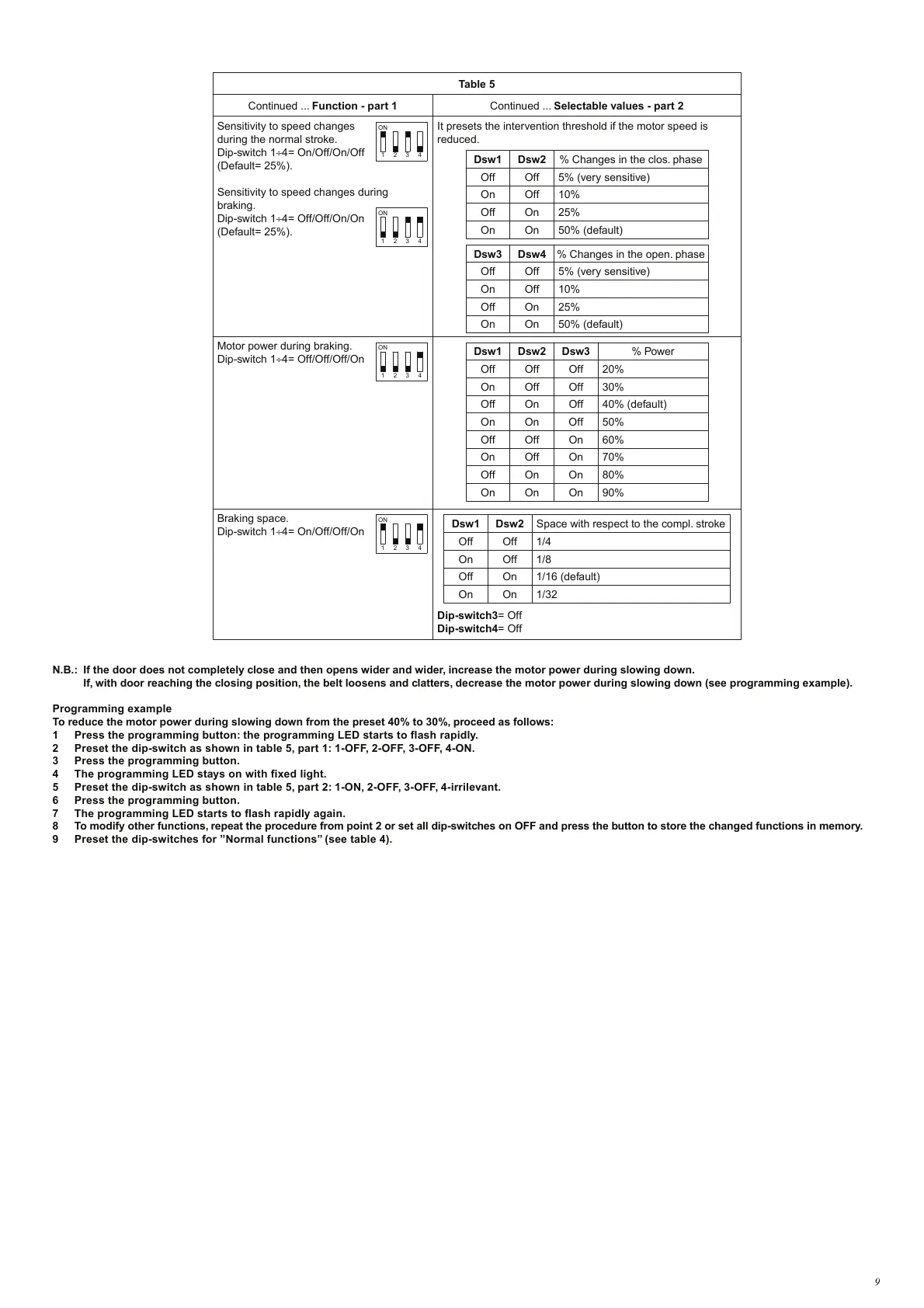
Table 5
Continued ... Function - part 1 Continued ... Selectable values - part 2
Sensitivity to speed changes
during the normal stroke.
Dip-switch 1÷4= On/Off/On/Off
(Default= 25%).
Sensitivity to speed changes during
braking.
Dip-switch 1÷4= Off/Off/On/On
(Default= 25%).
It presets the intervention threshold if the motor speed is
reduced.
ON
1 2 3 4
ON
1 2 3 4
Dsw1 Dsw2 % Changes in the clos. phase
Off
Off 5% (very sensitive)
10%
25%
50% (default)
On Off
Off
On
On On
Dsw3 Dsw4 % Changes in the open. phase
Off
Off 5% (very sensitive)
10%
25%
50% (default)
On
Off
Off
On
On On
Motor power during braking.
Dip-switch 1÷4= Off/Off/Off/On
ON
1 2 3 4
Dsw1 Dsw2 % Power
Off
Off 20%
30%
40% (default)
On
Off
Off
On
On On
Dsw3
Off
Off
Off
50%On
On Off
60%Off
Off On
70%On
Off On
80%
90%
Off On On
On
Braking space.
Dip-switch 1÷4= On/Off/Off/On
ON
1 2 3 4
Dip-switch3= Off
Dip-switch4= Off
Dsw1
Dsw2 Space with respect to the compl. stroke
Off Off 1/4
1/8
1/16 (default)
1/32
On
Off
Off
On
On On
N.B.: If the door does not completely close and then opens wider and wider, increase the motor power during slowing down.
If, with door reaching the closing position, the belt loosens and clatters, decrease the motor power during slowing down (see programming example).
Programming example
To reduce the motor power during slowing down from the preset 40% to 30%, proceed as follows:
1 Press the programming button: the programming LED starts to flash rapidly.
2 Preset the dip-switch as shown in table 5, part 1: 1-OFF, 2-OFF, 3-OFF, 4-ON.
3 Press the programming button.
4 The programming LED stays on with fixed light.
5 Preset the dip-switch as shown in table 5, part 2: 1-ON, 2-OFF, 3-OFF, 4-irrilevant.
6 Press the programming button.
7 The programming LED starts to flash rapidly again.
8 To modify other functions, repeat the procedure from point 2 or set all dip-switches on OFF and press the button to store the changed functions in memory.
9 Preset the dip-switches for ”Normal functions” (see table 4).


 To Next Page