BenQ C600 Mobile Phone
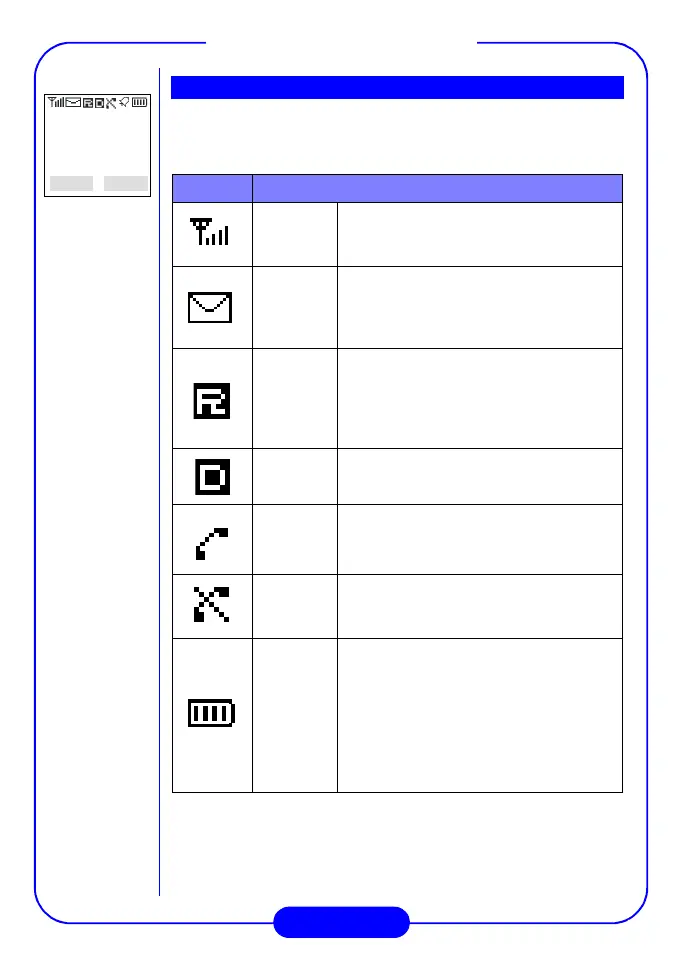
There are several icons that appear on the LCD screen to indicate the
status of your phone. Please see the table below for the meaning of
each icon:
Icon Meaning
Signal
strength
Shows current signal strength. The more
bars displayed, the better the signal
strength.
Message
Steady:
Indicates that there are new and
unread text or voice messages.
Blinking:
Indicates that there are new
unread urgent messages.
Roaming
Steady:
Indicates that this phone is out
of the reach of its primary service area,
but is in a friendly roaming area.
Blinking:
Indicates that the phone is
currently in an unfriendly roaming area
Digital
mode
This icon appears when the phone is in
digital mode.
Call
status
When you are in a call with your phone
or there is an incoming call, this icon will
appear.
No
service
This icon indicates that the phone cannot
receive a signal from the network
operator.
Battery
level
The battery level is shown by the number
of bars in the battery icon. The more bars
displayed, the higher the battery strength.
This icon will flash when the battery is
extremely low.
When you charge the battery, the bars
will animate until the battery is fully
charged.
LCD Screen
2002-09-10
Fri 11:50
Menu Book



 To Next Page