Maintenance 41
Indicators
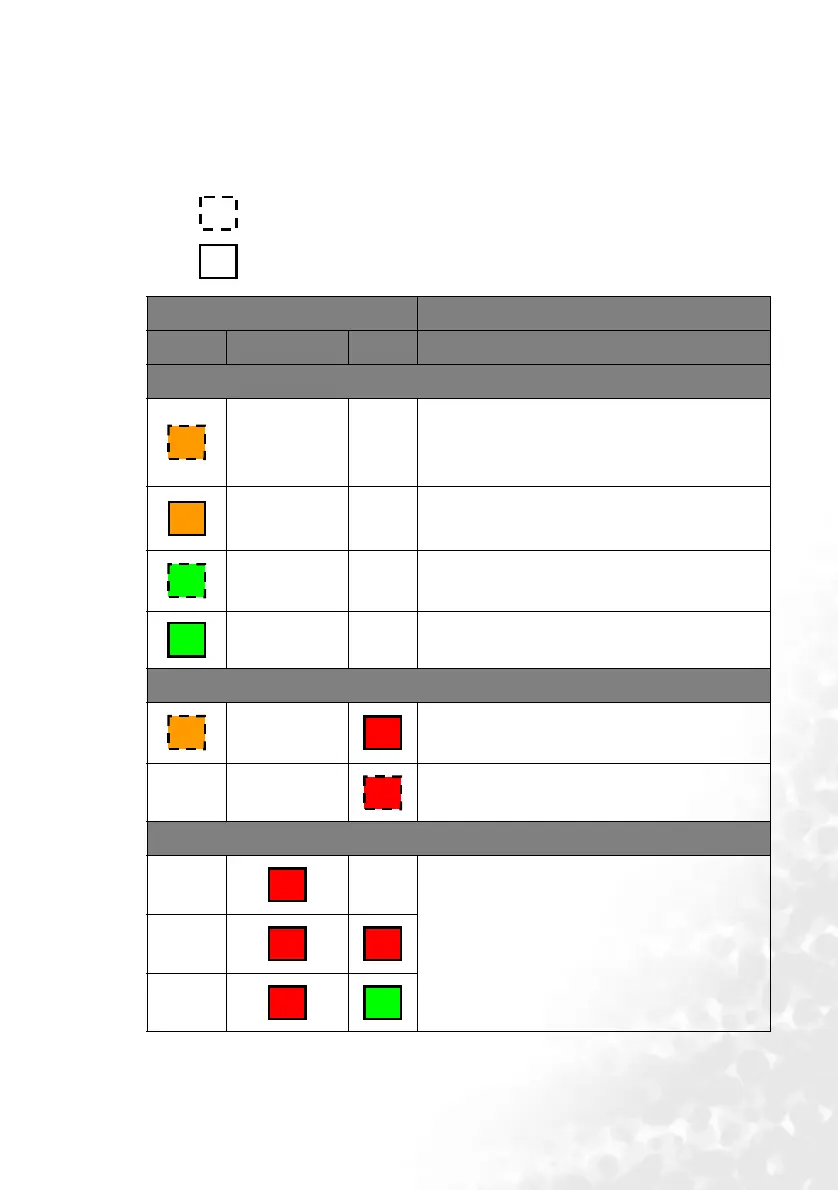
Illustration
• Blank - : Light OFF
•
O : Orange light
• : Light flashing
•
R : Red light
• : Light ON
•
G : Green light
Light Status & Description
POWER TEMPerature LAMP
Power events
--
• The projector needs to cool after the power is
turned off.
• The projector is in the startup cooling
process.
--
Stand-by mode.
--
The Power indicator light is flashing during
powering up.
--
The projector is under normal operation.
Lamp events
-
It is warning you that lamp usage has exceeded
2000 / 3000 (Economic mode) hours. Replace the
projection lamp with a new one immediately.
--
The lamp is not properly attached or the lamp is
damaged. Please contact your dealer for assistance.
Thermal events
--
The projector has shutdown automatically. If you
try to re-start the projector, it will shutdown again.
Please contact your dealer for assistance.
-
-
O
O
G
G
O
R
R
R
R
R
R
G



 To Next Page