10 Introduction
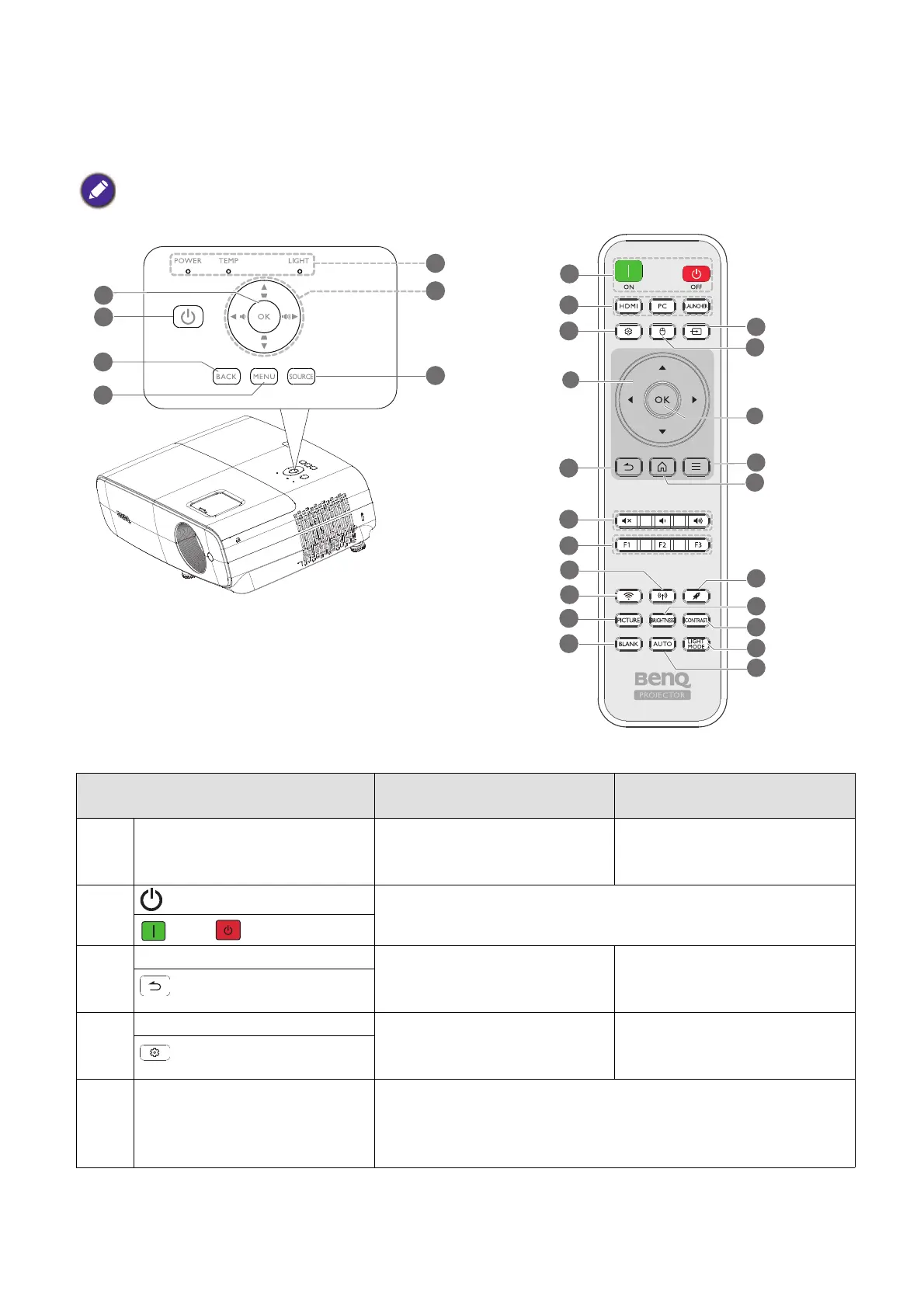
Controls and functions
Projector & Remote control
• All the key presses described in this document are available on the remote control or projector.
No.
When the input source is
BenQ Launcher
When the input source is
NOT BenQ Launcher
1. OK Confirms the selected menu
item.
Confirms the selected
On-Screen Display (OSD)
menu item.
2.
POWER
Toggles the projector between standby mode and on.
ON/ Off
3. BACK Returns to the previous menu,
main settings menu or exit the
app.
Goes back to previous OSD
menu or exits menu settings.
(BACK)
4. MENU Enters the Settings menu. Turns on or off the projector’s
On-Screen Display (OSD)
menu.
(MENU)
5. POWER indicator
light/TEMPerature
warning light/LIGHT
indicator light
(See Indicators on page 61.)
6
1
10
12
17
3
4
7
16
11
2
8
15
13
20
21
14
22
9
18
19












 To Next Page