Operation32
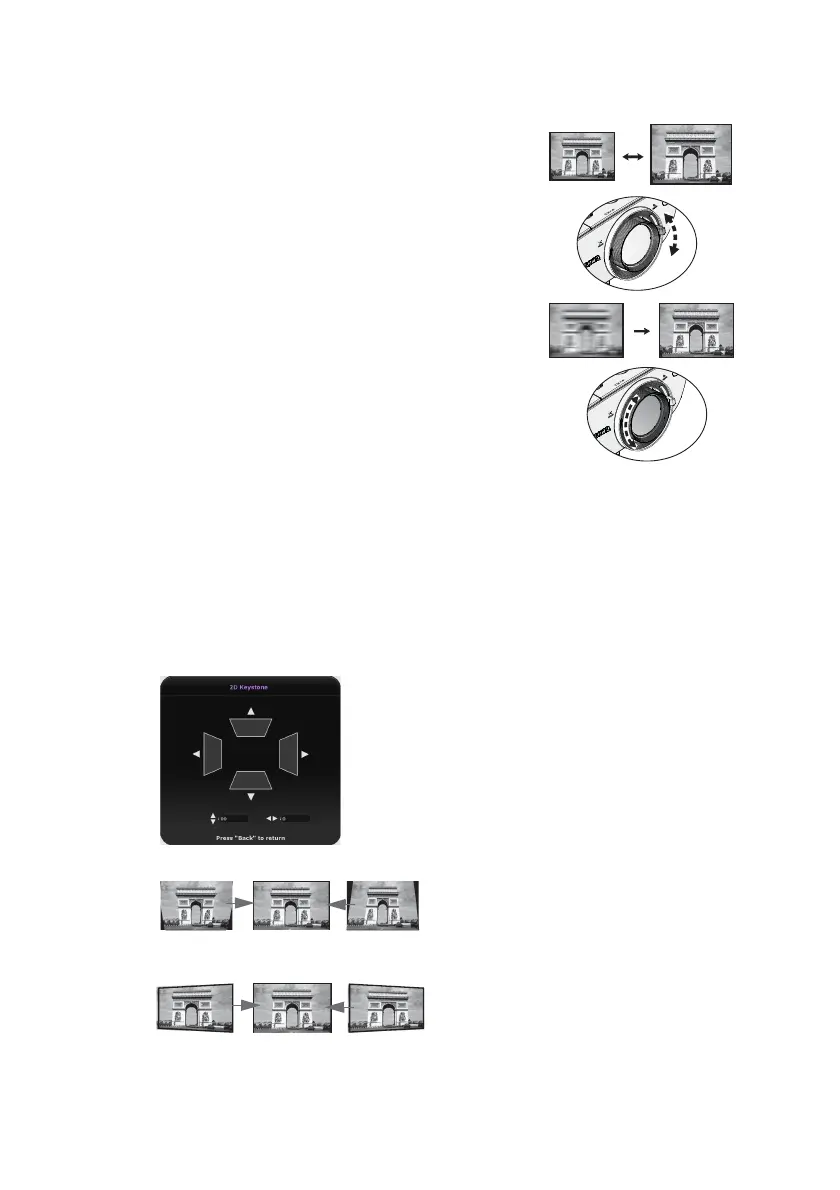
Fine-tuning the image size and clarity
1. Adjust the projected image to the size that you
need using the ZOOM slide lever.
2. Then sharpen the image by rotating the FOCUS
ring.
Correcting keystone
Keystoning refers to the situation where the projected image is noticeably wider at either
the top or bottom. It occurs when the projector is not perpendicular to the screen.
You may correct this in ONE of these ways.
• Using the remote control
Press KEYSTONE to display, the 2D Keystone window.
• Using the projector
Press ▲, ▼, ◄ or ► to display the 2D Keystone window.
• To correct keystoning at the top of the
image, use
▼.
• To correct keystoning at the bottom of
the image, use
▲.
• To correct keystoning at the right side of
the image, use
◄.
• To correct keystoning at the left side of
the image, use
►.
When done, press BACK to save your
changes and exit.











 To Next Page