Maintenance68
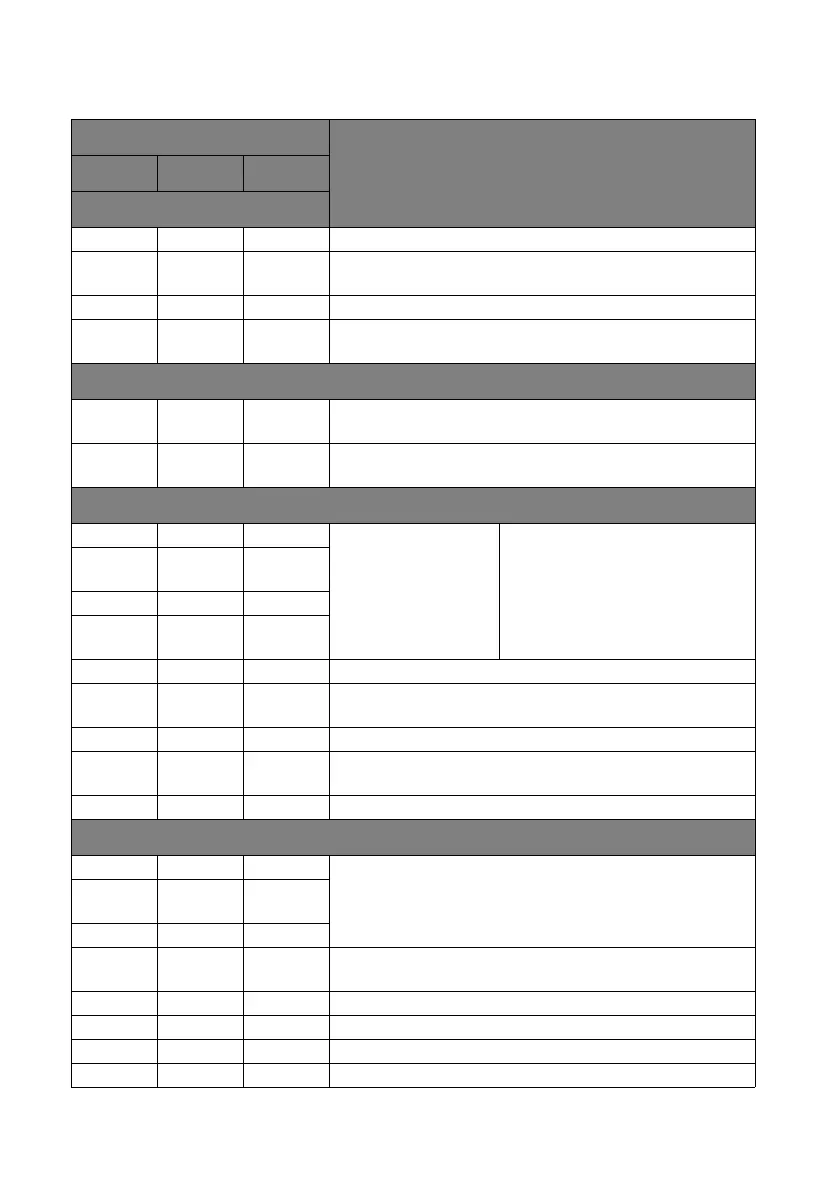
Indicators
Light
Status & DescriptionPower Temp Lamp
Power events
Orange Off Off Stand-by mode
Green
Flashing
Off Off Powering up
Green Off Off Normal operation
Orange
Flashing
Off Off Projector is cooling.
Lamp events
Off Off
Orange
Flashing
The lamp ignition is not lit up.
Off Off Red
1. The projector needs 90 seconds to cool down. Or
2. Please contact your dealer for assistance.
Thermal events
Red Red Off
The fans are not
working.
The projector has shutdown
automatically. If you try to re-start the
projector, it will shutdown again.
Please contact your dealer for
assistance.
Red
Red
Flashing
Off
Red Green Off
Red
Green
Flashing
Off
Green Red Off Temperature 1 error (over limited temperature).
Green
Red
Flashing
Off Thermal sensor 1 open error.
Green Green Off Thermal sensor 1 short error.
Green
Green
Flashing
Off Thermal IC #1 I2C connection error.
Green Red Red Thermal break error.
System events
Green Off Red
The projector has shutdown automatically. If you try to re-start
the projector, it will shutdown again. Please contact your dealer
for assistance.
Red
Flashing
Off Off
Red Off Red
Off Green Red
Lamp door is open. Please check if the lamp door is open or not
closed properly.
Green Off Orange Lamp life exhausted.
Red Off Off Download.
Off Red Off LAN download fail.
Off Green Off LAN download processing.







 To Next Page