17 Connection
Using the cable tie set
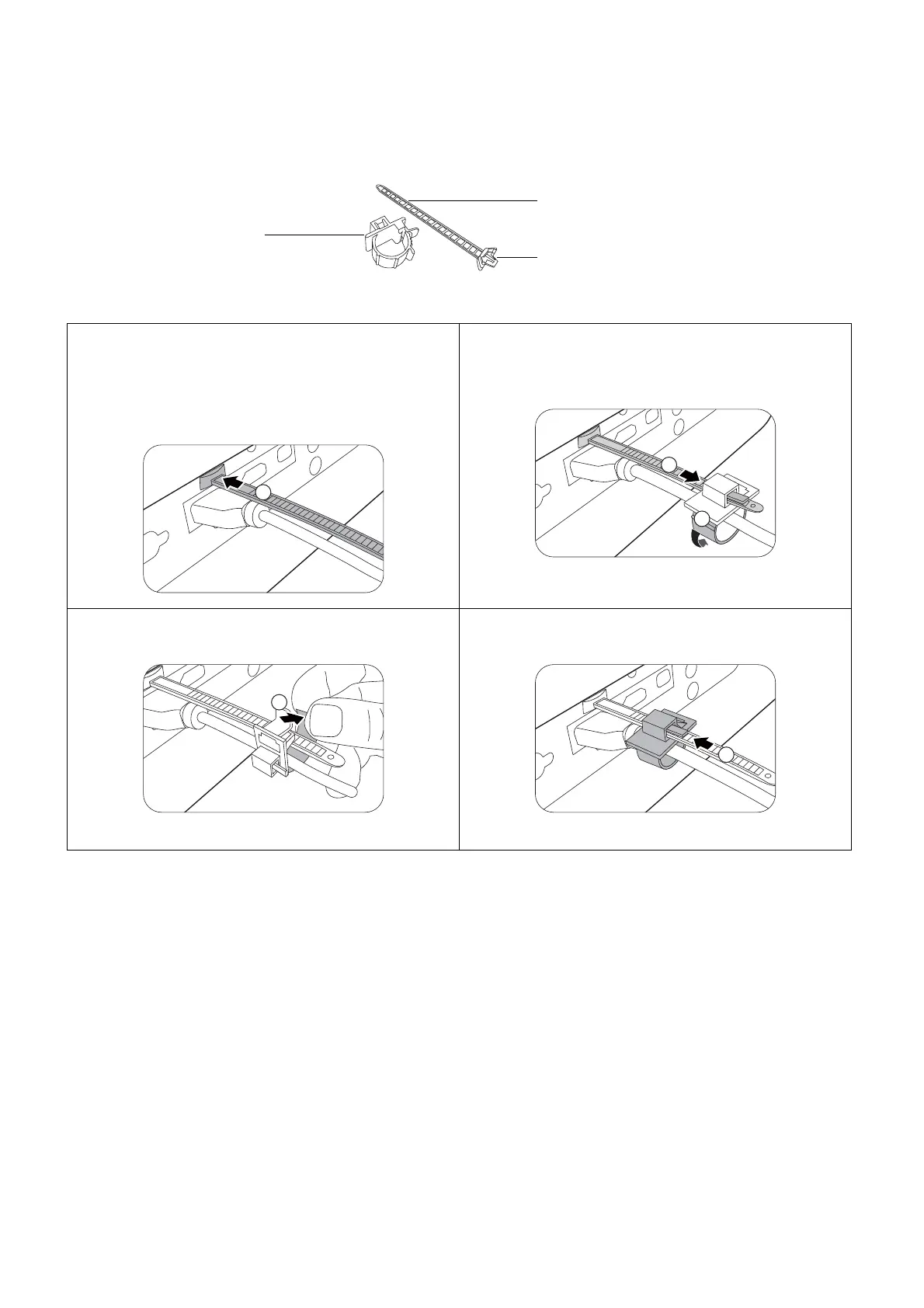
The cable tie set helps prevent a cable plug from falling out of the connecting port. It contains the
following parts.
To use the cable tie set:
1. Firmly plug a cable to a correct port on the
projector. Insert the cable tie head to the
cable tie hole right above the connecting port.
Note that the cable tie cannot be removed
from the hole once it is inserted.
3. Insert the end of the cable tie to the cable tie
ratchet as illustrated.
4. Close the cable tie ratchet by pressing its tab.
2. Take the cable tie ratchet. Slightly open the
ratchet to surround the connecting cable.
5. Move the cable tie ratchet along with the
cable tie to the end of the cable plug.
The cable tie installation is done.
Cable tie
Cable tie ratchet
Cable tie head
1
2










 To Next Page