42 Navigating the main menu
Picture menu
Available menu options may vary depending on the input sources, functions and settings. Menu
options that are not available will become grayed out. And keys that are not available will be
disabled and the corresponding OSD icons will disappear. For models without certain functions,
their settings and related items will not appear on the menu.
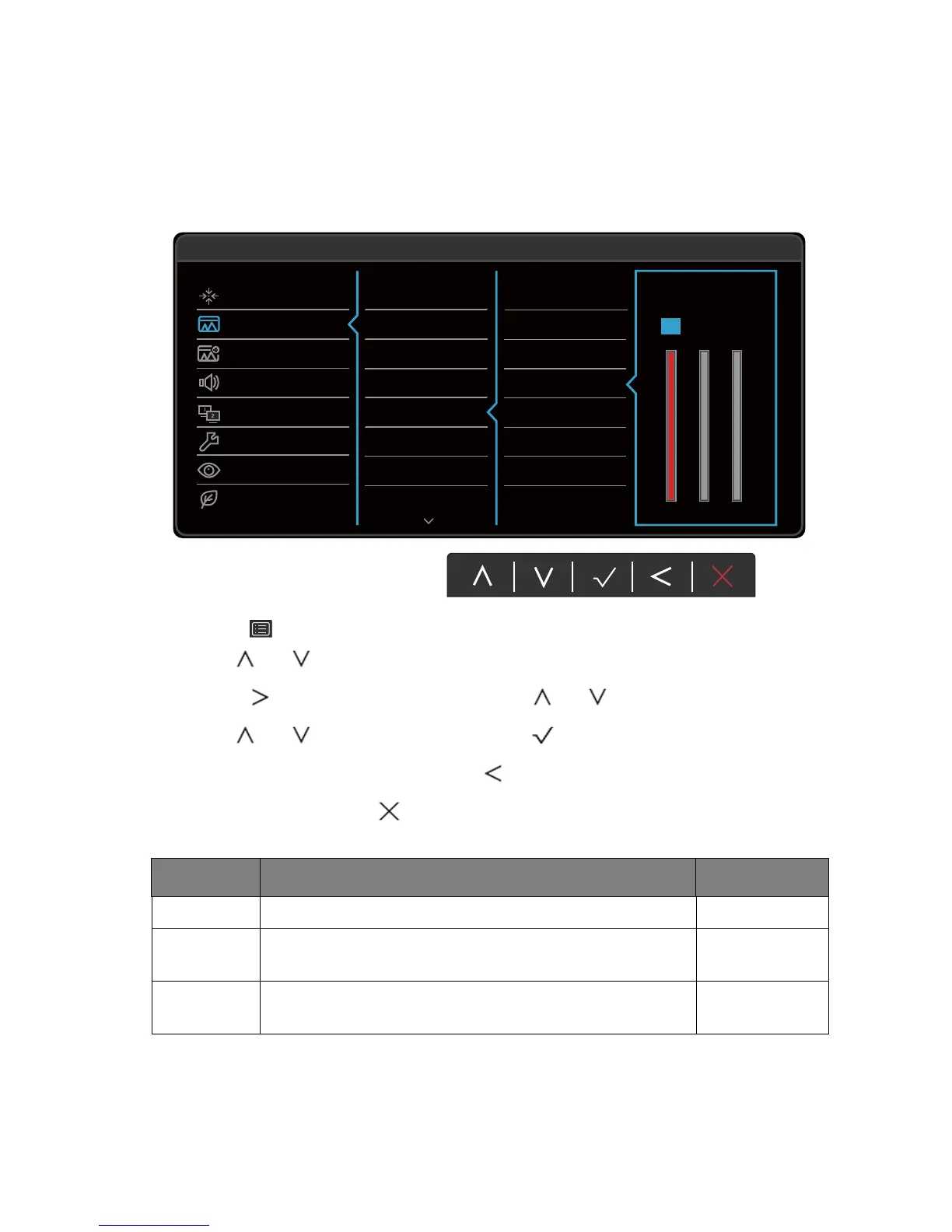
1. Select (Menu) from the hot key menu.
2. Use or to select Picture.
3. Select to go to a sub menu, and then use or to select a menu item.
4. Use or to make adjustments, or use to make selection.
5. To return to the previous menu, select .
6. To exit the menu, select .
50
100 100
RG
B
100
Display
Picture
Picture Advanced
Audio
KVM Switch
System
Ergonomics
Eco
Mode: User
Normal
Bluish
Reddish
User Define
Brightness
Contrast
Sharpness
Gamma
Color Temperature
Hue
Saturation
Reset Color
Item Function Range
Brightness Adjusts the balance between light and dark shades. 0 to 100
Contrast Adjusts the degree of difference between darkness and
lightness.
0 to 100
Sharpness Adjusts the clarity and visibility of the edges of the subjects
in the image.
1 to 10



 To Next Page