47
InstaShare 2
InstaShare 2 ( ) is a software-based solution for multi-user collaboration, which lets users to
share contents with all devices in a meeting wirelessly.
Use either way to access InstaShare 2:
• On the Android main interface, select Wireless Projection (
).
• Select All Apps(
) > InstaShare 2 ( )
Before launching the application, make sure your display is properly connected to the Internet.
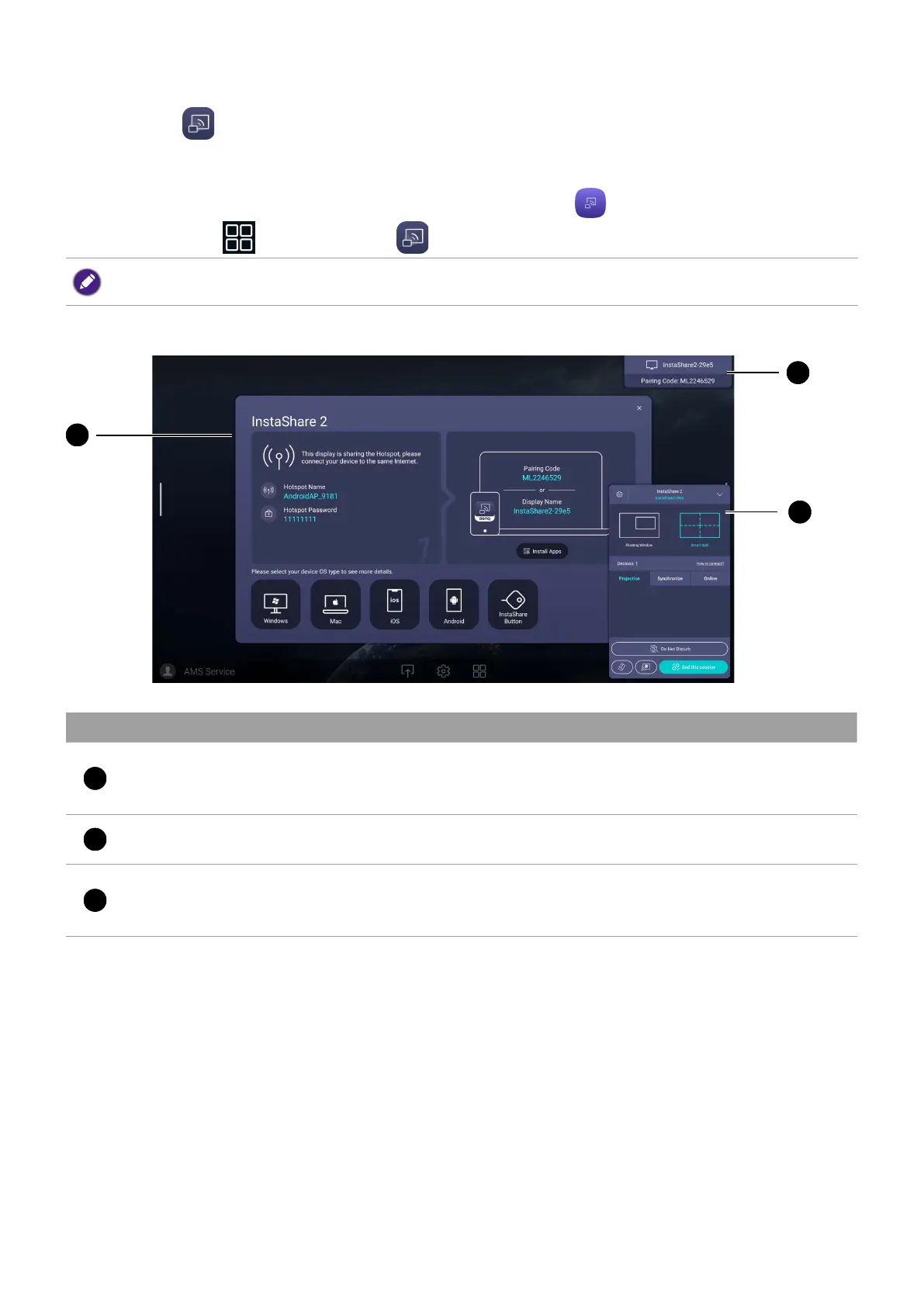
When you enter InstaShare 2, the main interface is shown as below:
2
3
No Function Description
1
Tutorial window
Follow the guide to connect and pair your device with
the display. Select the device OS type below to see the
projection tutorial respectively.
2
Information window
Shows the display name, pairing code and connection
password while presenting.
3
Host Controls window
Allows you to control the whole session and participant
actions. You can also install InstaShare 2 app to manage
the meeting session remotely



 To Next Page