Connection 17
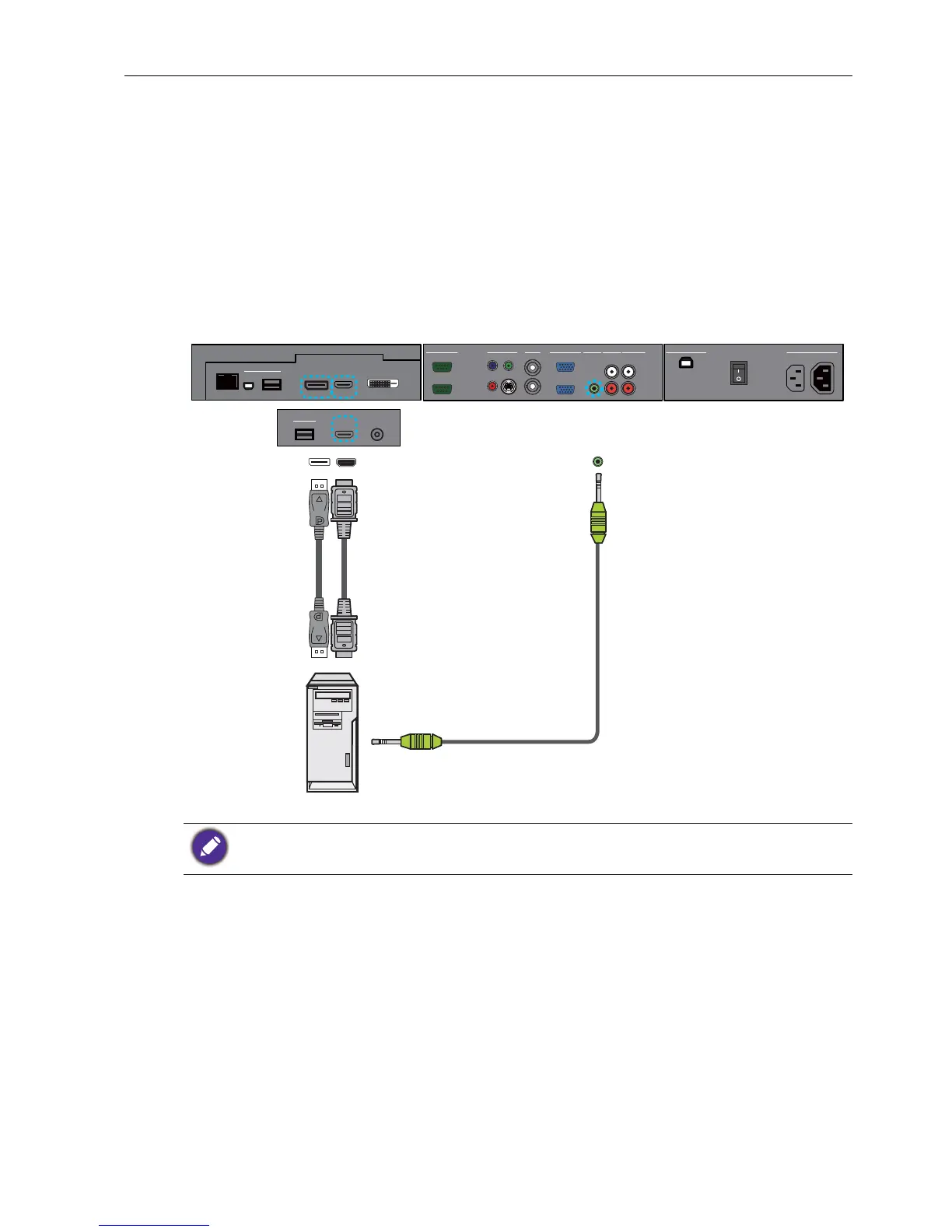
Connecting the digital inputs
1. Connect the HDMI output jack of a computer or A/V device (such as a VCR or DVD
player) to the HDMI input jack on the display using an HDMI cable. If the device has a
DisplayPort output jack, connect it to the display’s DP input jack using a DisplayPort
cable.
2. If the DisplayPort connection is used, connect the audio output jack of the device to
the AUDIO IN (AUDIO1) jack on the display using a suitable audio cable. This
audio connection is not required for the HDMI connection.
3. To view video image from this input, press the HDMI-1 or DP button on the
remote control. To select an appropriate audio source, see Audio Source on page
35 for details.
The cables are not supplied and should be purchased separately.
R
L
AUDIO IN
AUDIO INVGA
AV
OUT
VIDEO IN
RS-232C
OUT
IN
Y
Pb
Pr
S-VIDEO
IN
OUT
IN
AUDIO 2AUDIO 1
AUDIO OUT
USB TYPE B FOR TOUCH
AC SWITCH
ON/OFF
100-240V~50-60Hz
3.4A
IN
1.7A
OUT
DP
HDMI
RJ-45
USB
Mini-B
USB Type A
MULTI-MEDIA
HDMI MIC IN
MULTI-MEDIA
USB Type A
Audio cable
Computer
HDMI cable
DisplayPort
cable



 To Next Page