Connection22
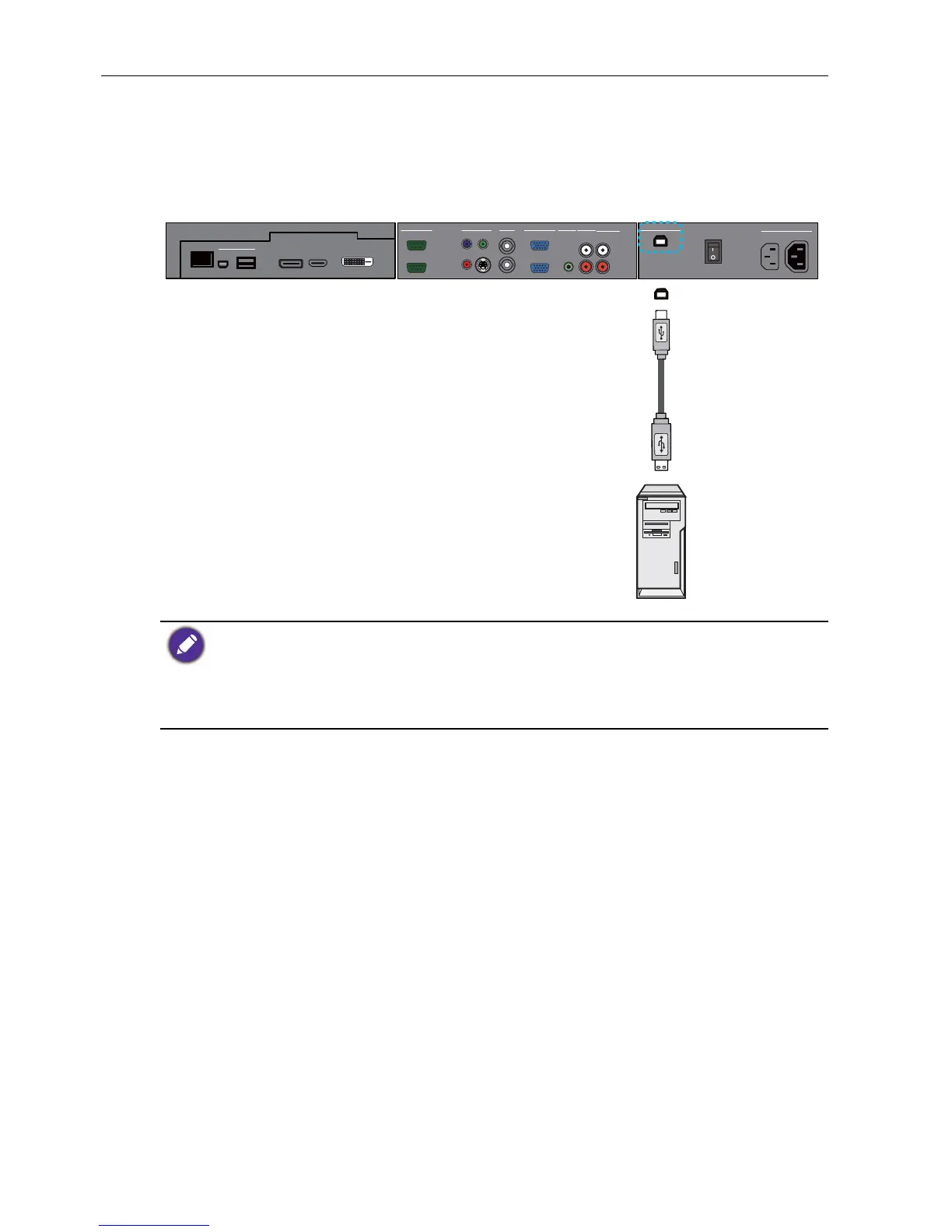
Connecting the touch module
Connect the USB TYPE B FOR TOUCH (type B) jack on the display to the USB port
of a computer using the supplied USB cable. The touch module of the display supports
easy Plug-and-Play operation. There is no need to install additional drivers on the
computer.
• Avoid blocking the touch screen frame (where sensors are located) when initiating the touch
module.
• It is highly recommended that you connect the display to the PC or laptop directly. Avoid
connecting the display to a face plate device which may cause failures in touch operations.
• If any ghost image occurs, please try to un-plug and then re-plug all USB cables. If the failure
image still exists, use another USB type B to A cable.
R
L
AUDIO IN
AUDIO INVGA
AV
OUT
VIDEO IN
RS-232C
OUT
IN
Y
Pb
Pr
S-VIDEO
IN
OUT
IN
AUDIO 2AUDIO 1
AUDIO OUT
USB TYPE B FOR TOUCH
AC SWITCH
ON/OFF
100-240V~50-60Hz
3.4A
IN
1.7A
OUT
DP
HDMI
RJ-45
USB
Mini-B
USB Type A
MULTI-MEDIA



 To Next Page