Parts of the display and their functions 9
Parts of the display and their functions
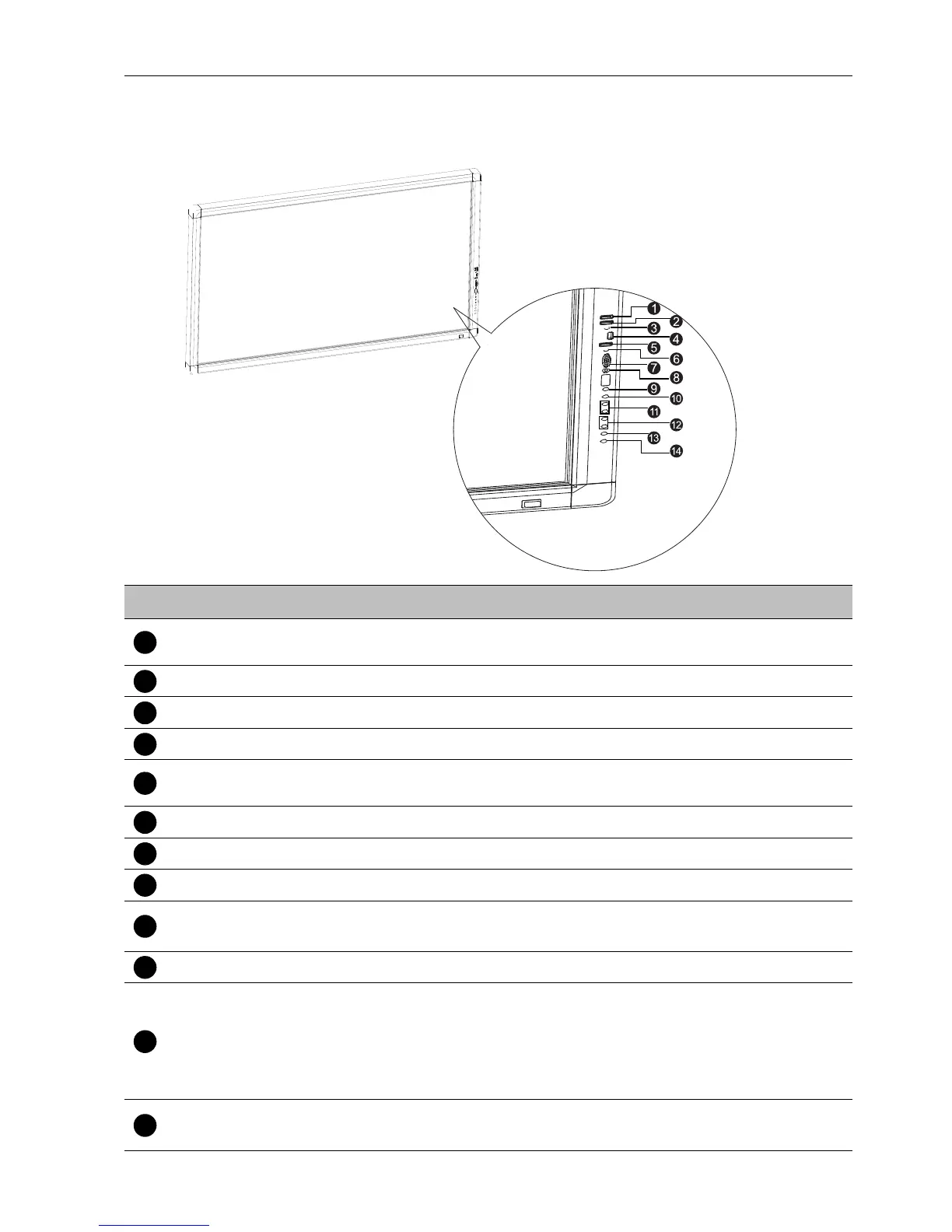
Front/Rear panel
No. Name Description
PC USB
Connects to the extended USB port of computer from PC
USB at back.
M USB Accesses multimedia files on USB drives directly.
MIC Connects to a microphone.
HDMI 3 Receives HDMI signals from an external device.
TOUCH 3
Connects the USB cable from the display to a computer to
use the touch module.
AUDIO Receives audio signals from an external device.
VGA 3 Receives analog RGB signals from an external device.
AV 2 Receives composite video signals from an external device.
INPUT/ENTER
• Selects/confirms options in On-Screen Display (OSD) menu.
• Selects input sources.
MENU Opens or closes the OSD menu.
FREEZE/BLANK
• Freezes/vacates the screen.
• Scrolls through settings and options in the OSD menu.
• Freezes the image when the OSD menu is off/Hides the
image (the screen becomes blank) when the OSD menu is
off.
/-,/+
• Scrolls through settings and options in the OSD menu.
• /-,/+: Hot keys for audio volume adjustment.



 To Next Page