48
Connecting with video equipment
Resetting the lamp timer
Do not reset the lamp timer if the lamp has not been replaced as this could cause damage.
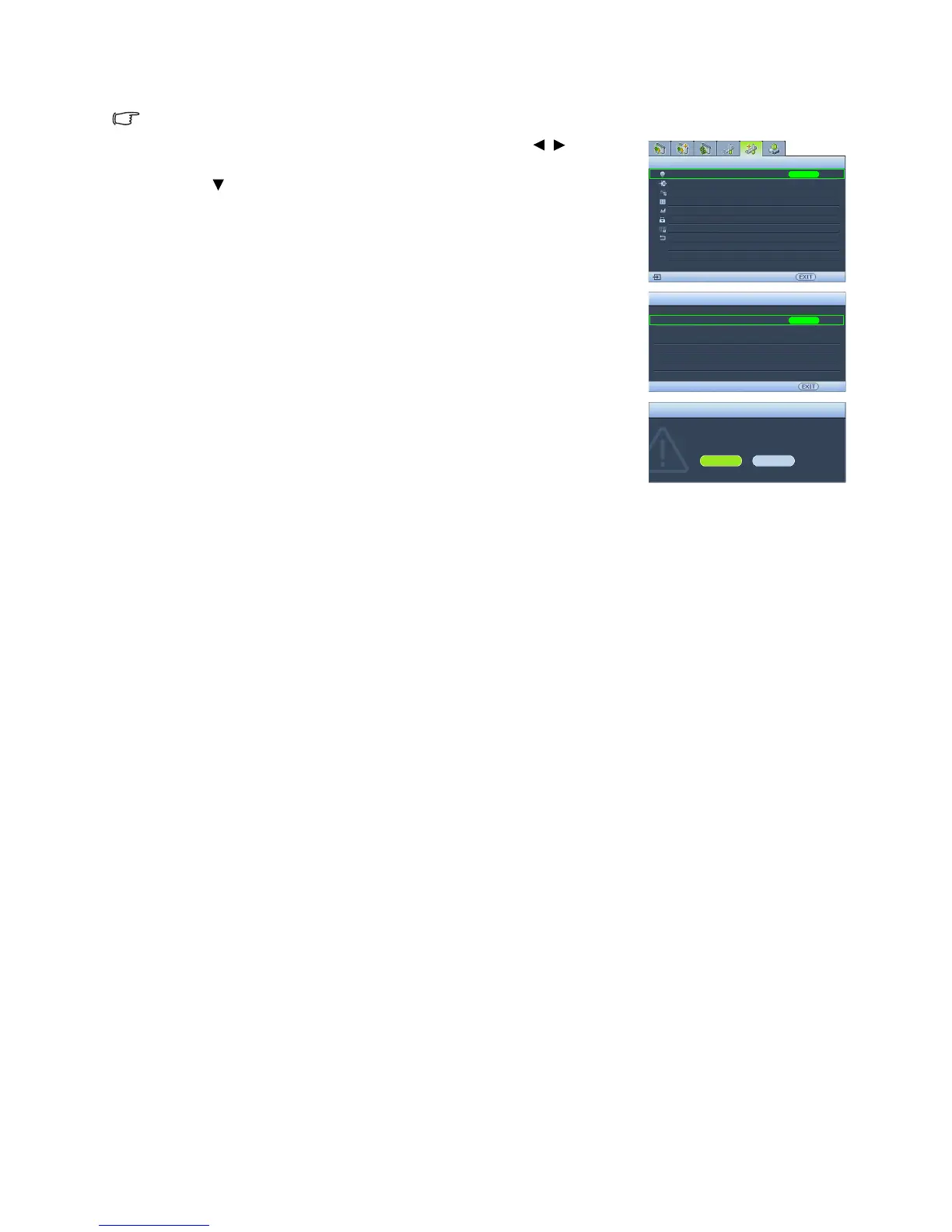
1. After the start-up logo, press MENU and then press / until the
Advanced Setup menu is highlighted.
2. Press to highlight Lamp Settings and press ENTER. The Lamp
Settings page displays.
3. Highlight Reset Lamp Timer and press ENTER. A warning
message displays asking if you want to reset the lamp timer. Highlight
Reset and press ENTER. The lamp time will be reset to "0".
Lamp Settings
HDMI Settings
High Altitude Mode
Password
Key Lock
Reset All Settings
Advanced Setup
Back
S-Video
ENTER
Off
Lamp Settings
Lamp Power
Equivalent Lamp Hour
ENTER
Back
Reset Lamp Timer
Reset Lamp Timer?
Reset Cancel
Reset Lamp Timer
Normal
Test Pattern
ISF
Baud Rate
115200
50
Off



 To Next Page