EasyManua.ls Logo

Bergstrom H300 - User Manual

Bergstrom H300
9 pages
Print Icon
To Next Page IconTo Next Page
Loading...
Personal Portable DAB Radio
H300 v01: 21/10/20
Please read and retain these instructions for future reference
THIS POCKET SIZED DAB RADIO IS PERFECT FOR
WHEN YOU ARE OUT AND ABOUT, GARDENING,
DOING DIY ETC
SMALL ENOUGH THAT IT FITS IN YOUR POCKET
WITH ACCESS TO UP TO 250 COMMERCIAL AND
34 BBC RADIO STATIONS AS WELL AS FM
BROADCAST YOU WILL NEVER BE WITHOUT
SOMETHING TO LISTEN TO
20 STATION PRE-SET
ALARM & SLEEP TIMER
LCD BACKLIT DISPLAY
3.5MM STEREO OUTPUT HEADPHONES
INCLUDED (length about 112cm)
WITH A RE-CHARGEABLE 1000mA BATTERY YOU
CAN ENJOY UP TO 10 HOURS OF LISTENING ON
ONE FULL CHARGE
COMES WITH USB CHARGING LEAD
DAB/DAB+/FM RADIO
SPECIFICATIONS
Specifications are subject to change without notice.
Radio DAB/DAB+ and FM (RDS)
Frequencies Digital: Band III 174-240MHz, FM: 87.5-108MHz
Headphones 32ohm 14mm diameter driver
Receiving power supply 5V(1A) DC micro-USB (cable supplied)
Lithium-ion rechargeable battery (1000mAh)
Inputs 5VDC (1A) Micro-USB power socket
The supplied Micro-USB cable is only suitable for charging
Outputs 3.5mm stereo headphone socket
Presets 10 digital presets, 10 FM presets
Operational temperature 0° C to +40° C
Dimensions 90mm (H) x 51mm (W) x 16mm (D)
Weight 100g
Aerial Supplied in-ear headphones act as aerial
Question and Answer IconNeed help?

Do you have a question about the Bergstrom H300 and is the answer not in the manual?

Summary

Safety Information

Hearing Protection Warning

Warning against listening at high volumes to prevent hearing damage.

Product Overview

Connections

Details on the headphone and micro-USB sockets for connectivity.

Charging and Powering On

Initial Charging and First Use

Instructions for charging the battery before first use and switching on the device.

Locking and Unlocking Controls

How to lock and unlock the device buttons to prevent accidental presses.

DAB and FM Modes

Switching Between DAB and FM

Procedure to switch between DAB and FM radio modes using the MODE button.

Display Information

How to change displayed information for DAB and FM stations using MENU/INFO.

DAB Menu Options

Navigating DAB menus for full scan, manual tune, prune, and system settings.

FM Mode Operations

FM Scan and Audio Settings

Configuring FM scan behaviour and audio output settings (stereo/mono).

Storing and Recalling Presets

How to store favourite DAB/FM stations to presets and recall them later.

Station Navigation

Cycling through radio stations or menu options using Next/Previous buttons.

Volume and Battery Management

Adjusting Volume

How to control the audio volume using the volume dial.

Battery Reset Procedure

Steps to perform a battery reset if the device becomes unresponsive.

Disposal and Recycling

Packaging Disposal

Guidelines for disposing of product packaging and identifying recyclable plastics.

Overview

The document describes the Personal Portable DAB Radio H300, a compact and lightweight digital radio designed for on-the-go use.

Function Description:

The H300 is a pocket-sized DAB/DAB+/FM radio that allows users to listen to a wide range of digital and FM radio stations. It is ideal for outdoor activities, gardening, DIY, or general portable listening. The device features a backlit LCD display, a built-in rechargeable battery, and includes headphones which also serve as the aerial. It supports both DAB (Digital Audio Broadcasting) and FM (Frequency Modulation) with RDS (Radio Data System) for enhanced information display.
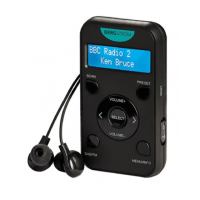
Important Technical Specifications:

  • Model: H300
  • Radio Type: DAB/DAB+ and FM (RDS)
  • Frequencies Digital: Band III 174-240MHz
  • Frequencies FM: 87.5-108MHz
  • Headphones: 32ohm, 14mm diameter driver (included)
  • Receiving Power Supply: 5V(1A) DC micro-USB (cable supplied)
  • Battery: Lithium-ion rechargeable battery (1000mAh)
  • Battery Life: Up to 10 hours of listening on one full charge
  • Inputs: 5VDC (1A) Micro-USB power socket
  • Outputs: 3.5mm stereo headphone socket
  • Presets: 10 digital presets, 10 FM presets
  • Operational Temperature: 0°C to +40°C
  • Dimensions: 90mm (H) x 51mm (W) x 16mm (D)
  • Weight: 100g
  • Aerial: Supplied in-ear headphones act as the aerial.

Usage Features:

  • Portability: Small enough to fit in a pocket, making it highly portable.
  • Station Access: Provides access to up to 250 commercial and 34 BBC radio stations, plus FM broadcast.
  • Presets: Features 20 station pre-sets (10 DAB, 10 FM) for quick access to favourite stations.
  • Display: LCD backlit display for clear visibility.
  • Headphones: Includes 3.5mm stereo output headphones (approx. 112cm length).
  • Charging: Recharges via a micro-USB cable (supplied) and can be connected to a USB power adapter (not supplied) or a computer's USB port.
  • Initial Setup: Requires charging the battery for at least 8 hours before first use. Headphones must be connected as they function as the aerial.
  • Power/Lock Switch: A slide switch controls power and locks buttons to prevent accidental presses.
  • DAB Mode:
    • Auto Tune: Automatically tunes to digital radio stations upon switching on.
    • Display Information: MENU/INFO button allows cycling through various display information such as DLS (Dynamic Label Segment), signal strength, PTY (Programme Type), ensemble, frequency, signal quality, bit rate codec, time, and date.
    • Menu Options: Press and hold MENU/INFO to access menu options: Full Scan, Manual Tune, Prune, and System.
    • Full Scan: Scans for all available DAB stations.
    • Manual Tune: Allows manual tuning to specific DAB channels/frequencies, displaying live signal strength.
    • Prune: Removes invalid stations from the station list.
    • Time Settings: Automatically updates time via DAB signals or can be set manually, with options for 12/24 hour format and date format.
    • Backlight: Adjustable backlight timeout (Medium, High, Low).
    • Factory Reset: Clears all user-defined settings and restores default values.
    • Software Version: Displays the current software version.
  • FM Mode:
    • Switching: Press the MODE button repeatedly to switch to FM mode.
    • Manual Frequency Change: TU+/- buttons allow changing FM frequency by 0.05MHz.
    • Display Information: MENU/INFO button allows cycling through display information such as radio text, PTY (Programme Type), PS (Programme Service), stereo/mono, time, and date.
    • Menu Options: Press and hold MENU/INFO to access menu options: Scan Setting, Audio Setting, and System.
    • Scan Setting: Options to scan for "Strong stations only" or "All stations."
    • Audio Setting: Options for "Stereo allowed" or "Forced mono" to improve audio quality for weak stations.
  • Volume Control: A volume dial adjusts the listening level.
  • Station Selection: Next/Previous buttons cycle through radio stations or menu options.
  • Preset Storage/Recall: Press and hold the PRESET button to store a station, then use Next/Previous and SELECT to choose a preset number. Press PRESET once to recall a stored station.

Maintenance Features:

  • Safety Instructions: Emphasises reading and retaining safety instructions, including proper handling of liquids, temperature exposure, and battery care.
  • Cleaning: Unplug from power supply before cleaning. Do not use abrasive pads or cleaning solutions.
  • Battery Care: Keep batteries away from children/pets, do not mix old/new batteries, remove if unused for long periods, never dispose in fire, and follow local regulations for disposal.
  • Battery Reset: If controls stop responding, a battery reset can be performed by pressing the reset button on the side of the radio with a paper clip.
  • Repairs: Product repairs should only be carried out by authorised personnel; users should not remove screws or attempt internal repairs.
  • Disposal: Packaging is recyclable. At the end of its lifespan, the product should be disposed of at an authorised household waste recycling centre. Plastics (LDPE) used in packaging are recyclable.

Bergstrom H300 Specifications

General IconGeneral
BrandBergstrom
ModelH300
CategoryRadio
LanguageEnglish