16 / 49
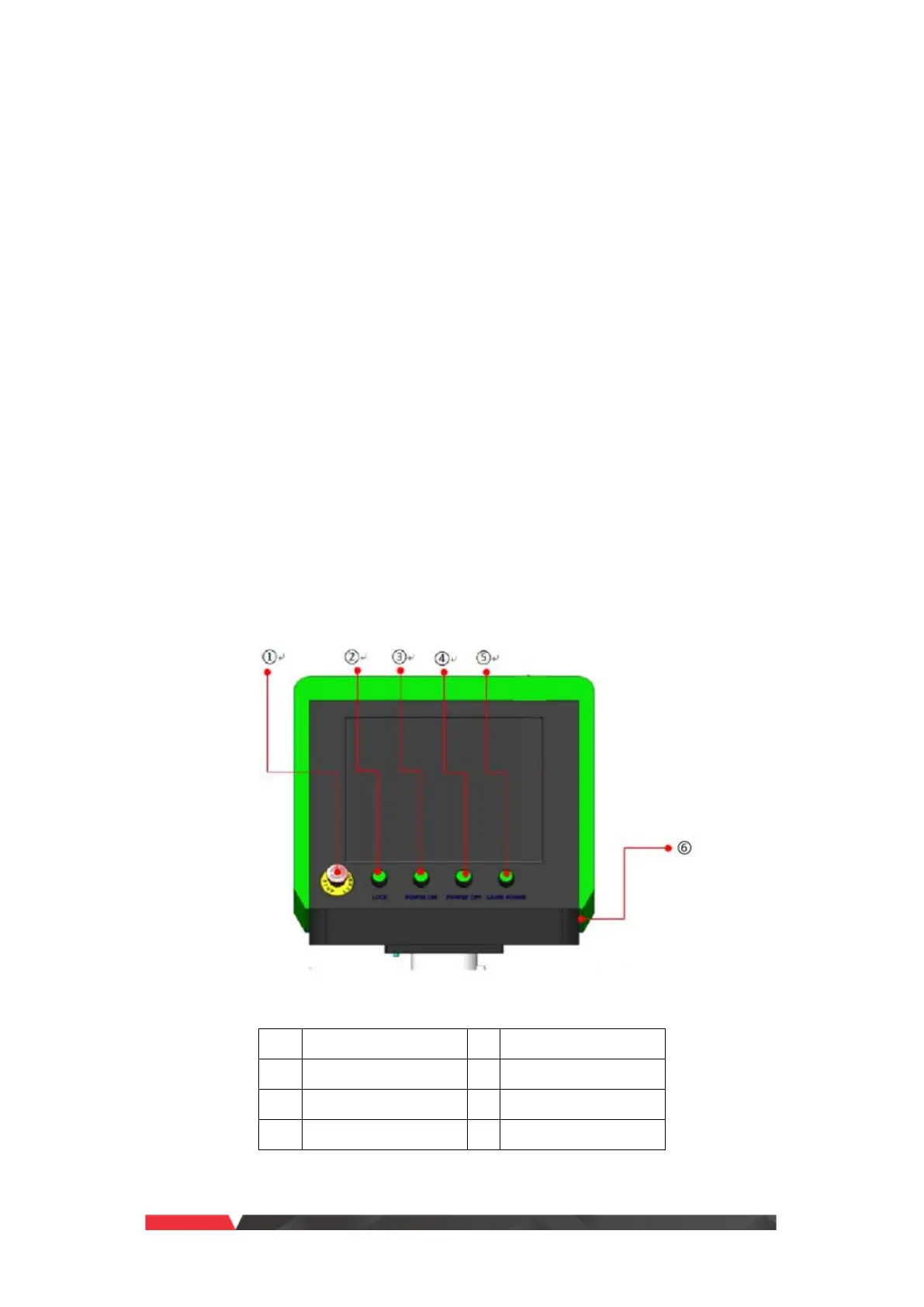
Description of Operation Panel
➢
Emergency stop button [EMERGENCY]: Press this button to activate the emergency
stop function. When the button is pressed down, the power will be cut off, and the
equipment enters “Stop” state; to release emergency stop, rotate the button
clockwise.
➢
Key switch [LOCK]: When the key switch is activated, the computer starts, and other
power supplies can be turned on; rotate to the right to unlock, and rotate to the left
to lock. If the equipment won’t be used, it is recommended to remove the key switch
and keep it properly to prevent personnel without permission from operating the
equipment.
➢
Main power switch [POWER ON/OFF]: The button is a self-locking illuminated
pushbutton switch; press it to turn on the chiller and electric motors of each axis, and
the indicator turns on; press the button again to turn off the chiller and electric
motors of each axis, and the indicator turns off.
➢
Laser power switch [LASER POWER]: The button is a self-locking illuminated
pushbutton switch; press it to turn on the laser power, and the indicator turns on;
press the button again to turn off the laser power, and the indicator turns off.
➢
USB interface [USB]: The interface is connected to the USB interface of the computer,
and is used by USB disk.
Fig.3-9 Operation Panel Diagram



 To Next Page