EN - 18
Internet
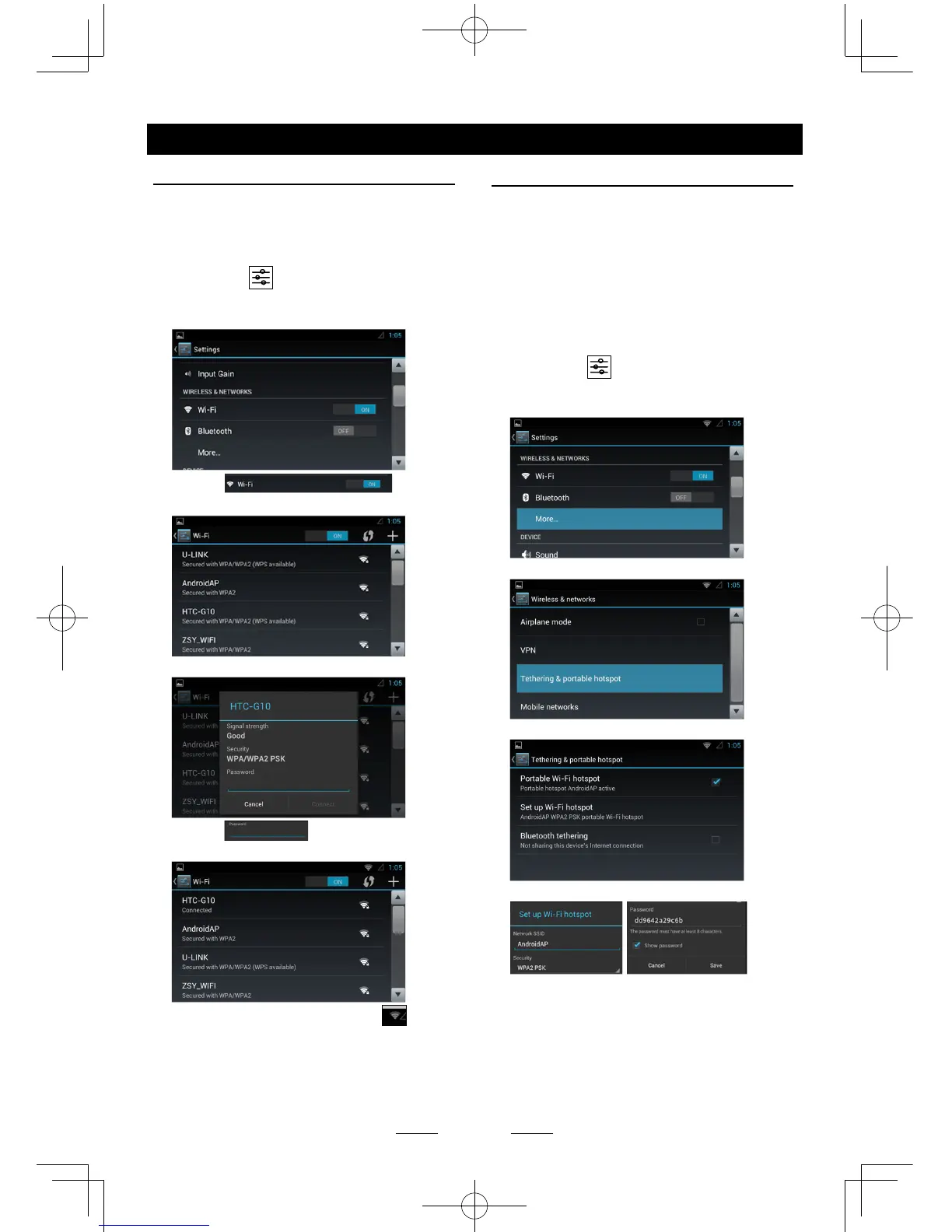
Wi-Fi Settings
The unit support the WiFi dongle: realtek
8188cu, 8188eu.
1. Connect the WiFi dongle to the unit.
Touch the [
] icon on the main menu
to enter setting menu, and turn on Wi-Fi (if
necessary).
2. Touch [ ] to enter
WiFi setting menu.
3. Touch an available WiFi hotspot.
4. Touch [ ] and input the
password, touch [Connect] to conrm.
5. After connect successfully, the [ ]
icon appears on the top right corner of the
screen. Now you can access internet.
Create Wi-Fi Hotspot
User can use the unit to create a personal
Wi-Fi hotspot. All your other Wi-Fi enabled
devices will then be able to connect to this
hotspot and share the primary internet
connection.
1. Connect the Wi and 3G dongle to the USB
slots on the rear of the unit.
Refer to “Device Connections”.
2. Touch the [
] icon on the main
menu, and drag down to “WIRELESS &
NETWORKS”.
3. Select “More...”.
4. Touch “Tethering & portable hotspot”.
5. Touch “Portable Wi-Fi hotspot”.
After setting done, you can touch “Set up Wi-
Fi hotspot” to modify the settings.



 To Next Page