EN - 12
SD/USB Operations
9 10
11 12 13 14 15
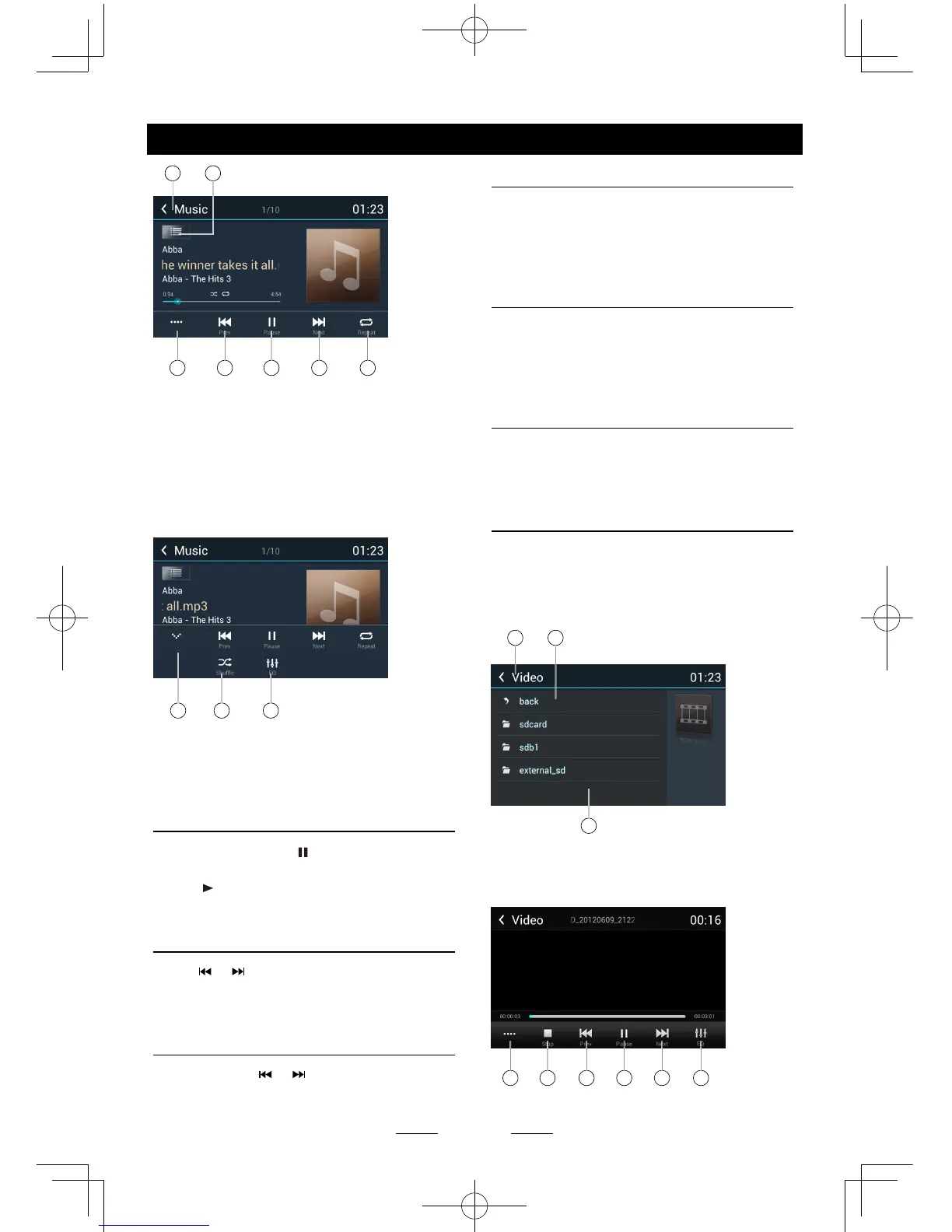
9. Return to home menu
10. Show list menu
11. Show more control buttons
12. Previous track
Fast backward (long press)
13. Play/Pause
14. Next track
Fast forward (long press)
15. Repeat play
16 17 18
16. Hide the second line of control buttons.
17. Shufe play
18. Enter EQ menu.
Play/Pause
When playing, press [ ] button to pause, and
the sound will be mute.
Press [ ] button to play.
Previous/next track
Press or button to go to previous or next
track.
Fast forwarding or reversing
Press and hold or button to fast
backward/forward.
Select Music by Artist
1. Touch [Artists] on the left of the screen.
2. Touch an artist shown on the list.
3. Select a song to play.
Select Music by Album
1. Touch [Albums] on the left of the screen.
2. Touch an album shown on the list.
3. Select a song to play.
Select Music by Song Name
1. Touch [Songs] on the left of the screen.
2. Select a song to play.
Video Playback
Select [Video] on the applications menu,
the unit will display all the video files on the
storages.
During playback, touch the screen(except top
left corner) to show control buttons.
1 2
3
1. Return to home menu
2. Back
3. Folder/File list
Drag up/down to scroll, touch to access.
4 5 6 7 8 9



 To Next Page