EN - 8
Disc Operation
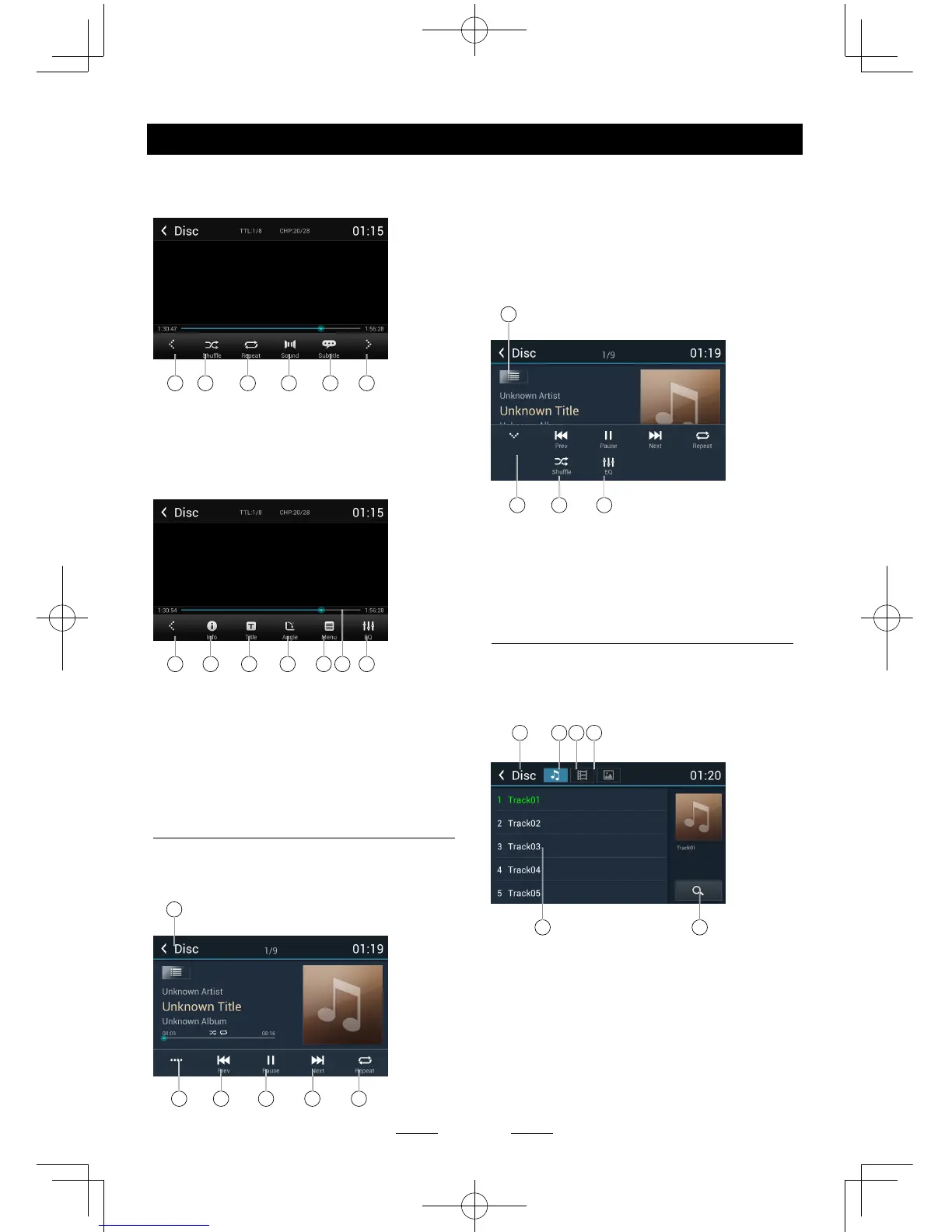
6. Next chapter
Fast forward (long press)
7. To enter search menu
8 9 10 11 12 13
8. Previous page of control buttons
9. Random play
10. Repeat play
11. Select audio channel
12. Select subtitle language
13. Next page of control buttons
8 14 15 16 17 1918
14. Show DVD informations
15. Show DVD title
16. Select viewing angle
17. Show DVD menu
18. Progress bar
19. Enter EQ menu
CD Playback
Insert a CD in the disc slot, and the unit will
read the disc. For some discs, you will need to
choose Music/Video/Photo for playback.
1
2 3 4 5 6
1. Return to home menu
2. Show more control buttons
3. Previous track
Fast backward (long press)
4. Play/Pause
5. Next track
Fast forward (long press)
6. Repeat play
7
8 9 10
7. Show le list
8. Hide the second line of control buttons
9. Shufe play
10. Enter EQ menu
Mixed Disc Playback
When inserting a mixed disc, the unit will read
the disc and show the files list. For some
discs, you need to choose Music/Video/Photo
to play back.
1 2 3 4
65
1. Return to home menu
2. Show music list
3. Show video list
4. Show photo list
5. File/Folder list
Drag the list up/down to scroll.
Touch a le name to visit it.
6. Enter search menu



 To Next Page