7
Using
EN
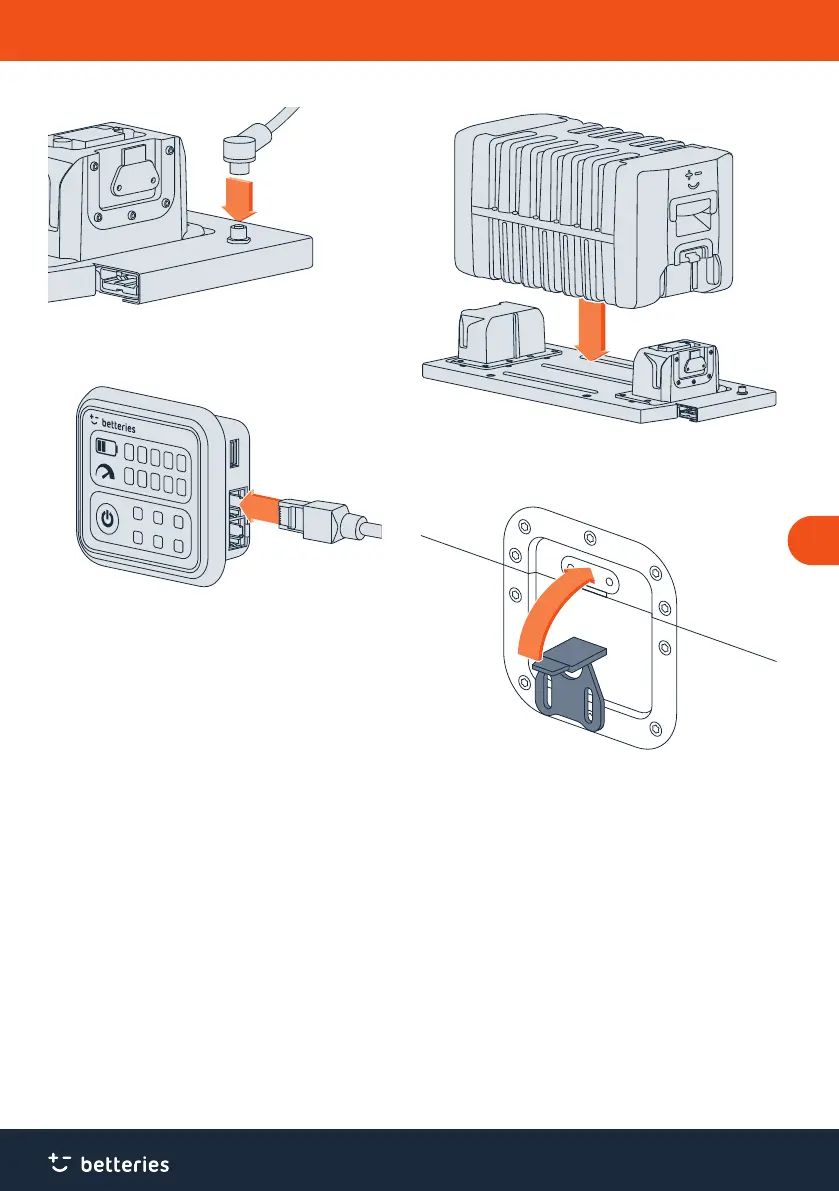
Fig. 3 Plugging data cable into the betterLink.
3. Connect the betterUI to the betterLink. To do so, plug the
data cable into the betterLink and screw tight.
Fig. 4 Plugging data cable into the betterUI.
4. Plug the data cable into one of the two connections on
the betterUI.
4.3 Stacking betterPacks
1. Remove the dust caps from the connections and put
them aside for later use.
2. Li and carry betterPacks with another person.
3. Align the connection of the betterLink and the connection
of the betterPack vertically, one above the other.
Fig. 5 Stacking the betterPack onto the betterLink.
4. Carefully stack the first betterPack onto the betterLink
without any force.
Fig. 6 Liing the wing screw.
5. Lock the first betterPack on the betterLink. To do so, li
the wing screw and hook the curved top on the upper
part of the betterPack.



 To Next Page