34
8. Transferring measurements
Transfers using the USB interface
Connect the blood pressure monitor to your PC using the USB
cable.
No data transfer may be launched whilst performing a
measurement.
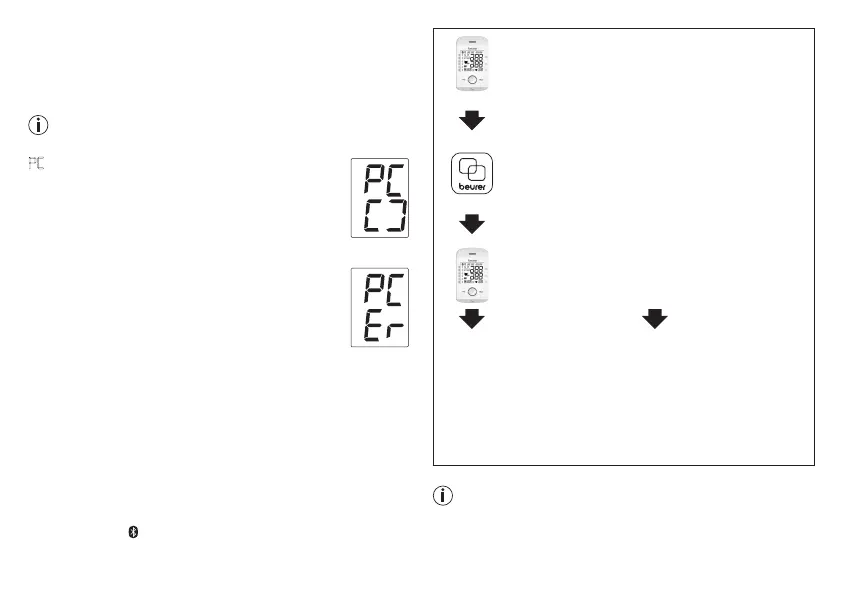
PC
is shown on the display.
Begin the data transfer in the “beurer
HealthManager” PC software. During the data
transfer, an animation is shown on the display.
Asuccessful data transfer is displayed as in
figure 1. If the data transfer is unsuccessful, an
error message appears as in figure 2. In this case,
interrupt the PC connection and start the data
transfer again.
After 30 seconds of not being in use or if commu-
nication with the PC is interrupted, the blood pres-
sure monitor switches itself off automatically.
Bluetooth
®
low energy technology transfers
It is also possible to transfer the measured values saved on
the device to your smartphone using Bluetooth
®
low energy
technology.
You will need the “beurer HealthManager”-app for this. This is
available in the Apple App Store and from Google Play.
Proceed as follows to transfer values:
data is transferred if Bluetooth
®
has been activated in the set-
tings menu. The symbol appears in the top left of the display
(see section 4 “Preparing for the measurement”).
Step 1: BM 85
activate Bluetooth
®
on your device (see section
4 “Preparing for the measurement, Blue-
tooth
®
”).
Step 2: „beurer HealthManager“ app
In the „beurer HealthManager“-app, add the
BM 85 under “Settings/My devices”.
Step 3: BM 85
take a measurement.
Step 4: BM 85
data transfer immediately
following measurements.
•
Select the desired user
memory. Start Bluetooth
®
data transfer (chapter 5)
Step 4: BM 85
Data transfer at a later point:
•
go to memory mode
(chapter 7). Select the
desired user memory.
Bluetooth
®
data transfer
starts automatically.
The “beurer HealthManager”-app must be active to allow
data transfers.
f
ig. 1
f
ig. 2


 To Next Page