26 27
8.3 Changing the filter
NOTICE
When replacing the filter
4
, only use original replacement filters from Beurer (see section “9. Accessories
and replacement parts”).
Change the filter
4
after 6 months at the latest. After 1440 operating hours*, the filter change indicator
19
lights up automatically. If the filter
4
is already heavily soiled, deformed or discoloured before the 1440
operating hours have elapsed, you must replace the filter
4
earlier and then reset the operating hours
counter to 0 (see step 6 in this section).
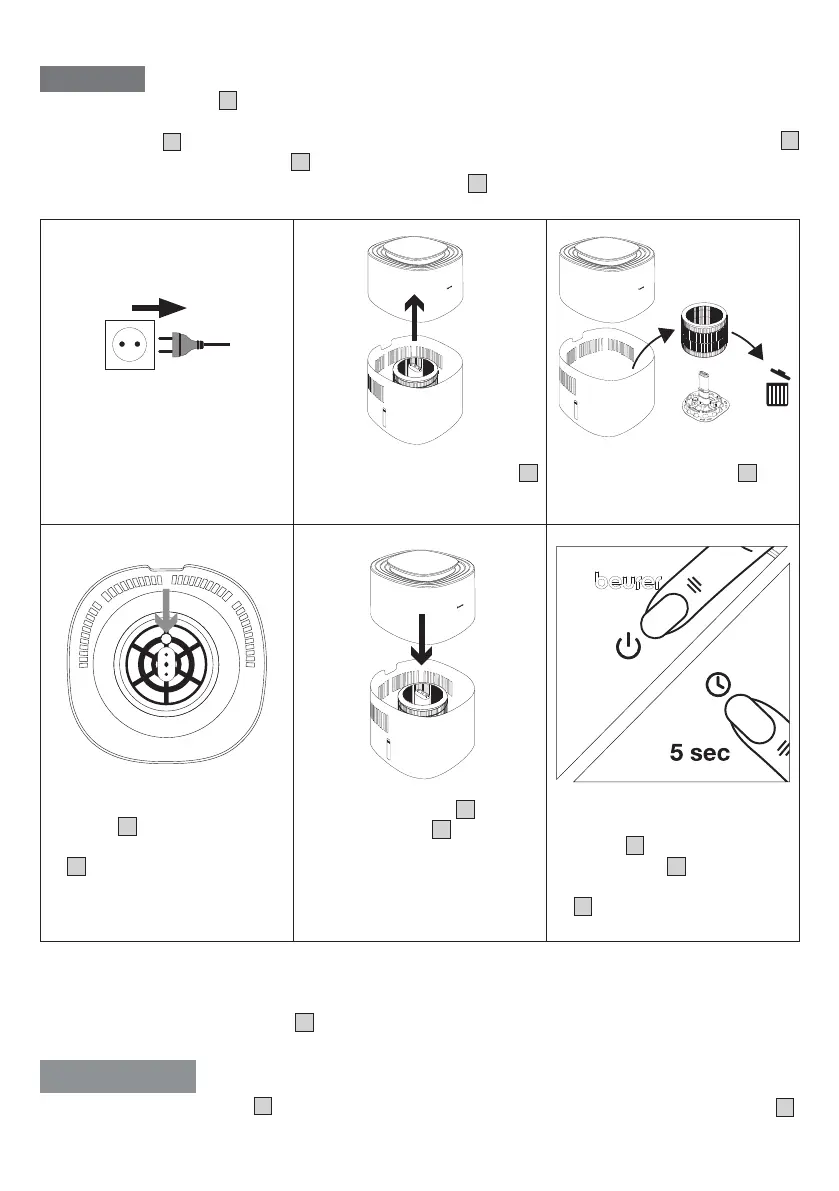
1.
Disconnect the air humidifier
from the socket.
2.
Pull off the motor unit
3
upwards.
3.
Remove the old filter
4
and
dispose of it properly.
4.
Place the new filter on the filter
holder
7
. Make sure that the
round hole of the filter holder
7
is on the small projection in
the bottom of the water tank.
5. Put the motor unit
3
back on
the water tank
8
. Make sure
that there is no gap between
them.
6.
Switch on the air humid-
ifier using the ON/OFF
button
10
. Press and hold the
timer button
14
for 5 seconds
until the filter change indicator
19
goes out. Internal operating
hours counter is now reset to 0.
* Based on an average of 8 hours of daily use of the air humidifier over 6 months.
8.4 Cleaning the motor unit housing
Clean the housing of the motor unit
3
with a slightly damp cloth (water or a mild cleaning solution). Do not
use solvents, other aggressive cleaning/scrubbing agents or alcohol, as these could damage the surface.
WARNING
Never clean the motor unit
3
in the dishwasher. Make sure that no liquid enters the air outlet
2
.


 To Next Page
 Loading...