25
Step 6: After use
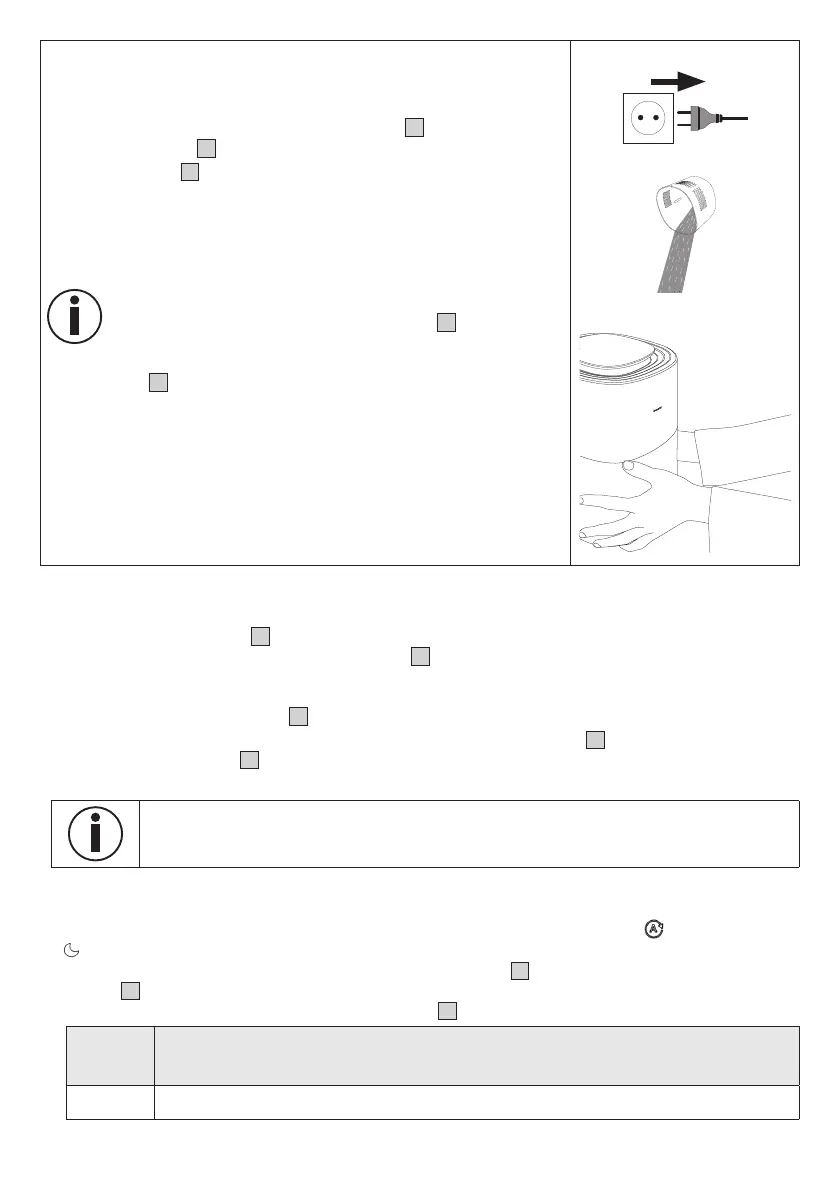
1. Disconnect the mains plug from the socket after each use.
2.
Empty any remaining water from the water tank
8
. Do not leave water
in the water tank
8
when the device is not in use.
3. Allow the filter
4
to air dry when not in use or use the filter drying
function from time to time after use (see section “8.1 Filter drying
function”).
If you want to reposition the air humidifier, pull the mains plug
out of the socket and empty the water tank
8
to avoid over-
flowing. When carrying the air humidifier, make sure that you
hold the device with both hands at the bottom of the water
tank
8
.
7.2 Setting target humidity
If desired, you can optionally set a target air humidity on the air humidifier.
The target humidity indicator
12
shows the currently set target humidity (40 %, 50 % or 60 %).
If no value lights up in the target humidity indicator
12
, the humidifier humidifies the air until a humidity of
70 % is reached and then switches o. In order to avoid overhumidification of a room, we recommend that
you select a humidity between 40–60 %.
1. Use the target humidity button
13
to select your desired target humidity.
2. The selected target humidity will light up in the target humidity indicator
12
. If no value lights up in the
target humidity indicator
12
, the target humidity is set to 70 %. As soon as the target humidity is reached,
the air humidifier switches o automatically.
In order to achieve the desired target air humidity as quickly as possible, we recommend
keeping the windows and doors closed during use, as dry outside air could slow down
reaching the target air humidity.
7.3 Setting the fan speed/mode
The air humidifier has three fan speeds ( I, 2 and 3 ) and two modes ( AUTO mode A and NIGHT mode
SL
).
• With the air humidifier turned on, use the fan speed button
15
to select a fan speed or mode. The
display
11
shows the currently set fan speed or current mode. After a few seconds, the current relative
humidity of the room is shown again on the display
11
.
Illumi-
nates in
display
Description
I
Low fan speed


 To Next Page
 Loading...