36
1.8 Connection to a PC
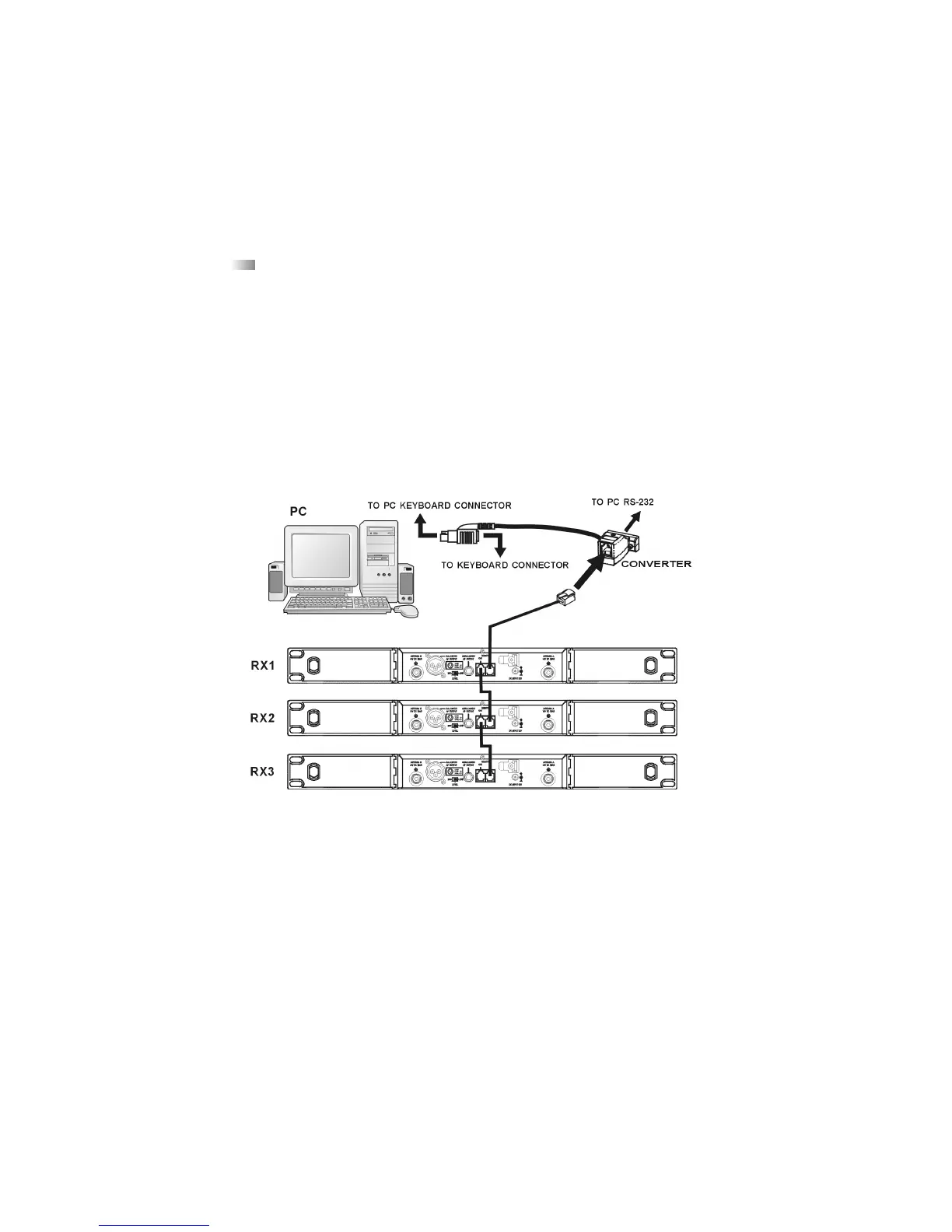
The Opus 800 MF receiver is fitted with a network interface connector (9) with an IN and
Out socket. In order to operate several receivers with a PC they have to be connected as
described below.
• Connect the OUT-socket of the first receiver (RX 1) with the IN-socket of the second receiv-
er (RX 2), connect the OUT-socket of the second receiver (RX 2) with the IN-socket of the
third receiver (RX 3) and so on.
• Connect the IN-socket of the first receiver (RX 1) to the converter.
• Connect the converter with to the RS 232 or USB interface of the PC.
• 64 channels can be operated simultaneously at maximum.
• The distance between PC and receiver should not be too long, because to ensure high-
speed transmission the network cable should not be longer than 100 metres.
or USB PORT
RJ 11


 To Next Page