52
1.7 ZAS 800 Antenna Splitter
1.7.1 Controls and Indicators
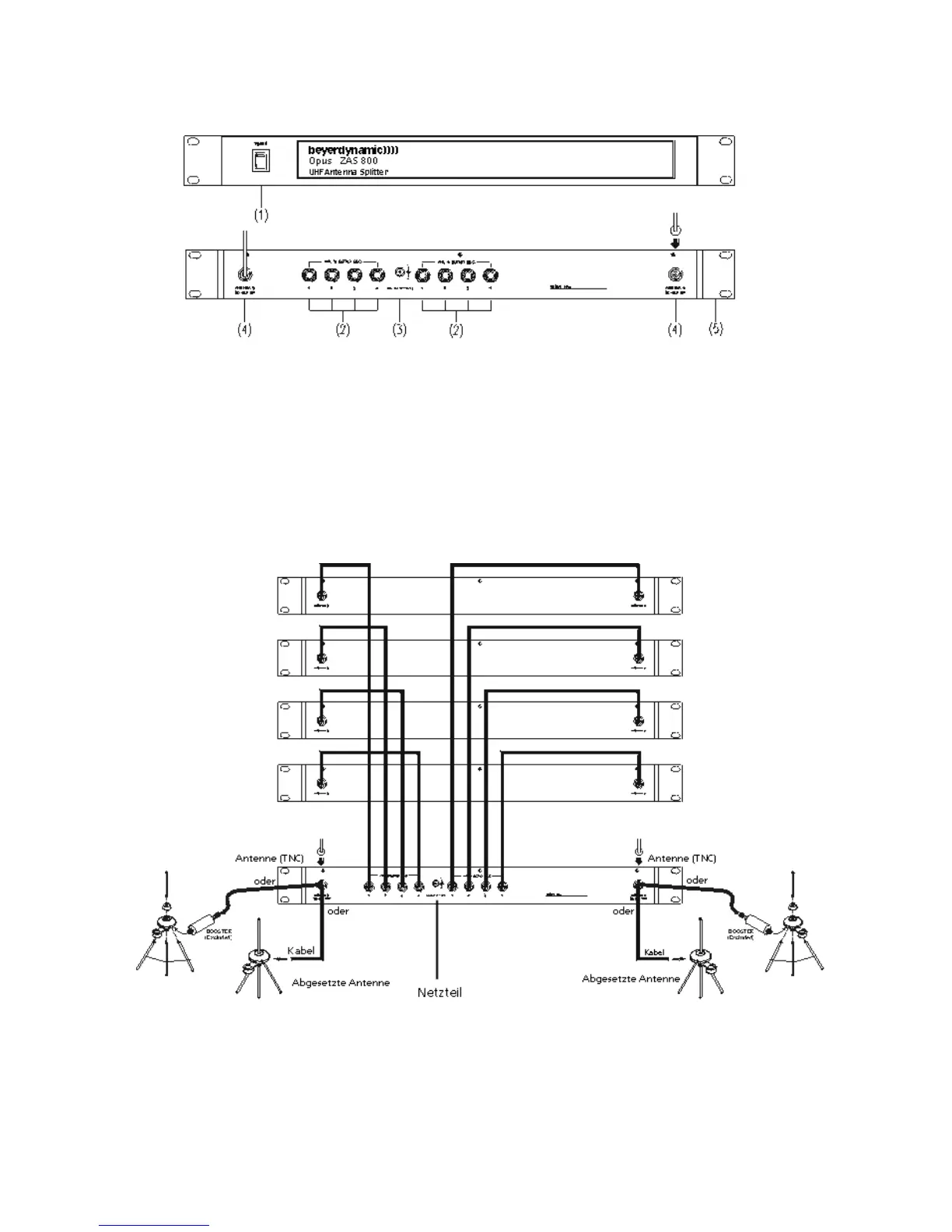
(1) On/Off switch and power on LED. When the antenna splitter is switched on, the red
LED will illuminate.
(2) RF outputs to connect the receivers
(3) DC-connection to connect the DC power supply unit (12 V)
(4) Antenna sockets A/B. The antenna sockets provide a DC supply for antenna amplifiers.
(DC-Out: 8 V / 170 mA)
(5) Mounting brackets for 19" rack mounting
1.7.2 Installation
1. Mount the ZAS 800 antenna splitter and the receivers into a 19" rack by using the
mounting brackets.
2. Connect the supplied antennae to the antenna sockets A/B (4). You can also use optional
remote antennae. For mounting the antennae on the front use the supplied FB-30
mounting bracket.
3. Connect the NE 900 receivers to the ZAS 800 antenna splitter with the supplied cables.
First receiver
Second receiver
Third receiver
Fourth receiver



 To Next Page