56
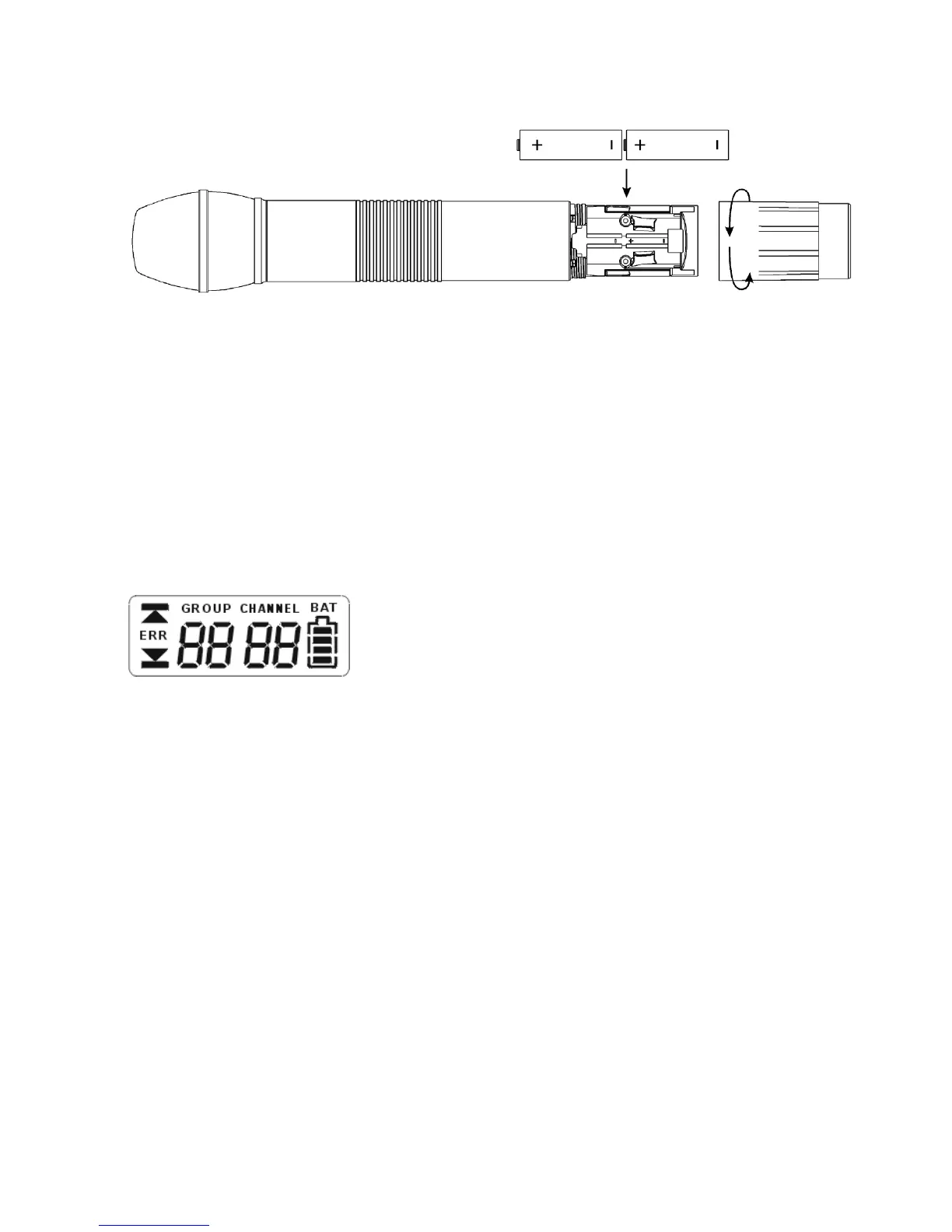
2.2 How to insert the Batteries (S 900 and S 900 M)
1. Unscrew the battery cap of the S 900 or S 900 M counter-clockwise.
2. Insert two 1.5 V batteries into the battery compartment observing polarity markings.
Note:
The S 900 C transmitter is powered by rechargeable batteries which cannot be changed by
the user. If the rechargeable batteries have to be changed, please contact your beyerdynamic
dealer.
2.3 LC-Display
1. “ERR“ Message: When the “ERR“ message is displayed, there is an error.
ERR noo3: The frequency you want to program is above the switching bandwidth of the
transmitter. Use a receiver with an appropriate frequency group. (At this time the micro-
phone is still operating and the frequency remains unchanged. To clear the
displayed “ERR“ message switch off the handheld transmitter and on again.)
ERR noo4: The frequency you want to program is below the switching bandwidth of the
transmitter. Use a receiver with an appropriate frequency group. (At this time the micro-
phone is still operating and the frequency remains unchanged. To clear the
displayed “ERR“ message switch off the handheld transmitter and on again.)
2. “Group“ & “Channel“: When both indications are displayed, it means that you are
using the pre-programmed frequency of the receiver.
3. “Channel“: If “Channel“ is displayed only, it means that you are using a frequency
which is not pre-programed.



 To Next Page