38
7. Settings Menu.
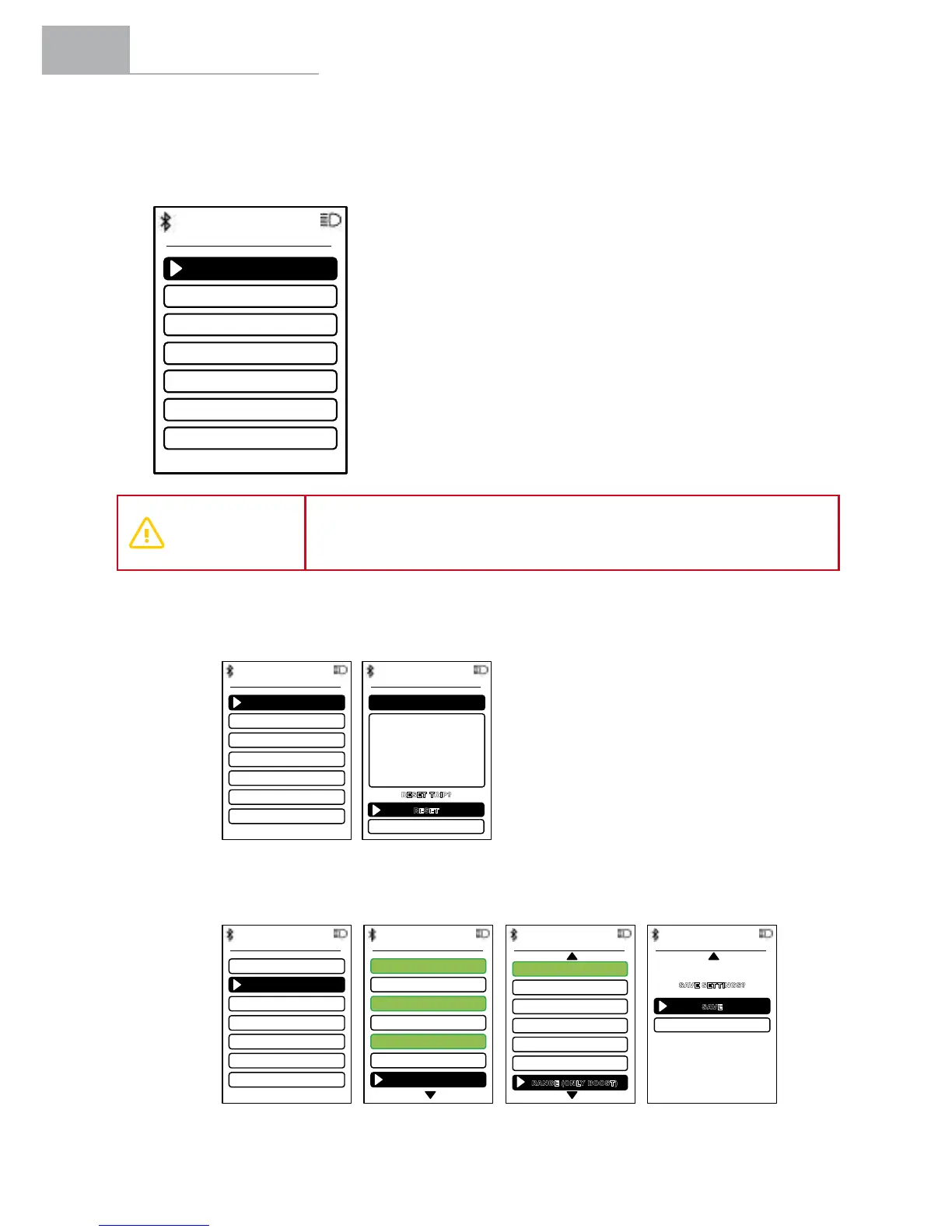
The user can access the settings menu by holding down the (+) and (-) buttons for 3 seconds.
Press the (+) and (-) buttons to scroll through the different settings. Press the POWER button to enter
the selected menu. Additionally, the system will exit the settings menu when the user holds down
the POWER button for 3 seconds.
RESET TRIP
DISPLAY INFORMATION
BRIGHTNESS
UNITS
SYSTEM STATUS
WHEEL SIZE
LANGUAGE
SETTINGS
KM
27,5”
EN
WARNING
When making any adjustments, make sure that you stop the bicycle and
make them in a safe place. Otherwise, the lack of attention to the surrounding
trafccouldcauseanaccident.
1. Resetting the Trip Information.
The user can view and reset the trip information at any time.
TRIP INFORMATION
Distance: 28,8 km
Time: 2h 00m 24s
Speed: 14,4 km/h
Power: 210 W
Cadence: 76 rpm
Motor / UserB alance: 27%
BatteryU se: 37%
RESET TRIP
RESET
CANCEL
R
ESET TRIP?
RESET TRIP
DISPLAY INFORMATION
BRIGHTNESS
UNITS
SYSTEM STATUS
WHEEL SIZE
LANGUAGE
SETTINGS
KM
27,5”
EN
2. Selection of Secondary Information on the Screen.
The user can select the data to appear in the secondary information indicator on the screen.
RESET TRIP
DISPLAY INFORMATION
UNITS
SYSTEM STATUS
WHEEL SIZE
LANGUAGE
SETTINGS
KM
27,5”
EN
BRIGHTNESS
INSTANT POWER
TRIP POWER
INSTANT CADENCE
TRIP CADENCE
MOTOR-USER BALANCE
ASSISTANCE MODE
CONSUMPTION
DISPLAY INFORMATION
TRIP SPEED
TOTAL SPEED
TRIP DISTANCE
TOTAL DISTANCE
TRIP TIME
TOTAL TIME
RANGE (ONLY BOOST)
DISPLAY INFORMATION
DISPLAY INFORMATION
SAVE SETTINGS?
SAVE
CANCEL


 To Next Page