35
Display Panel Operation
The display panel provides the following operations and information screens:
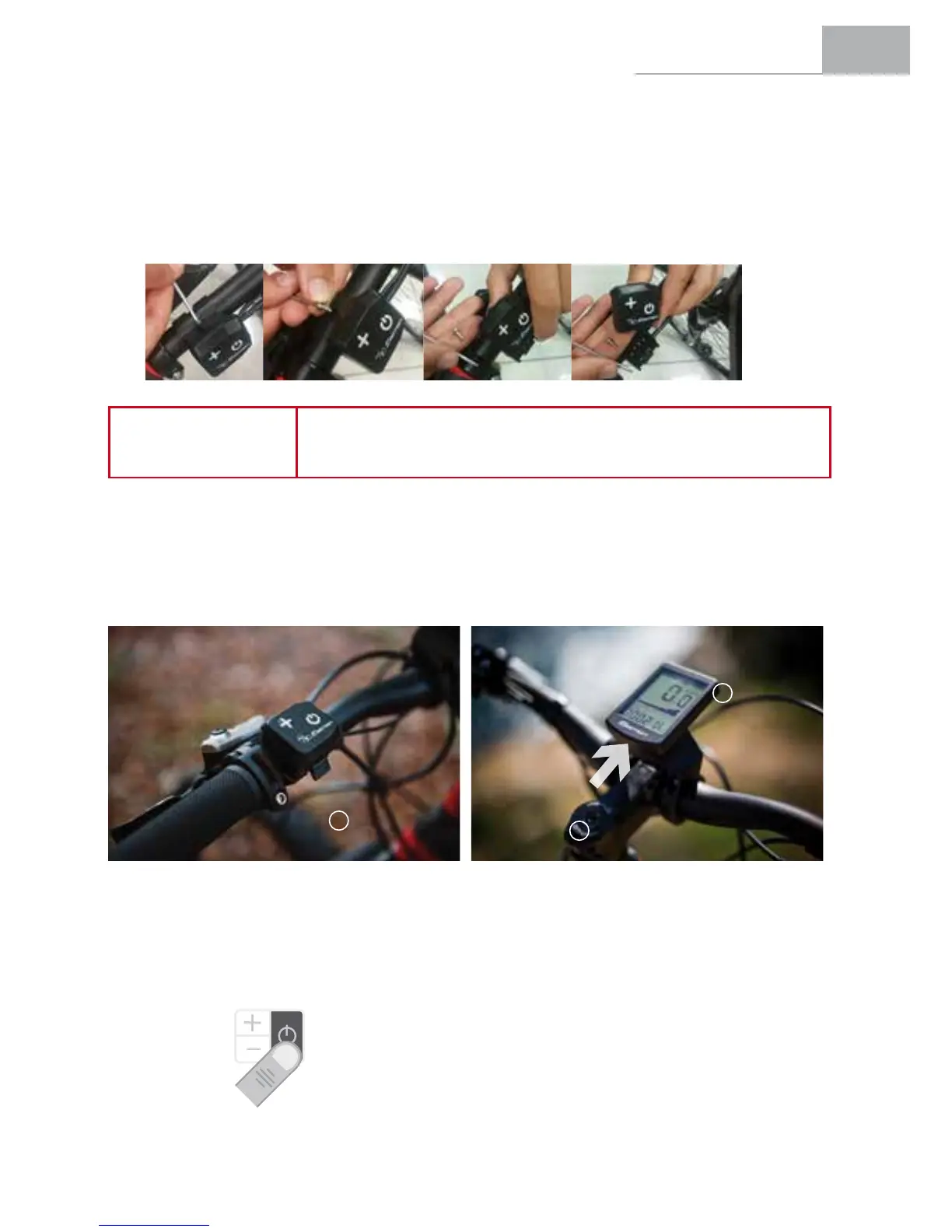
1. Installation of the Fixed or Removable Display Panel.
Theremotecontrolcaneitherbemadexedorremovable,dependingontheneedsoftheuser,bysimply
inserting or removing an M3 screw, as shown in the image.
Bydefault,theremotecontrolwillbexedwiththescrew.
NOTE
In order to reduce risk of theft, to remove (or insert) the panel screw,
theusermustrstloosenthegrips,leftbrakelever,shiftleverandthepanel
support bracket.
Here are the steps to remove the remote control after removing the screw; follow the instructions below:
1. Theuserpushestheapbeneaththeremotecontrol.
2. Whileholdingdowntheap,theuserslidesthepanelupwardstofullyremoveit.
3. The panel is released.
2. Switching the Pedal Assistance System on and off.
The pedal assistance system is turned on by holding down the POWER button for 3 seconds.
The pedal assistance system is turned off by holding down the POWER button again for 3 seconds.
The bicycle can be used normally without any type of assistance.
3 sec
1
2
3


 To Next Page