- 12 -
USE
USER INSTRUCTIONS
3 HOW TO USE
3.1 Display operation
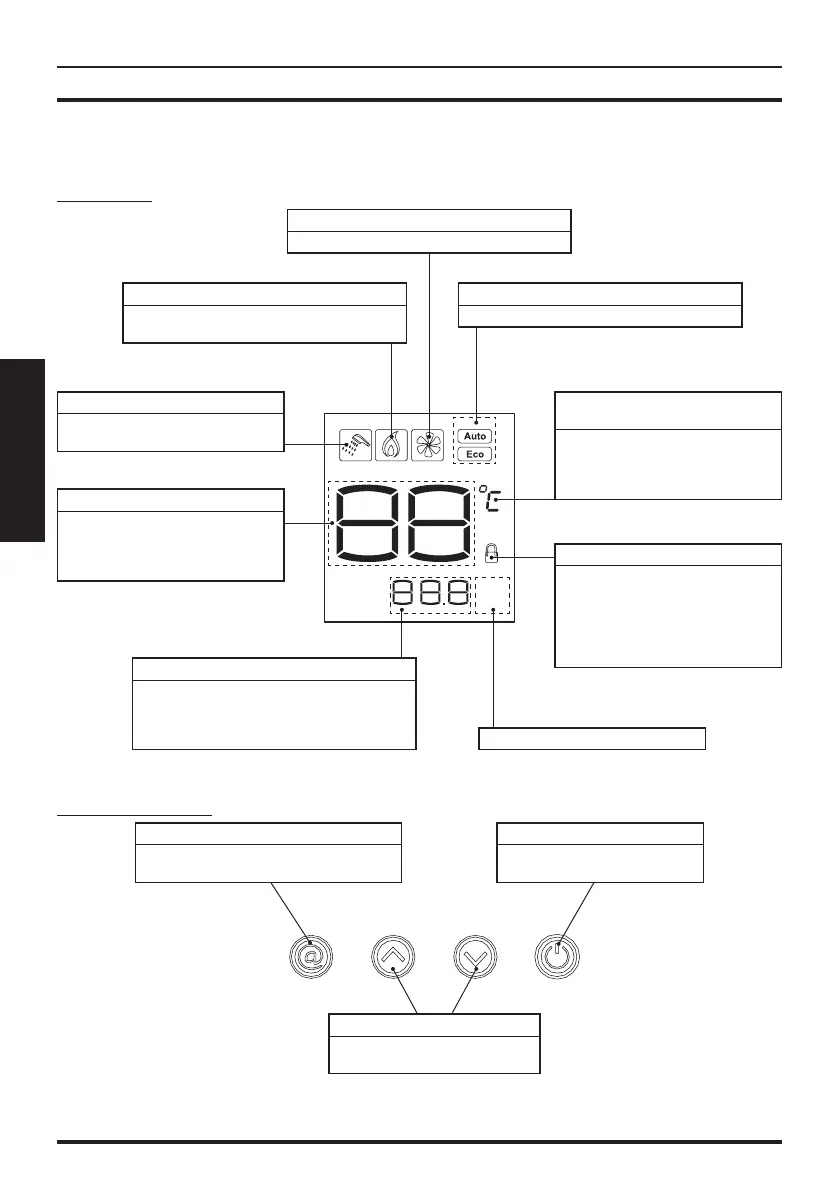
Display info
Figure 3.1
Water flow
Gas flow
L/min
m
3
/h
Flame feedback icon
When the water heater is working, this flame
icon will display.
Fan icon
Dynamic display when fan in operation.
Inlet water flow
When a flow of water is detected the
draw off icon is activated.
Working mode icon
Show the current operating mode.
Information display area
• Real-time water flow production indicates.
• Real-time gas consumption indicator.
• Accumulative amount of water usage.
• Accumulative amount of gas consumption.
Adjust temperature
adjustment icon:
• Temperature adjustment mode,
flashing display.
• Always alight, non-adjustment
state.
Main digital display area
• In normal operation, the tempera-
ture setting is displayed.
•
If there is a fault, the fault code will
display.
Child lock function
When the child lock protection is on,
the padlock icon is shown.
When attempting to set the
temperature above 48 °C the child
lock icon will flash to show an unsafe
setting is being attempted.
Water flow, gas flow indicator.
Button information
Figure 3.2
@ button
Press this key to select the system working
mode or query function.
ON/OFF button
Water heater, press to turn on and
turn off.
Up and down button
For selecting temperature or water
flow settings.


 To Next Page