- 15 -
USE
USER INSTRUCTIONS
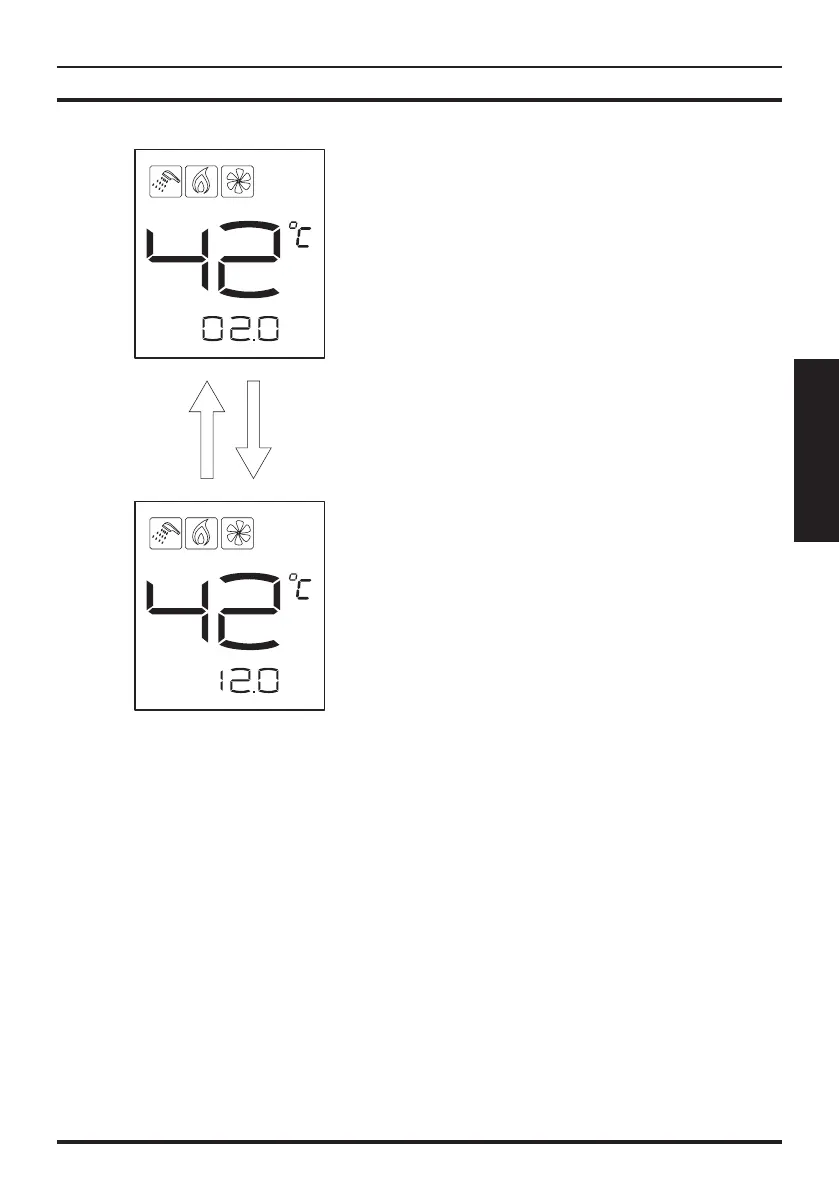
Figure 3.4
Gas flow
m
3
/h
Water flow
L/min
Real-time gas consumption
Real-time hot water production
Alternate
display
3.7 Check the cumulative amount of
gas and water
The @ button can inquire about the cumula-
tive water and gas consumption.
Click the @ key to query cumulative amount of
water usage, press @ key again to display the
accumulated gas consumption information.
Press a third time or do not touch for 20s and
you will exit this function.
Note:
• Real-time gas consumption is shown in units
of m³/h.
• Real-time hot water production is shown in
units of L/min.
• The total amount of gas and water consump-
tion is shown in m
3
. When the counter has
reached 999 m
3
it will automatically reset to 0.
• Cumulative gas consumption and cumula-
tive amount of water is automatically cleared
after power failure.
• The contents of this function is only for ref-
erence, can not be used for metering meas-
urements.
4 SAFETY CAUTIONS
4.1 Prevention of freezing
Drain the residual water inside the heater to
prevent freezing after every use when the en-
vironment temperature is near or under 0°C,
do as instructed. (Figure 4.1)
• Close down the gas valve 1.
• Turn the water temperature knob 2 to “LOW”
position, or turn the water volume button
knob to “LARGE” position (level).
• Close the cold water inlet valve sans 3.
• If there is a control valve 4 at the hot water
outlet, please open it.
• Turn the drain valve 5 and take off, replace
it after the residual water is completely dis-
charged.


 To Next Page