24
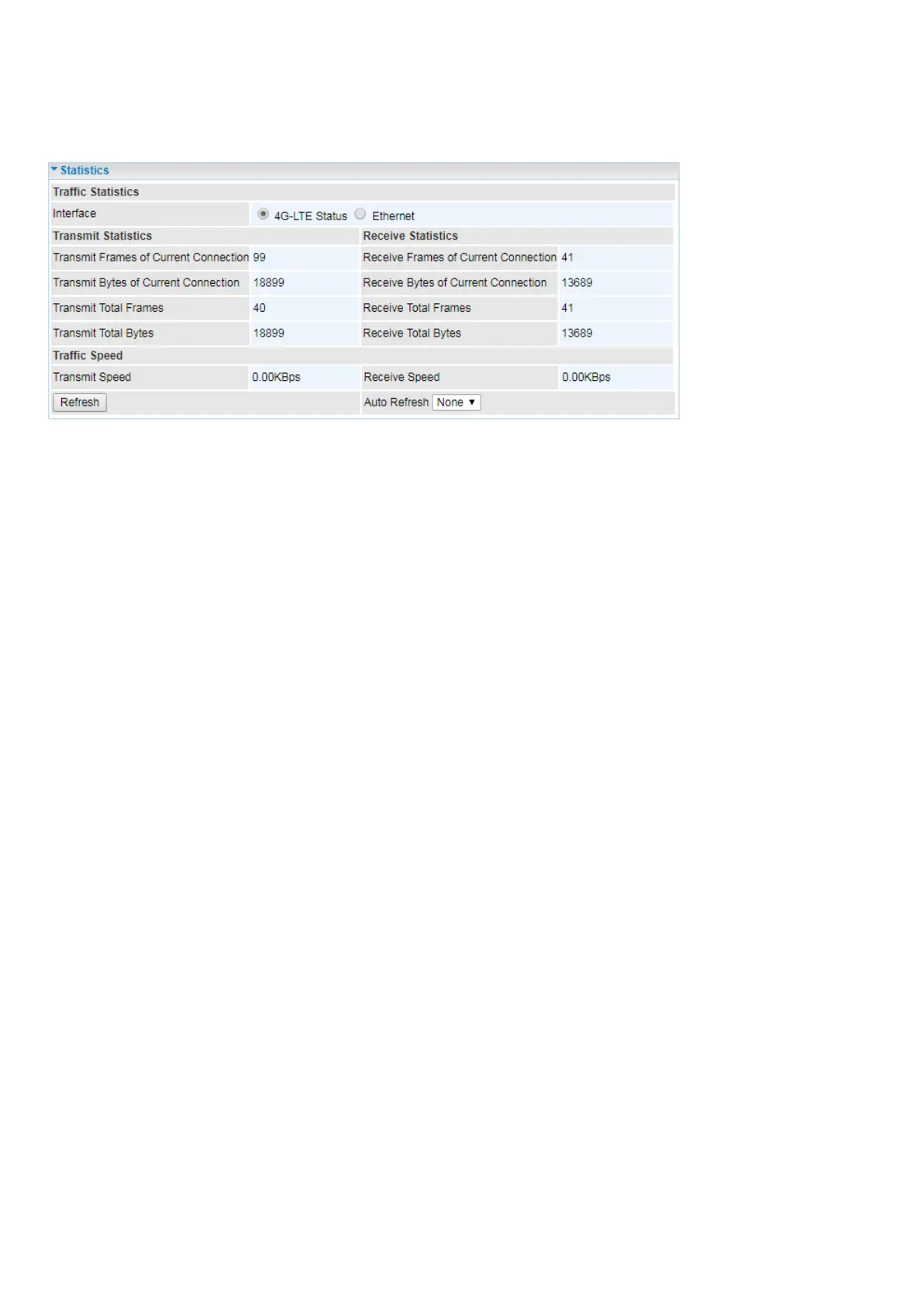
Statistics
4G/LTE
Interface: List all available network interfaces in the router. You are currently checking on the physical
status of 4G/LTE interface.
Transmit Frames of Current Connection: This field displays the total number of 4G/LTE frames
transmitted until the latest second for the current connection.
Transmit Bytes of Current Connection: This field shows the total bytes transmitted till the latest
second for the current connection for the current connection.
Transmit Total Frames: The field displays the total number of frames transmitted till the latest second
since system is up.
Transmit Total Bytes: This field displays the total number of bytes transmitted until the latest second
since system is up.
Receive Frames of Current Connection: This field displays the number of frames received until the
latest second for the current connection.
Receive Bytes of Current Connection: This field shows the total bytes received till the latest second
for the current connection.
Receive Total Frames: This field displays the total number of frames received until the latest second
since system is up.
Receive Total Bytes: This field displays the total frames received till the latest second since system is
up.
Transmit Speed: Display the current upload rate.
Receive Speed: Display the current download rate.
Auto Refresh: Choose whether to refresh the data automatically and how often. Select None to
disable the feature. Or automatically refresh the statistics every 10 sec or 30 sec.
Refresh: Press this button to refresh the statistics.






 To Next Page