42
5.1.2 3G Status
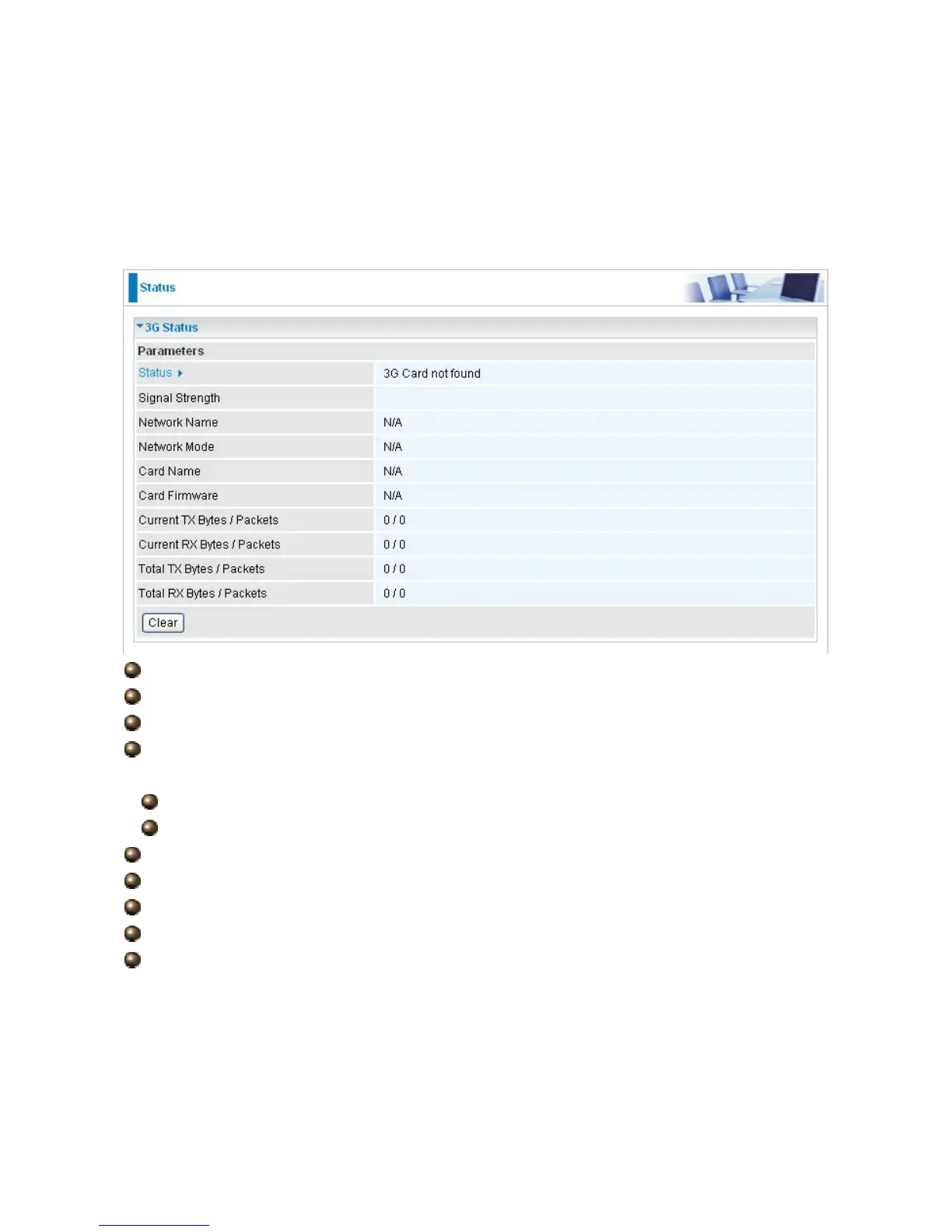
This section displays the 3G Card’s overall status, which shows you a number of helpful
information such as the current signal strength and statistics on current and total bytes
transferred and received.
Status: The current status of the 3G card.
Signal Strength: The signal strength bar indicates current 3G signal strength.
Network Name: The network name that the device is connected to.
Network Mode: The current operation mode in 3G card, it depends on service provider
and card’s limitation. It may be UMTS (3G),GPRS, EDGE, or GSM .
Card Name: The name of the 3G card.
Card Firmware: The current firmware for the 3G card.
Current TX Bytes / Packets: The statistics of transmission, count for this call.
Current RX Bytes / Packets: The statistics of receive, count for this call.
Total TX Bytes / Packets: The statistics of transmission, count from system ready
Total RX Bytes / Packets: The statistics of receive, count from system ready
Clear: Click Clear button to reset the statistics value of Total TX/RX.





 To Next Page