74
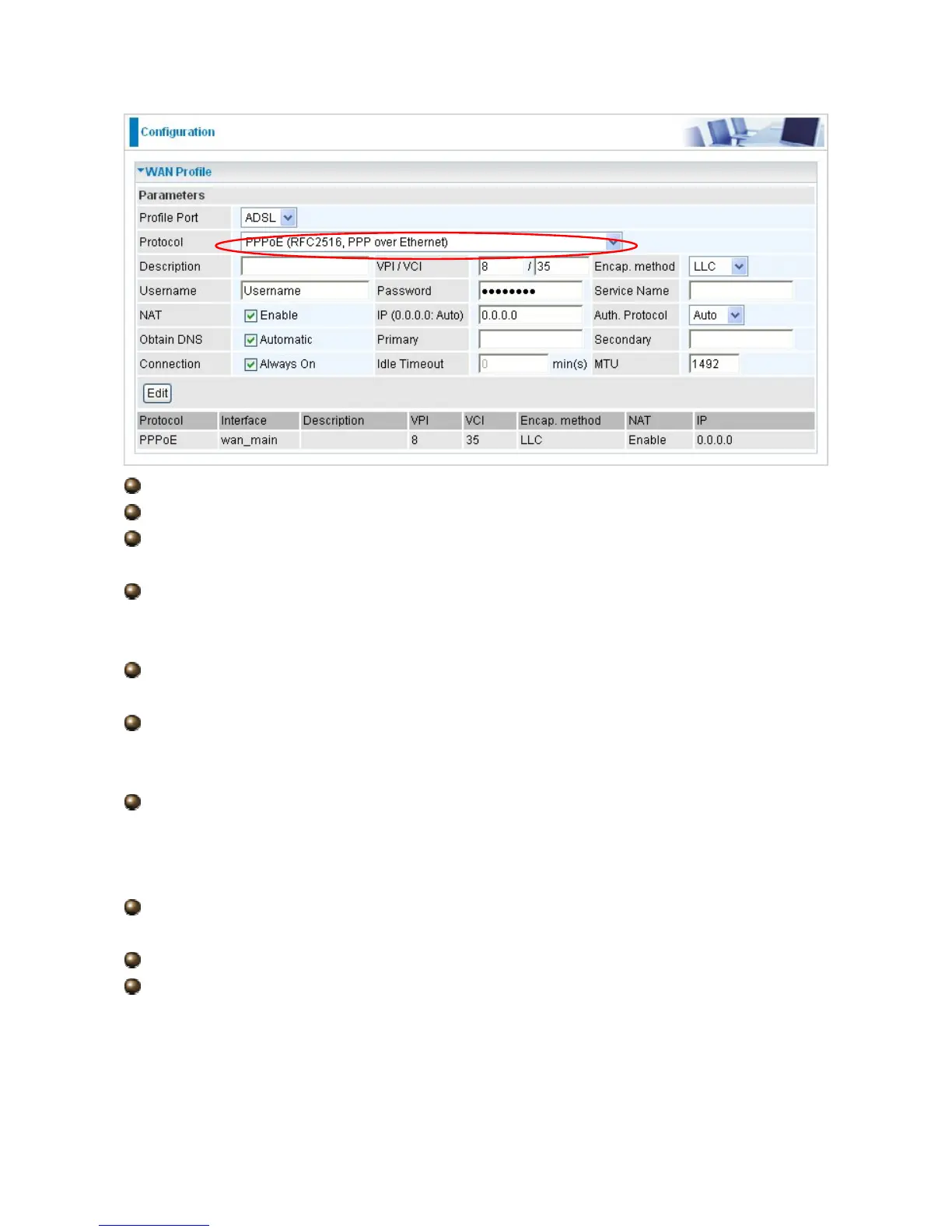
Description: A user-definable name for this connection.
VPI/VCI: Enter the VPI and VCI information provided by your ISP.
Encap. method: Select the encapsulation format, the default is LLC. Select the one
provided by your ISP
Username: Enter the username provided by your ISP. You can input up to 128
alphanumeric characters (case sensitive). This is in the format of “username@ispname”
instead of simply “username”.
Password: Enter the password provided by your ISP. You can input up to 128
alphanumeric characters (case sensitive)
Service Name: This item is for identification purposes. If it is required, your ISP
provides you the information. Maximum input is 15 alphanumeric characters.
NAT: The NAT (Network Address Translation) feature allows multiple users to access
the Internet through a single ISP account, sharing a single IP address. If users on your LAN
have public IP addresses and can access the Internet directly, the NAT function can be
disabled.
IP Address: Your WAN IP address. Leave this at 0.0.0.0 to automatically obtain an IP
address from your ISP.
Auth. Protocol: Default is Auto. Your ISP advises on using Chap or Pap.
Connection:
Always on: If you want the router to establish a PPPoE session when starting up
and to automatically re-establish the PPPoE session when disconnected by the ISP.
Connect to Demand (un-select Always On): If you want to establish a PPPoE
session only when there is a packet requesting access to the Internet (i.e. when a




 To Next Page