VoIP/(802.11g) ADSL2+ (VPN) Firewall Router
Chapter 4: Configuration
63
MSN (7001) UDP(17) 7001 7001 YES YES N/A N/A N/A N/A
MSN VEDIO
(9000)
TCP(6)
9000 9000 NO YES N/A N/A N/A N/A
Inbound: Internet to LAN ; Outbound: LAN to Internet.
YES: Allowed ; NO: Blocked ; N/A: Not Applicable
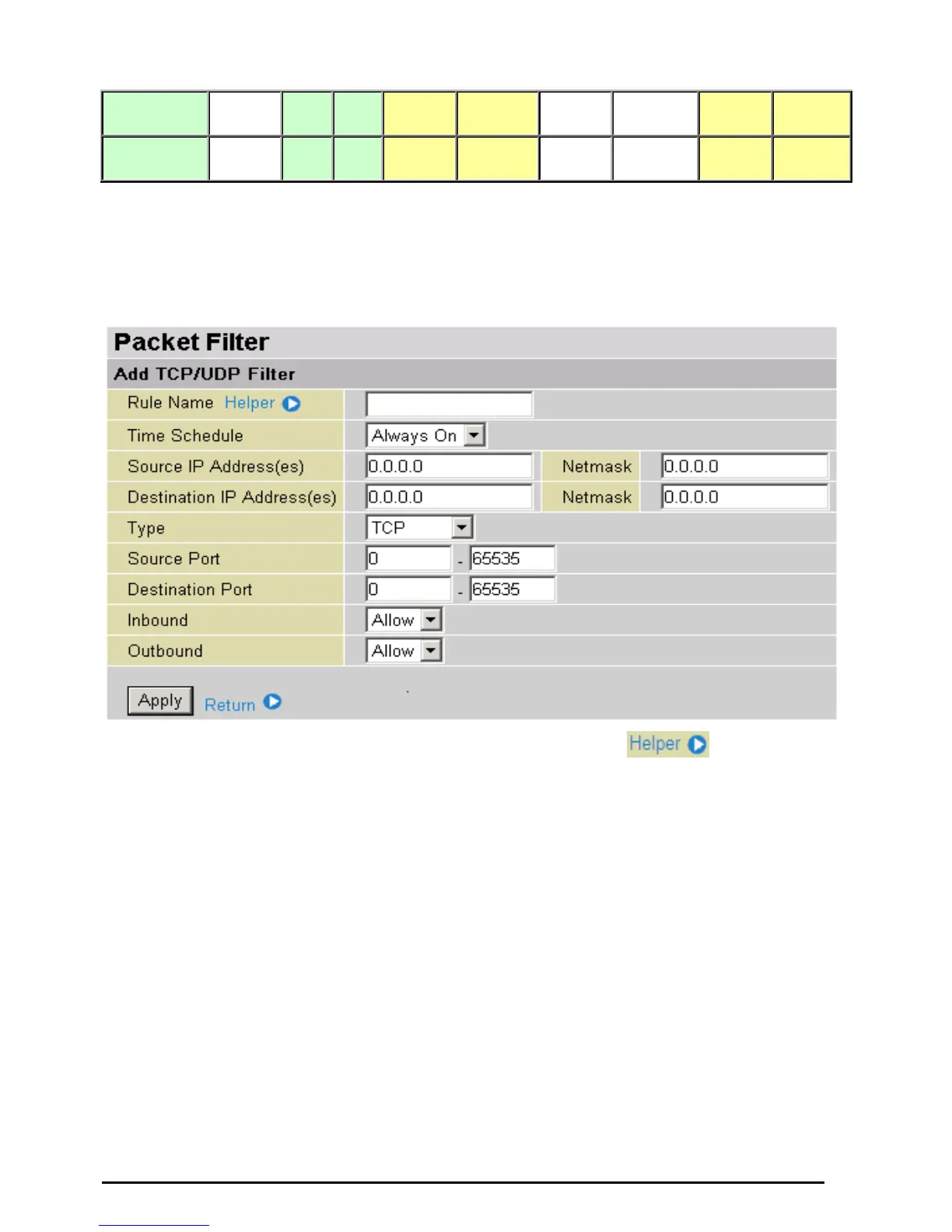
Packet Filter – Add TCP/UDP Filter
Rule Name: Users-define description to identify this entry or click
to select existing
predefined rules. The maximum name length is 32 characters.
Time Schedule: It is self-defined time period. You may specify a time schedule for your prioritization
policy. For setup and detail, refer to Time Schedule section
Source IP Address(es) / Destination IP Address(es): This is the Address-Filter used to allow or block
traffic to/from particular IP address(es). Selecting the Subnet Mask of the IP address range you wish to
allow/block the traffic to or form; set IP address and Subnet Mask to 0.0.0.0 to inactive the Address-Filter
rule.
Tip: To block access, to/from a single IP address, enter that IP address as the Host IP Address and use
a Host Subnet Mask of “255.255.255.255”.
Type: It is the packet protocol type used by the application, select TCP, UDP or both TCP/UDP.
Source Port: This Port or Port Ranges defines the port allowed to be used by the Remote/WAN to
connect to the application. Default is set from range 0 ~ 65535. It is recommended that this option be
configured by an advanced user.
Destination Port: This is the Port or Port Ranges that defines the application.
Inbound / Outbound: Select Allow or Block the access to the Internet (“Outbound”) or from the
Internet (“Inbound”).
Click Apply button to apply your changes.













 To Next Page