5.2.1 IR Control In- Transmitter Only
The most common use of the IR Control In port is to send a wired IR signal from an
Automation System to an IR Flasher connected to the Receiver. This connection does not
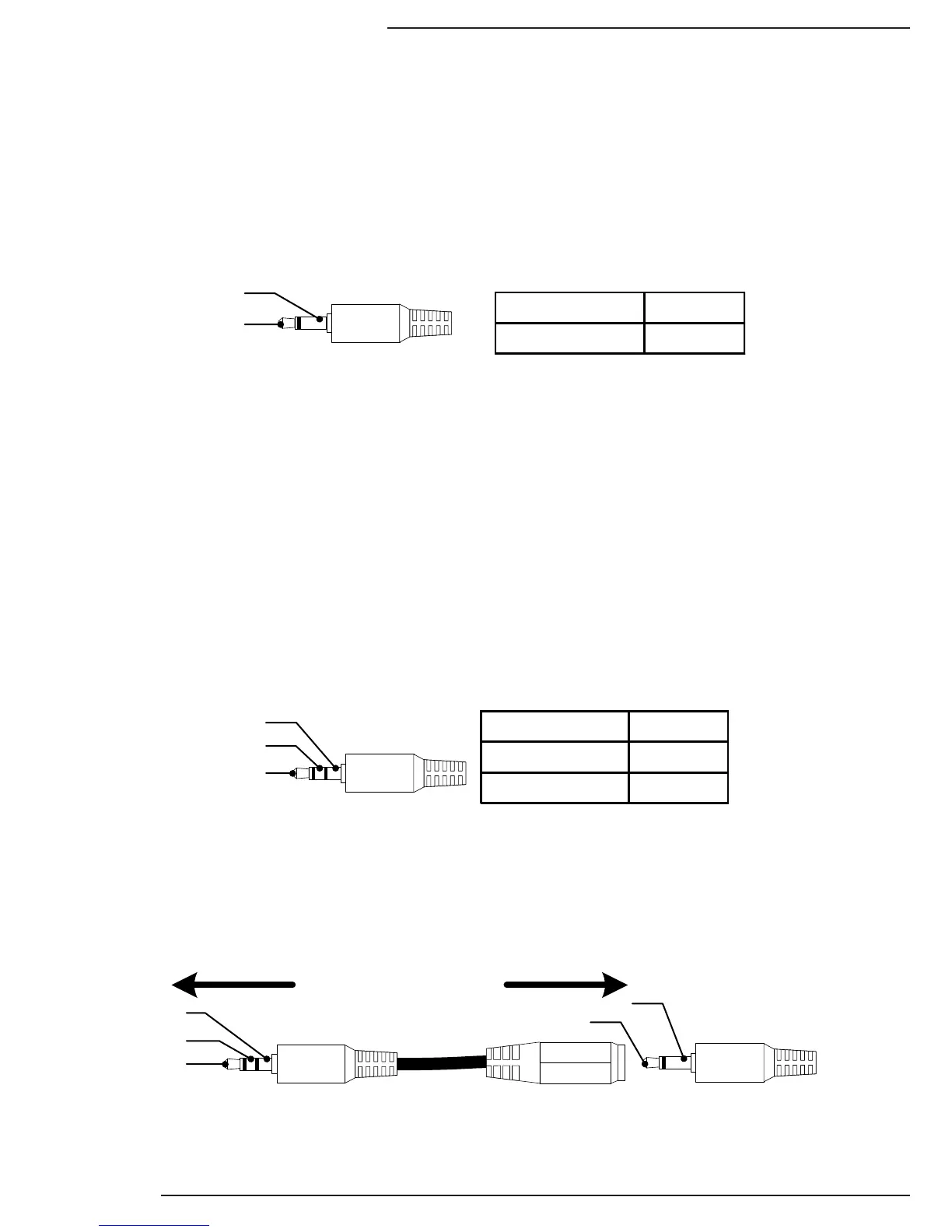
include power for an IR Receiver. A 3.5mm {1/8”} Mono Cable is used to connect directly to
the Automation System IR output or Connecting Block.
Connection Type: 3.5mm {1/8”} Mono
5.2.2 IR Receiver In - Receiver Only
The most common use of the IR Receiver port is to send an IR signal from a powered
IR Receiver to an IR Flasher connected to the Transmitter. This connection includes +9V DC
power for an IR Receiver. A 3.5mm {1/8”} Stereo Cable is used to connect directly to an IR
Receiver, DO NOT connect a mono cable to this connection as damage may occur.
Connection Type: 3.5mm {1/8”} Stereo
If the system requires a powered IR Receiver at the Transmitter, a powered IR Block
(ex: SnapAV KIT-IR-RPTR-1X4) will be needed between the IR Receiver and the
Transmitters IR Control
If the system requires connection to an Automation System or Connecting Block to send
IR to the Transmitter, the included IR Adapter Cable between the Automation System or
Connecting Block output and the IR Receiver input must be used.
IR Signal (Tip)
GND (Sleeve)


 To Next Page