3 GETTING TO KNOW YOUR PHONE
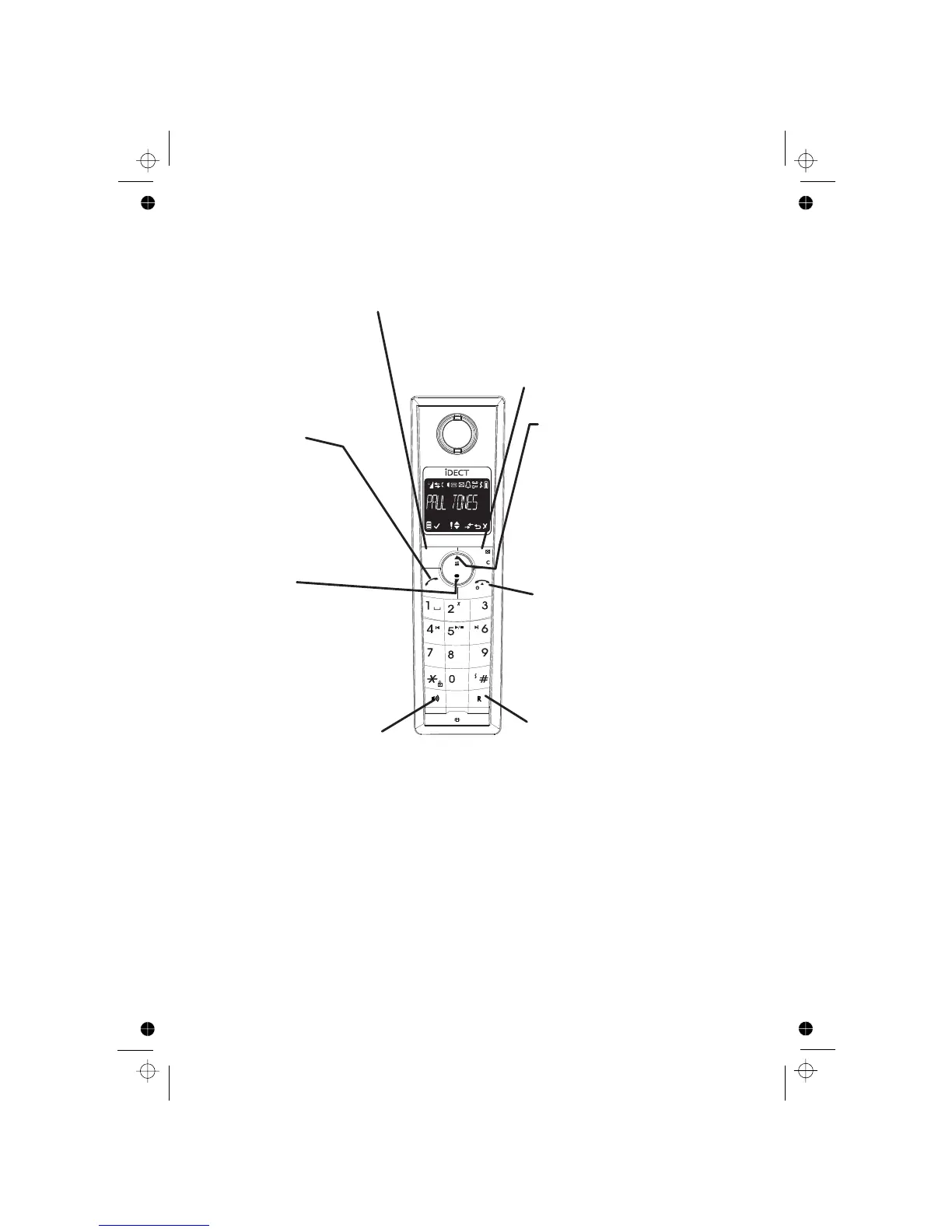
3.1 Handset Overview
TALK ON
In idle / predialing mode:
Press to make a call
In Redial List / Calls List
Phonebook list:
Press to make a call to the
LEFT SOFT KEY(MENU/OK)
In idle mode: Press
to access the main menu
In sub-menu mode:
Press to confirm the selection
During a call: Press to access
Intercom / Phonebook /
TALK OFF / POWER ON/OFF
During a call: Press to end a call and go
back to idle screen
In menu / editing mode: Press to go back
to previous menu
In idle mode:
Press and hold to power off the handset
In idle mode (when the handset is
power on
UP
In idle mode:
Press to access the Calls List
In menu mode:
Press to scroll up the menu items
In Phonebook list / Redial List / Calls List
Press to scroll up the list
During a call:
Press to increase the
earpiece or speaker volume
During ringing:
Press to increase the ringer volume
RIGHT SOFT KEY(CLEAR/BACK/MUTE/INTERCOM)
In sub-menu mode: Press to go back to previous level
In sub-menu mode: Press and hold to go back to idle screen
In editing / predialing mode: Press to clear a character / digit
In editing / predialing mode:
Press and hold to delete all the characters / digits
During a call: Press to mute/ unmute the microphone
In idle mode: Press to intercom another handset
In main menu mode: Press to go back to idle screen
MNO
WXYZ
DEF
ABC
TUV
JKL
PQRS
GHI
MENU
OK
DOWN
In idle mode:
Press to access the Redial List
In menu mode:
Press to scroll down the menu items
In Phonebook list /
Redial List / Calls List
:
Press to scroll down the list
During a call:
Press to decrease the
earpiece or speaker volume
During ringing:
Press to decrease the ringer volume
SPEAKERPHONE
During a call:
Press to turn on / off the speakerphone.
Call List / Phonebook list / Redial list:
Press to make a call with speakerphone
During ringing:
Press to answer a call with speakerphone
During answering machine message playback /
call screening:
Press to switch between speaker and earpiece.
RECALL(also called FLASH)
In idle / predialing mode:
Press to insert a recall
During a call:Press to send a recall (flash)
signal.(You may need the recall function
if your phone is connected to a PBX or
Redial List / Calls List
selected entry in the list
During ringing:
Press to answer a call
you use BT Calling features.)
powered off): Press and hold to
the handset.
6












 To Next Page