2
- When the instruction simply say 'press' a button, this means you should press it
briefly then release it.
- When the instruction say 'press and hold' a button, this means you should keep
it pressed until the display changes or you hear a tone.
Important:
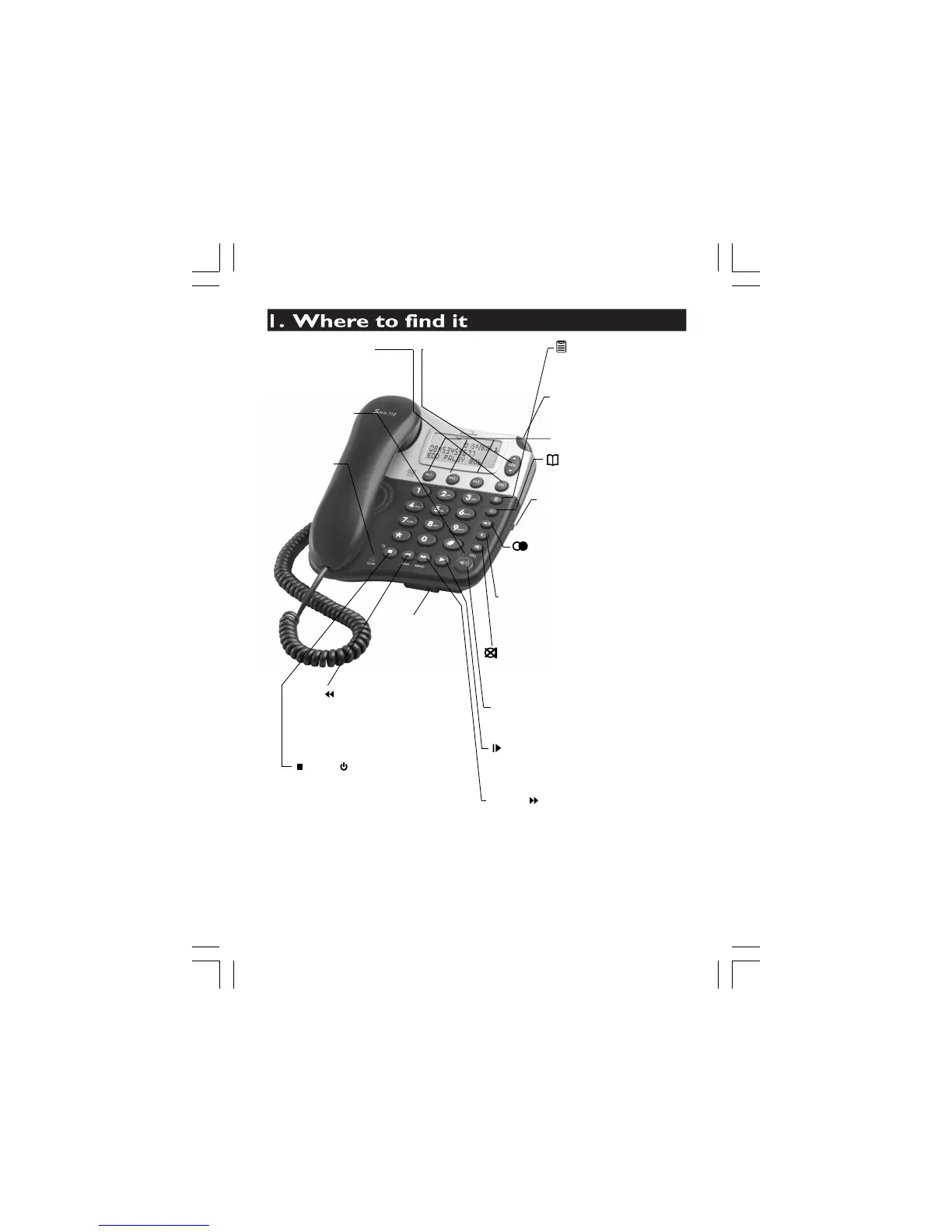
Microphone -
For
speakerphone use
and answering
machine OGM &
Memo recording.
playback. Press and hold to switch
the answering maching ON or OFF.
With TAM ON is standby mode,
press to select OGM1 or OGM2.
- To access the caller
display records, and
UP-DOWN (CDS) Buttons
to scroll through lists
and options.
- Press to delete individual
messages, memos, stored
DEL (DELETE) Button
light - Turns ON
when using the
speakerphone.
SPEAKERPHONE
- Turns ON
when the TAM
is on. Flashes
when you
have new
TAM
messages.
MESSAGE light
numbers or Caller Display
records.
- Press to enter Options Menu
to set the Date, Time,Screen
(MENU) Button
Contrast,
phone/TAM settings.
- Press to access the
Phonebook records.
(PHONEBOOK) Button
- Press to access the LNR lists
when in standby mode. Press to
insert a pause when dialing.
(REDIAL)/ P (PAUSE) Button
during a call to mute the microphone or
(MUTE) / STO(Store) Button - Press
- You may need this function if your
phone is connected to a PBX, or if
you use BT Calling Features.
R (RECALL) Button
- Press to make, answer, or end a call
using the speakerphone.
SPEAKERPHONE Button
- Press and hold to record your
outgoing messages. Press during
message playback to repeat the
current message or to go back
to the previous message(s).
OGM/ (REWIND) Button
- Press and hold to record a memo.
Press during message playback to
skip to the next message.
MEMO/ (SKIP) Button
- Press to play back messages and
memos. Press to pause playing of
a memo or message.
(PLAY/PAUSE) Button
Button - Press to stop recording or
(EXIT)/ (ANSWER ON/OFF)
- Used to adjust the volume
level of the Speakerphone.
SPEAKER Volume control
when the phone is ringing
for an incoming call.
Ringer light
- This flashes
mouthpiece. Press to store the (M1, M2
and M3)one touch memory dialing buttons
M1, M2, M3 one-Touch
Memory Buttons













 To Next Page