4
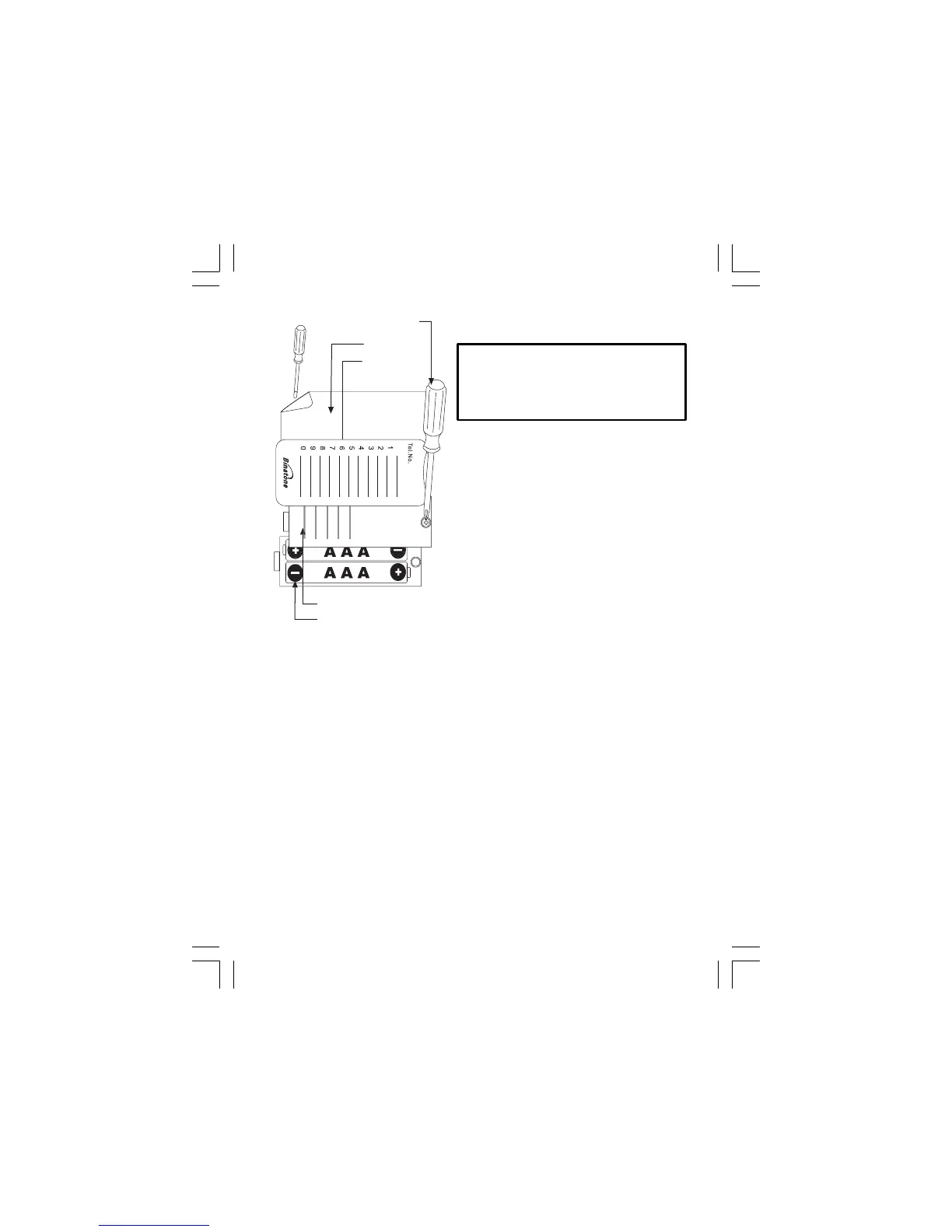
Installing (or Replacing) the Battery
IMPORTANT
- Before removing the
battery compartment cover, always
Binatone Help Line - 0845 345 9677
Calls are charged at Local Call rate.
Use a screwdriver to remove the screw
in the battery compartment cover on the
M1
top of the base unit.
Install 2 pcs of Alkaline AAA batteries
into the battery compartment and place
back the cover before use.
Note: 1) Please do NOT use Rechargeable
batteries in this phone.
2) The Caller display will not work
without batteries fitted.
l 2jmivvv vFE;FCH? <;NN?LC?M
w;NN?LS =IGJ;LNG?HN
=IP?L
3=L?Q >LCP?L
NI IJ?H
<;NN?LS >IIL
4?F?JBIH?
HOG<?L =;L>
06x JF;N?
make sure the base unit is
disconnected from the telephone line.














 To Next Page