WR3000N 300M Wireless N Router
- 27 -
Figure 4-6 WAN - Static IP
¾ IP Address - Enter the IP address in dotted-decimal notation provided by your ISP.
¾ Subnet Mask - Enter the subnet Mask in dotted-decimal notation provided by your ISP,
usually is 255.255.255.0.
¾ Default Gateway - (Optional) Enter the gateway IP address in dotted-decimal notation
provided by your ISP.
¾ MTU Size - The normal MTU (Maximum Transmission Unit) value for most Ethernet networks
is 1500 Bytes. It is not recommended that you change the default MTU Size unless required
by your ISP.
¾ Primary/Secondary DNS - (Optional) Enter one or two DNS addresses in dotted-decimal
notation provided by your ISP.
Click the Save button to save your settings.
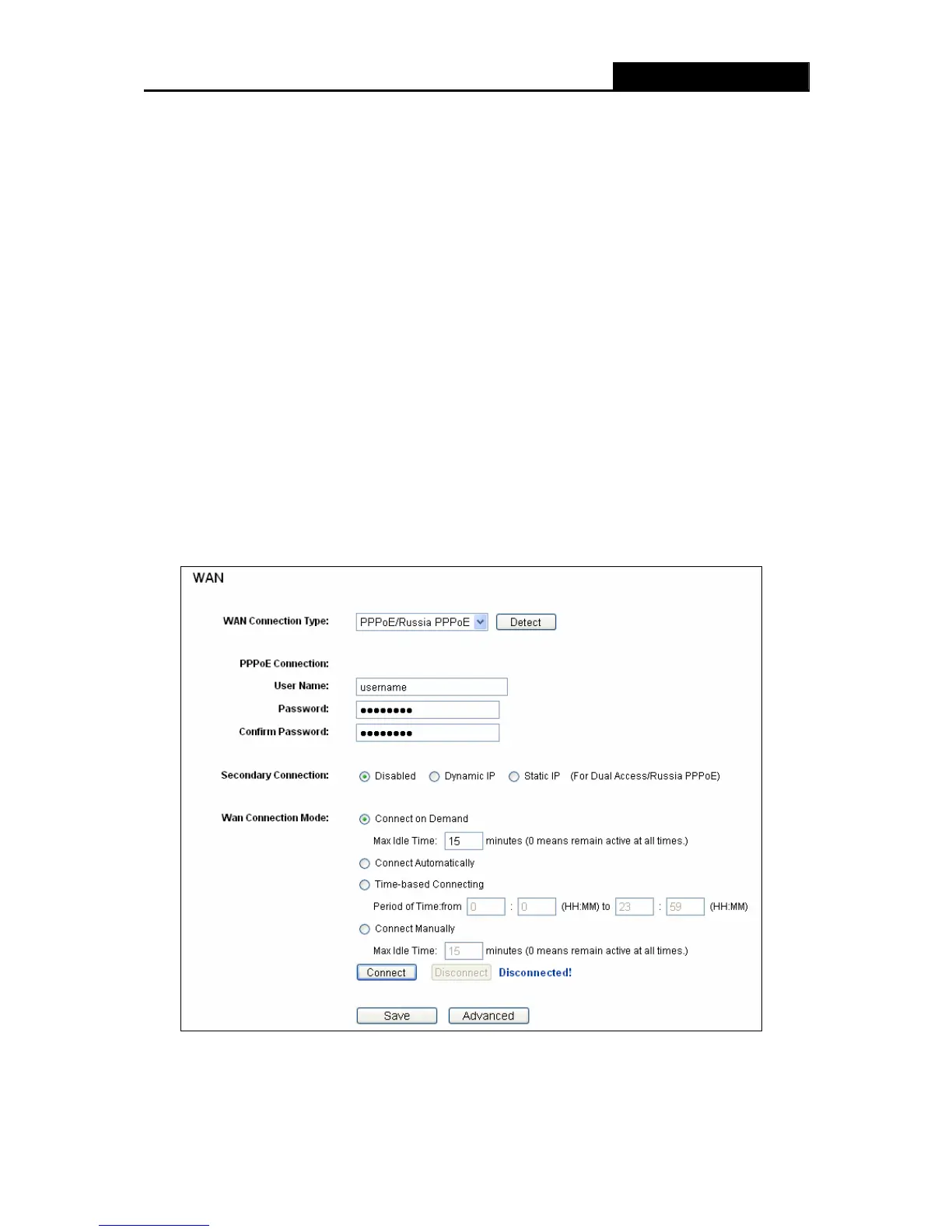
3. If your ISP provides a PPPoE connection, select PPPoE/Russia PPPoE option. And you
should enter the following parameters (
Figure 4-7):
Figure 4-7 WAN - PPPoE
¾ User Name/Password - Enter the User Name and Password provided by your ISP. These
fields are case-sensitive.


 To Next Page